08-后端Web实战(员工管理)

实现了部门管理的功能之后,接下来我们再来实现员工管理的功能。

image.png

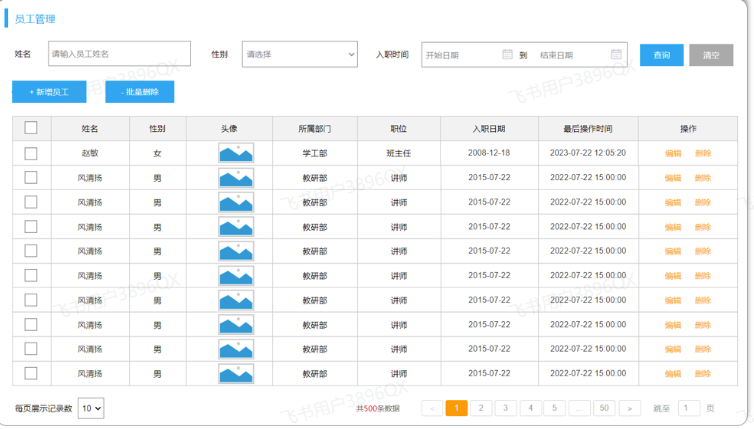
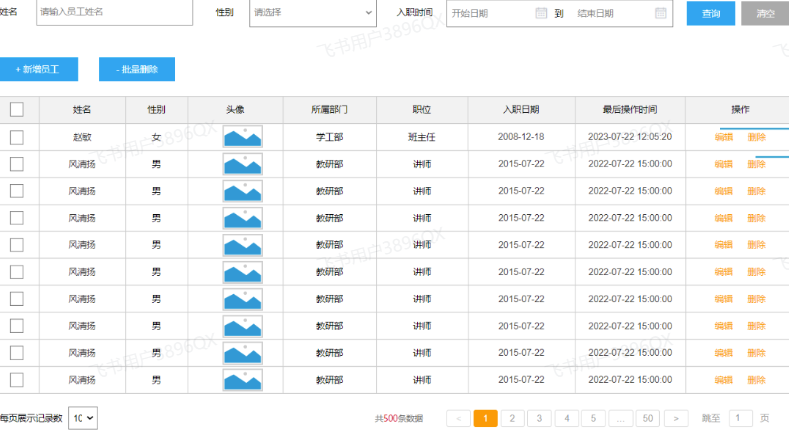
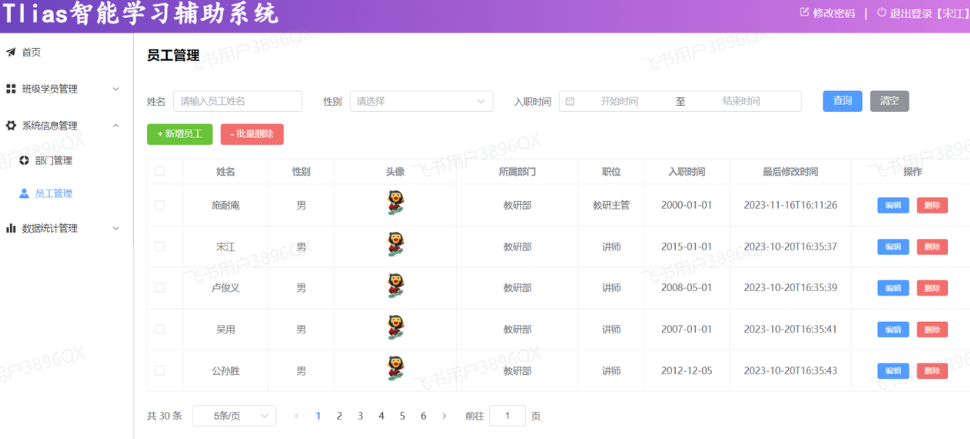
从页面原型中,我们可以看到,在查询员工信息的时候,除了要展示 姓名、性别、头像、职位、入职日期、最后操作时间这些员工信息外,还要展示出所属部门,那此时就需要从两张表中查询数据,一张是部门表,一张是员工表,此时就会涉及到多表操作。 所以今天的课程内容如下:

课程内容:

  • 多表关系
  • 多表查询
  • 员工列表查询

1. 多表关系

项目开发中,在进行数据库表结构设计时,会根据业务需求及业务模块之间的关系,分析并设计表结构,由于业务之间相互关联,所以各个表结构之间也存在着各种联系,基本上分为三种:

  • 一对多(多对一)
  • 多对多
  • 一对一

1.1 一对多

  • 场景:部门与员工的关系(一个部门下有多个员工)。

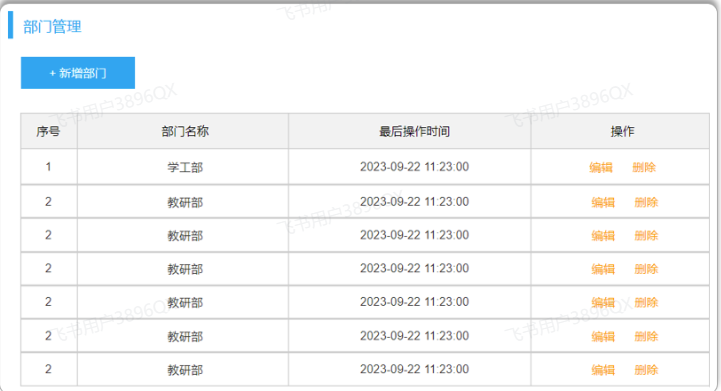
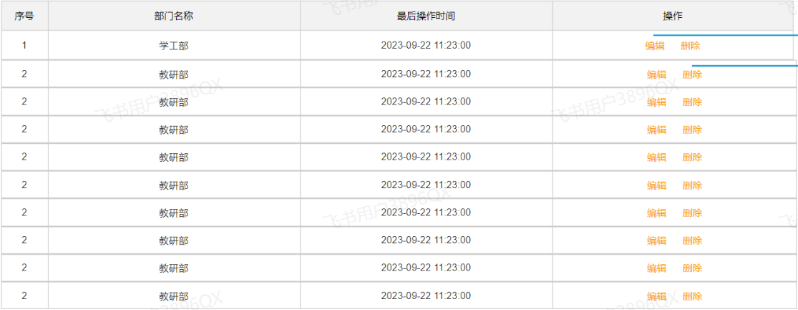
  • 部门管理的页面原型:

image.png

  • 员工管理的页面原型:

image.png

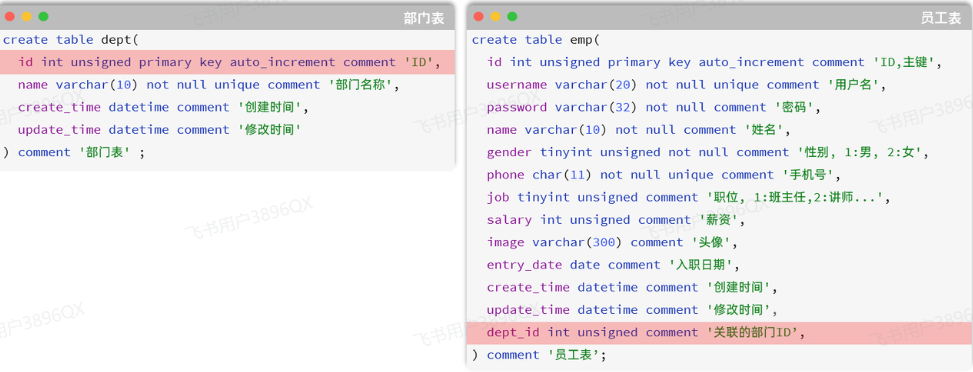
由于一个部门下,会关联多个员工。 而一个员工,是归属于某一个部门的 。那么此时,我们就需要在 emp 表中增加一个字段 dept_id 来标识这个员工属于哪一个部门,dept_id 关联的是 deptid 。 如下所示:

image.png

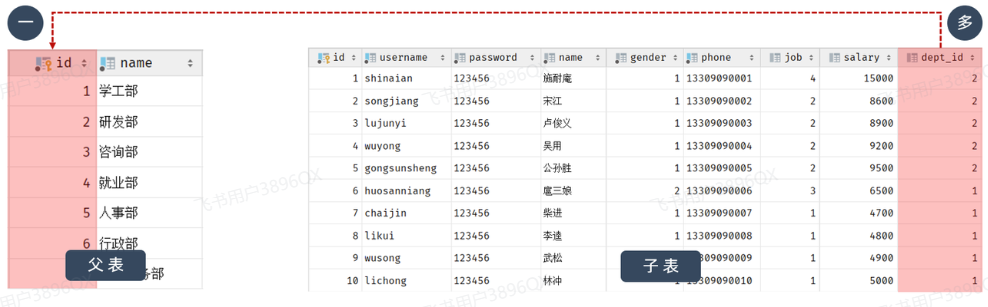
上述的 emp 员工表的 dept_id 字段,关联的是 dept 部门表的 id 。部门表是一的一方,也称为父表,员工表是多的一方,称之为子表

image.png

那接下来,我们就可以将上述的两张表创建出来。具体的SQL语句如下:

1
2
3
4
5
6
7
8
9
10
11
12
13
14
15
16
17
18
19
20
21
22
23
24
25
26
27
28
29
30
31
32
33
34
35
36
37
38
39
40
41
42
43
44
45
46
47
48
49
50
51
52
53
54
55
56
57
58
59
CREATE TABLE dept (
id int unsigned PRIMARY KEY AUTO_INCREMENT COMMENT 'ID, 主键',
name varchar(10) NOT NULL UNIQUE COMMENT '部门名称',
create_time datetime DEFAULT NULL COMMENT '创建时间',
update_time datetime DEFAULT NULL COMMENT '修改时间'
) COMMENT '部门表';

INSERT INTO dept VALUES (1,'学工部','2024-09-25 09:47:40','2023-04-25 09:47:40'),(2,'教研部','2024-09-25 09:47:40','2024-10-09 15:17:04'),
(3,'咨询部2','2024-09-25 09:47:40','2024-11-30 21:26:24'),(4,'就业部','2024-09-25 09:47:40','2024-09-25 09:47:40'),(5,'人事部','2024-09-25 09:47:40','2024-09-25 09:47:40'),(6,'行政部','2024-11-30 20:56:37','2024-11-30 20:56:37');

create table emp(
id int unsigned primary key auto_increment comment 'ID,主键',
username varchar(20) not null unique comment '用户名',
password varchar(50) default '123456' comment '密码',
name varchar(10) not null comment '姓名',
gender tinyint unsigned not null comment '性别, 1:男, 2:女',
phone char(11) not null unique comment '手机号',
job tinyint unsigned comment '职位, 1 班主任, 2 讲师 , 3 学工主管, 4 教研主管, 5 咨询师',
salary int unsigned comment '薪资',
image varchar(300) comment '头像',
entry_date date comment '入职日期',
dept_id int unsigned comment '部门ID',
create_time datetime comment '创建时间',
update_time datetime comment '修改时间'
) comment '员工表';


INSERT INTO emp VALUES
(1,'shinaian','123456','施耐庵',1,'13309090001',4,15000,'5.png','2000-01-01',2,'2023-10-20 16:35:33','2023-11-16 16:11:26'),
(2,'songjiang','123456','宋江',1,'13309090002',2,8600,'01.png','2015-01-01',2,'2023-10-20 16:35:33','2023-10-20 16:35:37'),
(3,'lujunyi','123456','卢俊义',1,'13309090003',2,8900,'01.png','2008-05-01',2,'2023-10-20 16:35:33','2023-10-20 16:35:39'),
(4,'wuyong','123456','吴用',1,'13309090004',2,9200,'01.png','2007-01-01',2,'2023-10-20 16:35:33','2023-10-20 16:35:41'),
(5,'gongsunsheng','123456','公孙胜',1,'13309090005',2,9500,'01.png','2012-12-05',2,'2023-10-20 16:35:33','2023-10-20 16:35:43'),
(6,'huosanniang','123456','扈三娘',2,'13309090006',3,6500,'01.png','2013-09-05',1,'2023-10-20 16:35:33','2023-10-20 16:35:45'),
(7,'chaijin','123456','柴进',1,'13309090007',1,4700,'01.png','2005-08-01',1,'2023-10-20 16:35:33','2023-10-20 16:35:47'),
(8,'likui','123456','李逵',1,'13309090008',1,4800,'01.png','2014-11-09',1,'2023-10-20 16:35:33','2023-10-20 16:35:49'),
(9,'wusong','123456','武松',1,'13309090009',1,4900,'01.png','2011-03-11',1,'2023-10-20 16:35:33','2023-10-20 16:35:51'),
(10,'linchong','123456','林冲',1,'13309090010',1,5000,'01.png','2013-09-05',1,'2023-10-20 16:35:33','2023-10-20 16:35:53'),
(11,'huyanzhuo','123456','呼延灼',1,'13309090011',2,9700,'01.png','2007-02-01',2,'2023-10-20 16:35:33','2023-10-20 16:35:55'),
(12,'xiaoliguang','123456','小李广',1,'13309090012',2,10000,'01.png','2008-08-18',2,'2023-10-20 16:35:33','2023-10-20 16:35:57'),
(13,'yangzhi','123456','杨志',1,'13309090013',1,5300,'01.png','2012-11-01',1,'2023-10-20 16:35:33','2023-10-20 16:35:59'),
(14,'shijin','123456','史进',1,'13309090014',2,10600,'01.png','2002-08-01',2,'2023-10-20 16:35:33','2023-10-20 16:36:01'),
(15,'sunerniang','123456','孙二娘',2,'13309090015',2,10900,'01.png','2011-05-01',2,'2023-10-20 16:35:33','2023-10-20 16:36:03'),
(16,'luzhishen','123456','鲁智深',1,'13309090016',2,9600,'01.png','2010-01-01',2,'2023-10-20 16:35:33','2023-10-20 16:36:05'),
(17,'liying','12345678','李应',1,'13309090017',1,5800,'01.png','2015-03-21',1,'2023-10-20 16:35:33','2023-10-20 16:36:07'),
(18,'shiqian','123456','时迁',1,'13309090018',2,10200,'01.png','2015-01-01',2,'2023-10-20 16:35:33','2023-10-20 16:36:09'),
(19,'gudasao','123456','顾大嫂',2,'13309090019',2,10500,'01.png','2008-01-01',2,'2023-10-20 16:35:33','2023-10-20 16:36:11'),
(20,'ruanxiaoer','123456','阮小二',1,'13309090020',2,10800,'01.png','2018-01-01',2,'2023-10-20 16:35:33','2023-10-20 16:36:13'),
(21,'ruanxiaowu','123456','阮小五',1,'13309090021',5,5200,'01.png','2015-01-01',3,'2023-10-20 16:35:33','2023-10-20 16:36:15'),
(22,'ruanxiaoqi','123456','阮小七',1,'13309090022',5,5500,'01.png','2016-01-01',3,'2023-10-20 16:35:33','2023-10-20 16:36:17'),
(23,'ruanji','123456','阮籍',1,'13309090023',5,5800,'01.png','2012-01-01',3,'2023-10-20 16:35:33','2023-10-20 16:36:19'),
(24,'tongwei','123456','童威',1,'13309090024',5,5000,'01.png','2006-01-01',3,'2023-10-20 16:35:33','2023-10-20 16:36:21'),
(25,'tongmeng','123456','童猛',1,'13309090025',5,4800,'01.png','2002-01-01',3,'2023-10-20 16:35:33','2023-10-20 16:36:23'),
(26,'yanshun','123456','燕顺',1,'13309090026',5,5400,'01.png','2011-01-01',3,'2023-10-20 16:35:33','2023-11-08 22:12:46'),
(27,'lijun','123456','李俊',1,'13309090027',2,6600,'8.png','2004-01-01',2,'2023-10-20 16:35:33','2023-11-16 17:56:59'),
(28,'lizhong','123456','李忠',1,'13309090028',5,5000,'6.png','2007-01-01',3,'2023-10-20 16:35:33','2023-11-17 16:34:22'),
(30,'liyun','123456','李云',1,'13309090030',NULL,NULL,'01.png','2020-03-01',NULL,'2023-10-20 16:35:33','2023-10-20 16:36:31'),
(36,'linghuchong','123456','令狐冲',1,'18809091212',2,6800,'1.png','2023-10-19',2,'2023-10-20 20:44:54','2023-11-09 09:41:04');

问题:一对多的表关系,在数据库层面该如何实现 ?

在数据库表中多的一方,添加字段,来关联一的一方的主键 。

1.2 多表问题分析

1.2.1 问题

表结构创建完毕后,我们看到两张表的数据分别为:
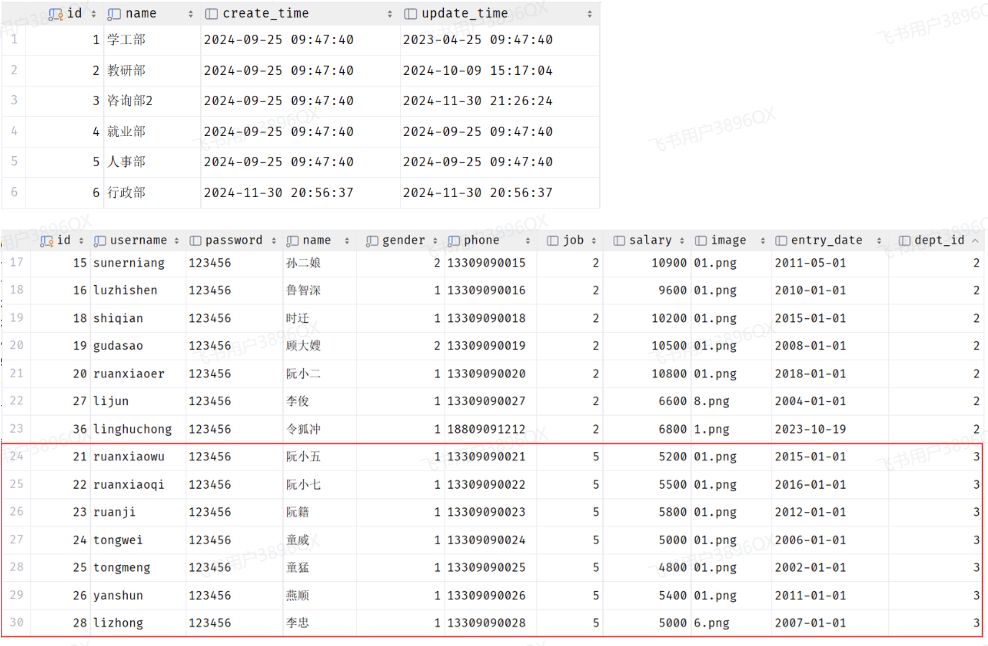
image.png

我们看到,在3号部门下,是关联的有7个员工。 当删除了3号部门后,数据变为:
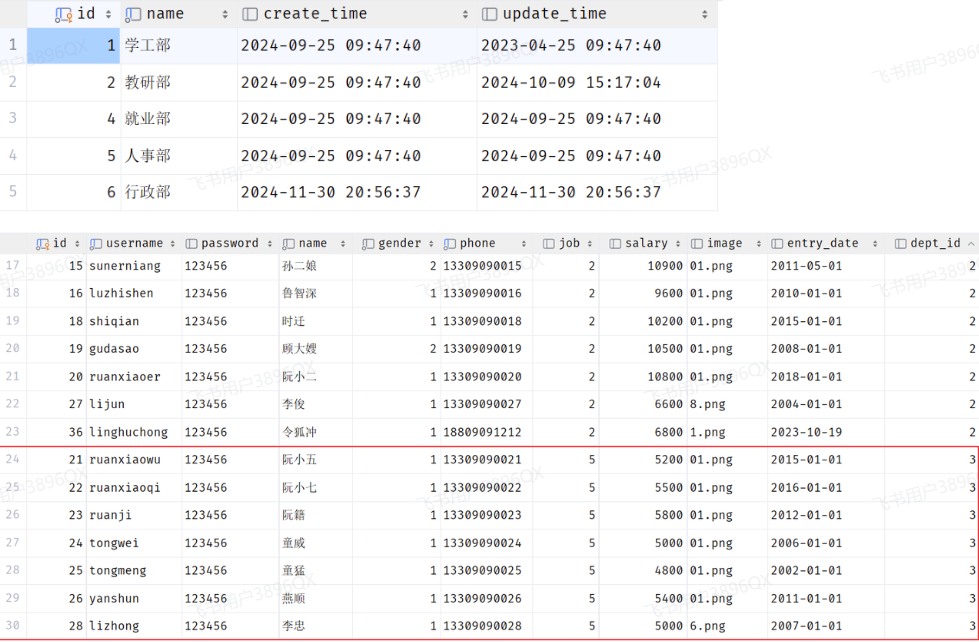
image.png

3号部门被删除了,但是依然还有7个员工是属于3号部门的。 此时:就出现数据的不完整、不一致了。

1.2.2 分析

  • 现象:部门数据可以直接删除,然而还有部分员工归属于该部门下,此时就出现了数据的不完整、不一致问题 。
  • 原因:目前上述的两张表,在数据库层面,并未建立关联,所以是无法保证数据的一致性和完整性的 。
  • 解决方案:想解决上述的问题呢,我们就可以通过数据库中的 外键约束 来解决。

外键约束:让两张表的数据建立连接,保证数据的一致性和完整性。

对应的关键字:foreign key

外键约束的语法:

1
2
3
4
5
6
7
8
9
-- 创建表时指定
create table 表名(
字段名 数据类型,
...
[constraint] [外键名称] foreign key (外键字段名) references 主表 (主表列名)
);

-- 建完表后,添加外键
alter table 表名 add constraint 外键名称 foreign key(外键字段名) references 主表(主表列名);

那接下来,我们就为员工表的dept_id 建立外键约束,来关联部门表的主键。

当我们添加外键约束时,我们得保证当前数据库表中的数据是完整的。 所以,我们需要将之前删除掉的数据再添加回来。

方式1:通过SQL语句操作

1
2
-- 修改表: 添加外键约束
alter table emp add constraint fk_dept_id foreign key (dept_id) references dept(id);

方式2:图形化界面操作

在左侧菜单栏,在emp表上右键,选择 modify Table... (old UI)
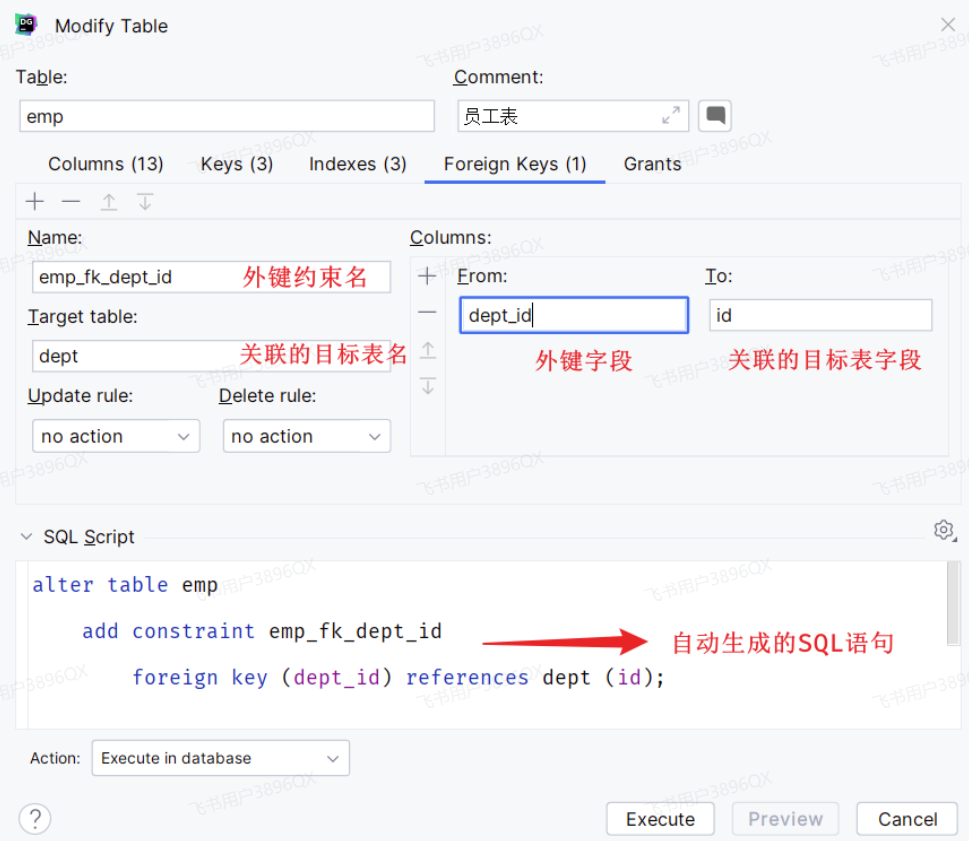
image.png

当我们添加了外键之后,再删除ID为3的部门,就会发现,此时数据库报错了,不允许删除。

外键约束(foreign key):保证了数据的完整性和一致性。

1.2.3 物理外键与逻辑外键

  • 物理外键

    • 概念:使用foreign key定义外键关联另外一张表。

    • 缺点:

      • 影响增、删、改的效率(需要检查外键关系)。
      • 仅用于单节点数据库,不适用于分布式、集群场景。
      • 容易引发数据库的死锁问题,消耗性能。
  • 逻辑外键

    • 概念:在业务层逻辑中,解决外键关联。
    • 通过逻辑外键,就可以很方便的解决上述问题。

在现在的企业开发中,很少会使用物理外键,都是使用逻辑外键。 甚至在一些数据库开发规范中,会明确指出禁止使用物理外键 foreign key

1.3 一对一

一对一关系表在实际开发中应用起来比较简单,通常是用来做单表的拆分,也就是将一张大表拆分成两张小表,将大表中的一些基础字段放在一张表当中,将其他的字段放在另外一张表当中,以此来提高数据的操作效率。

一对一的应用场景: 用户表(基本信息+身份信息)

image.png

  • 基本信息:用户的ID、姓名、性别、手机号、学历
  • 身份信息:民族、生日、身份证号、身份证签发机关,身份证的有效期(开始时间、结束时间)

如果在业务系统当中,对用户的基本信息查询频率特别的高,但是对于用户的身份信息查询频率很低,此时出于提高查询效率的考虑,我就可以将这张大表拆分成两张小表,第一张表存放的是用户的基本信息,而第二张表存放的就是用户的身份信息。他们两者之间一对一的关系,一个用户只能对应一个身份证,而一个身份证也只能关联一个用户。

那么在数据库层面怎么去体现上述两者之间是一对一的关系呢?

其实一对一我们可以看成一种特殊的一对多。一对多我们是怎么设计表关系的?是不是在多的一方添加外键。同样我们也可以通过外键来体现一对一之间的关系,我们只需要在任意一方来添加一个外键就可以了。

image.png

SQL脚本:

1
2
3
4
5
6
7
8
9
10
11
12
13
14
15
16
17
18
19
20
21
22
23
24
25
26
27
28
-- 用户基本信息表
create table tb_user(
id int unsigned primary key auto_increment comment 'ID',
name varchar(10) not null comment '姓名',
gender tinyint unsigned not null comment '性别, 1 男 2 女',
phone char(11) comment '手机号',
degree varchar(10) comment '学历'
) comment '用户基本信息表';
-- 测试数据
insert into tb_user values (1,'白眉鹰王',1,'18812340001','初中'),
(2,'青翼蝠王',1,'18812340002','大专'),
(3,'金毛狮王',1,'18812340003','初中'),
(4,'紫衫龙王',2,'18812340004','硕士');

-- 用户身份信息表
create table tb_user_card(
id int unsigned primary key auto_increment comment 'ID',
nationality varchar(10) not null comment '民族',
birthday date not null comment '生日',
idcard char(18) not null comment '身份证号',
issued varchar(20) not null comment '签发机关',
expire_begin date not null comment '有效期限-开始',
expire_end date comment '有效期限-结束',
user_id int unsigned not null unique comment '用户ID',
constraint fk_user_id foreign key (user_id) references tb_user(id)
) comment '用户身份信息表';
-- 测试数据
insert into tb_user_card values (1,'汉','1960-11-06','100000100000100001','朝阳区公安局','2000-06-10',null,1),(2,'汉','1971-11-06','100000100000100002','静安区公安局','2005-06-10','2025-06-10',2),(3,'汉','1963-11-06','100000100000100003','昌平区公安局','2006-06-10',null,3),(4,'回','1980-11-06','100000100000100004','海淀区公安局','2008-06-10','2028-06-10',4);

一对一 :在任意一方加入外键,关联另外一方的主键,并且设置外键为唯一的(UNIQUE)

1.4 多对多

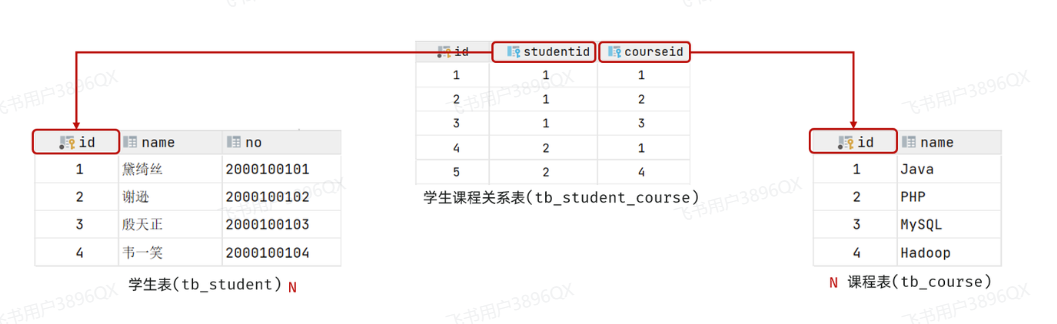
多对多的关系在开发中属于也比较常见的。比如:学生和老师的关系,一个学生可以有多个授课老师,一个授课老师也可以有多个学生。在比如:学生和课程的关系,一个学生可以选修多门课程,一个课程也可以供多个学生选修。

案例:学生与课程的关系

  • 关系:一个学生可以选修多门课程,一门课程也可以供多个学生选择
  • 实现关系:建立第三张中间表,中间表至少包含两个外键,分别关联两方主键

image.png

SQL脚本:

1
2
3
4
5
6
7
8
9
10
11
12
13
14
15
16
17
18
19
20
21
22
23
24
25
26
27
28
29
-- 学生表
create table tb_student(
id int auto_increment primary key comment '主键ID',
name varchar(10) comment '姓名',
no varchar(10) comment '学号'
) comment '学生表';
-- 学生表测试数据
insert into tb_student(name, no) values ('黛绮丝', '2000100101'),
('谢逊', '2000100102'),('殷天正', '2000100103'),('韦一笑', '2000100104');

-- 课程表
create table tb_course(
id int auto_increment primary key comment '主键ID',
name varchar(10) comment '课程名称'
) comment '课程表';
-- 课程表测试数据
insert into tb_course (name) values ('Java'), ('PHP'), ('MySQL') , ('Hadoop');

-- 学生课程表(中间表)
create table tb_student_course(
id int auto_increment comment '主键' primary key,
student_id int not null comment '学生ID',
course_id int not null comment '课程ID',
constraint fk_courseid foreign key (course_id) references tb_course (id),
constraint fk_studentid foreign key (student_id) references tb_student (id)
)comment '学生课程中间表';

-- 学生课程表测试数据
insert into tb_student_course(student_id, course_id) values (1,1),(1,2),(1,3),(2,2),(2,3),(3,4);

多对多 :需要建立一张中间表,中间表中有两个外键字段,分别关联两方的主键。

1.5 案例

下面通过一个综合案例加深对于多表关系的理解,并掌握多表设计的流程。

需求

  • 根据参考资料中提供的《Talis智能学习辅助系统》页面原型,设计员工管理模块涉及到的表结构。

步骤

  • 阅读页面原型及需求文档,分析各个模块涉及到的表结构,及表结构之间的关系。
  • 根据页面原型及需求文档,分析各个表结构中具体的字段及约束。

分析
涉及到的模块有:

  • 部门管理

image.png

部门管理涉及到一张部门表,这个前面我们都已经设计过了。 无需再进行设计了。

  • 员工管理

image.png

上述在员工列表查询的页面原型,当我们点击 “新增员工” 按钮时,会弹出一个新增员工的表单,表单展示形式如下:
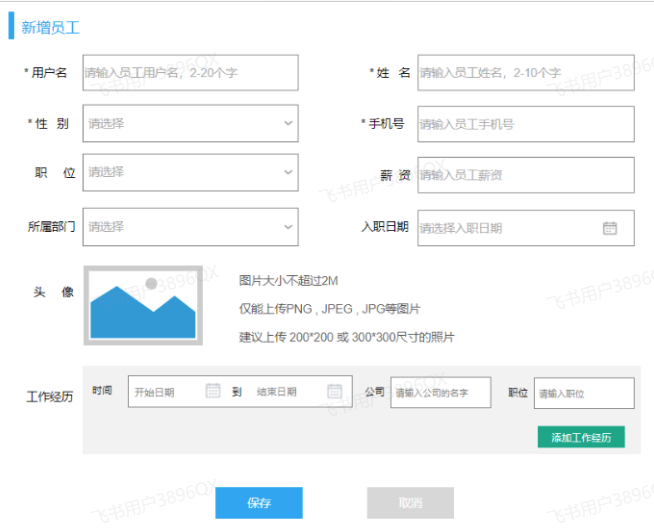
image.png

在上述的页面原型中,我们可以看到,每一个员工是归属于某一个部门的,而一个部门下可以有多个员工,所以部门与员工之间的关系是一对多的关系。

从页面员工中,我们可以看到,员工还有工作经历的信息。而每一个员工,是可以添加多个工作经历的。 所以,工作经历我们可以再设计一张表,而员工与员工的工作经历之间的关系,是一对多的关系。

那么,这里总共会涉及三张表,分别是:部门表、员工表、员工工作经历表。

最终,具体的表结构如下:

1
2
3
4
5
6
7
8
9
10
11
12
13
14
15
16
17
18
19
20
21
22
23
24
25
26
27
28
29
30
31
32
33
34
-- 部门表
create table dept (
id int unsigned PRIMARY KEY AUTO_INCREMENT COMMENT 'ID, 主键',
name varchar(10) NOT NULL UNIQUE COMMENT '部门名称',
create_time datetime COMMENT '创建时间',
update_time datetime COMMENT '修改时间'
) COMMENT '部门表';

-- 员工表
create table emp(
id int unsigned primary key auto_increment comment 'ID,主键',
username varchar(20) not null unique comment '用户名',
password varchar(50) default '123456' comment '密码',
name varchar(10) not null comment '姓名',
gender tinyint unsigned not null comment '性别, 1:男, 2:女',
phone char(11) not null unique comment '手机号',
job tinyint unsigned comment '职位, 1 班主任, 2 讲师 , 3 学工主管, 4 教研主管, 5 咨询师',
salary int unsigned comment '薪资',
image varchar(300) comment '头像',
entry_date date comment '入职日期',
dept_id int unsigned comment '部门ID', -- 关联的是dept部门表的ID
create_time datetime comment '创建时间',
update_time datetime comment '修改时间'
) comment '员工表';

-- 员工工作经历表
create table emp_expr(
id int unsigned primary key auto_increment comment 'ID, 主键',
emp_id int unsigned null comment '员工ID', -- 关联的是emp员工表的ID
begin date null comment '开始时间',
end date null comment '结束时间',
company varchar(50) null comment '公司名称',
job varchar(50) null comment '职位'
) comment '工作经历';

注意:在上述的表结构设计中,我们使用的都是逻辑外键。

2. 多表查询

2.1 概述

2.1.1 数据准备

创建数据库,执行如下SQL脚本:

1
2
3
4
5
6
7
8
9
10
11
12
13
14
15
16
17
18
19
20
21
22
23
24
25
26
27
28
29
30
31
32
33
34
35
36
-- 部门管理
create table dept(
id int unsigned primary key auto_increment comment 'ID, 主键',
name varchar(10) not null unique comment '部门名称',
create_time datetime comment '创建时间',
update_time datetime comment '修改时间'
) comment '部门表' ;

insert into dept (id, name, create_time, update_time) values
(1,'学工部',now(),now()),
(2,'教研部',now(),now()),
(3,'咨询部',now(),now()),
(4,'就业部',now(),now()),
(5,'人事部',now(),now());


-- 员工管理
create table emp(
id int unsigned primary key auto_increment comment 'ID,主键',
username varchar(20) not null unique comment '用户名',
password varchar(32) not null comment '密码',
name varchar(10) not null comment '姓名',
gender tinyint unsigned not null comment '性别, 1:男, 2:女',
phone char(11) not null unique comment '手机号',
job tinyint unsigned comment '职位, 1:班主任,2:讲师,3:学工主管,4:教研主管,5:咨询师',
salary int unsigned comment '薪资',
image varchar(300) comment '头像',
entry_date date comment '入职日期',
dept_id int unsigned COMMENT '关联的部门ID',
create_time datetime comment '创建时间',
update_time datetime comment '修改时间'
) comment '员工表';


-- 准备测试数据
INSERT INTO `emp` VALUES (1,'shinaian','123456','施耐庵',1,'13309090001',4,15000,'https://dawn-itcast.oss-cn-hangzhou.aliyuncs.com/01.png','2000-01-01',2,'2023-10-27 16:35:33','2023-10-27 16:35:35'),(2,'songjiang','123456','宋江',1,'13309090002',2,8600,'https://dawn-itcast.oss-cn-hangzhou.aliyuncs.com/01.png','2015-01-01',2,'2023-10-27 16:35:33','2023-10-27 16:35:37'),(3,'lujunyi','123456','卢俊义',1,'13309090003',2,8900,'https://dawn-itcast.oss-cn-hangzhou.aliyuncs.com/01.png','2008-05-01',2,'2023-10-27 16:35:33','2023-10-27 16:35:39'), (4,'wuyong','123456','吴用',1,'13309090004',2,9200,'https://dawn-itcast.oss-cn-hangzhou.aliyuncs.com/01.png','2007-01-01',2,'2023-10-27 16:35:33','2023-10-27 16:35:41'), (5,'gongsunsheng','123456','公孙胜',1,'13309090005',2,9500,'https://dawn-itcast.oss-cn-hangzhou.aliyuncs.com/01.png','2012-12-05',2,'2023-10-27 16:35:33','2023-10-27 16:35:43'),(6,'huosanniang','123456','扈三娘',2,'13309090006',3,6500,'https://dawn-itcast.oss-cn-hangzhou.aliyuncs.com/01.png','2013-09-05',1,'2023-10-27 16:35:33','2023-10-27 16:35:45'), (7,'chaijin','123456','柴进',1,'13309090007',1,4700,'https://dawn-itcast.oss-cn-hangzhou.aliyuncs.com/01.png','2005-08-01',1,'2023-10-27 16:35:33','2023-10-27 16:35:47'),(8,'likui','123456','李逵',1,'13309090008',1,4800,'https://dawn-itcast.oss-cn-hangzhou.aliyuncs.com/01.png','2014-11-09',1,'2023-10-27 16:35:33','2023-10-27 16:35:49'), (9,'wusong','123456','武松',1,'13309090009',1,4900,'https://dawn-itcast.oss-cn-hangzhou.aliyuncs.com/01.png','2011-03-11',1,'2023-10-27 16:35:33','2023-10-27 16:35:51'),(10,'lichong','123456','林冲',1,'13309090010',1,5000,'https://dawn-itcast.oss-cn-hangzhou.aliyuncs.com/01.png','2013-09-05',1,'2023-10-27 16:35:33','2023-10-27 16:35:53'), (11,'huyanzhuo','123456','呼延灼',1,'13309090011',2,9700,'https://dawn-itcast.oss-cn-hangzhou.aliyuncs.com/01.png','2007-02-01',2,'2023-10-27 16:35:33','2023-10-27 16:35:55'), (12,'xiaoliguang','123456','小李广',1,'13309090012',2,10000,'https://dawn-itcast.oss-cn-hangzhou.aliyuncs.com/01.png','2008-08-18',2,'2023-10-27 16:35:33','2023-10-27 16:35:57'),(13,'yangzhi','123456','杨志',1,'13309090013',1,5300,'https://dawn-itcast.oss-cn-hangzhou.aliyuncs.com/01.png','2012-11-01',1,'2023-10-27 16:35:33','2023-10-27 16:35:59'),(14,'shijin','123456','史进',1,'13309090014',2,10600,'https://dawn-itcast.oss-cn-hangzhou.aliyuncs.com/01.png','2002-08-01',2,'2023-10-27 16:35:33','2023-10-27 16:36:01'),(15,'sunerniang','123456','孙二娘',2,'13309090015',2,10900,'https://dawn-itcast.oss-cn-hangzhou.aliyuncs.com/01.png','2011-05-01',2,'2023-10-27 16:35:33','2023-10-27 16:36:03'),(16,'luzhishen','123456','鲁智深',1,'13309090016',2,9600,'https://dawn-itcast.oss-cn-hangzhou.aliyuncs.com/01.png','2010-01-01',2,'2023-10-27 16:35:33','2023-10-27 16:36:05'), (17,'liying','12345678','李应',1,'13309090017',1,5800,'https://dawn-itcast.oss-cn-hangzhou.aliyuncs.com/01.png','2015-03-21',1,'2023-10-27 16:35:33','2023-10-27 16:36:07'),(18,'shiqian','123456','时迁',1,'13309090018',2,10200,'https://dawn-itcast.oss-cn-hangzhou.aliyuncs.com/01.png','2015-01-01',2,'2023-10-27 16:35:33','2023-10-27 16:36:09'), (19,'gudasao','123456','顾大嫂',2,'13309090019',2,10500,'https://dawn-itcast.oss-cn-hangzhou.aliyuncs.com/01.png','2008-01-01',2,'2023-10-27 16:35:33','2023-10-27 16:36:11'), (20,'ruanxiaoer','123456','阮小二',1,'13309090020',2,10800,'https://dawn-itcast.oss-cn-hangzhou.aliyuncs.com/01.png','2018-01-01',2,'2023-10-27 16:35:33','2023-10-27 16:36:13'),(21,'ruanxiaowu','123456','阮小五',1,'13309090021',5,5200,'https://dawn-itcast.oss-cn-hangzhou.aliyuncs.com/01.png','2015-01-01',3,'2023-10-27 16:35:33','2023-10-27 16:36:15'),(22,'ruanxiaoqi','123456','阮小七',1,'13309090022',5,5500,'https://dawn-itcast.oss-cn-hangzhou.aliyuncs.com/01.png','2016-01-01',3,'2023-10-27 16:35:33','2023-10-27 16:36:17'),(23,'ruanji','123456','阮籍',1,'13309090023',5,5800,'https://dawn-itcast.oss-cn-hangzhou.aliyuncs.com/01.png','2012-01-01',3,'2023-10-27 16:35:33','2023-10-27 16:36:19'),(24,'tongwei','123456','童威',1,'13309090024',5,5000,'https://dawn-itcast.oss-cn-hangzhou.aliyuncs.com/01.png','2006-01-01',3,'2023-10-27 16:35:33','2023-10-27 16:36:21'),(25,'tongmeng','123456','童猛',1,'13309090025',5,4800,'https://dawn-itcast.oss-cn-hangzhou.aliyuncs.com/01.png','2002-01-01',3,'2023-10-27 16:35:33','2023-10-27 16:36:23'), (26,'yanshun','123456','燕顺',1,'13309090026',5,5400,'https://dawn-itcast.oss-cn-hangzhou.aliyuncs.com/01.png','2011-01-01',3,'2023-10-27 16:35:33','2023-10-27 16:36:25'),(27,'lijun','123456','李俊',1,'13309090027',5,6600,'https://dawn-itcast.oss-cn-hangzhou.aliyuncs.com/01.png','2004-01-01',3,'2023-10-27 16:35:33','2023-10-27 16:36:27'), (28,'lizhong','123456','李忠',1,'13309090028',5,5000,'https://dawn-itcast.oss-cn-hangzhou.aliyuncs.com/01.png','2007-01-01',3,'2023-10-27 16:35:33','2023-10-27 16:36:29'),(29,'songqing','123456','宋清',1,'13309090029',NULL,5100,'https://dawn-itcast.oss-cn-hangzhou.aliyuncs.com/01.png','2020-01-01',NULL,'2023-10-27 16:35:33','2023-10-27 16:36:31'),(30,'liyun','123456','李云',1,'13309090030',NULL,NULL,'https://dawn-itcast.oss-cn-hangzhou.aliyuncs.com/01.png','2020-03-01',NULL,'2023-10-27 16:35:33','2023-10-27 16:36:31');

2.1.2 介绍

多表查询:查询时从多张表中获取所需数据

单表查询的SQL语句:select 字段列表 from 表名;

那么要执行多表查询,只需要使用逗号分隔多张表即可,如: select 字段列表 from 表1, 表2;

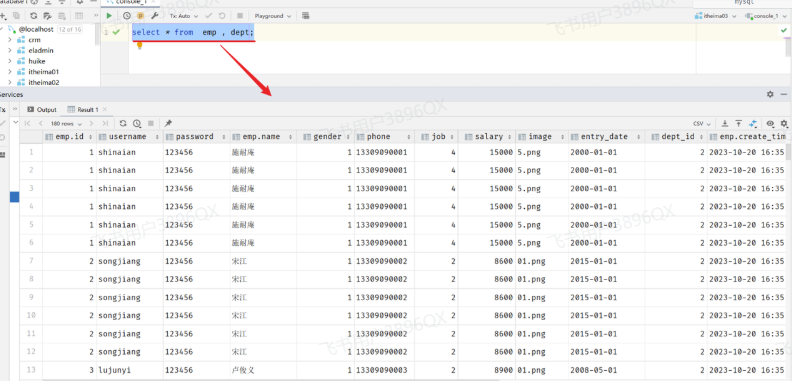
查询用户表和部门表中的数据:

1
select * from  emp , dept;

image.png

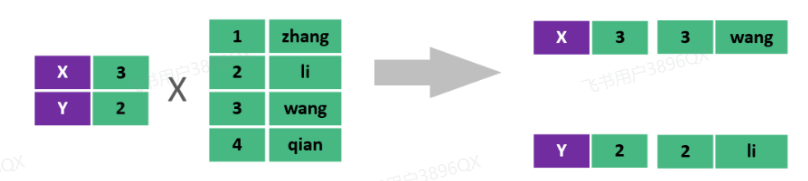
此时,我们看到查询结果中包含了大量的结果集,总共180条记录,而这其实就是员工表所有的记录(30行)与部门表所有记录(6行)的所有组合情况,这种现象称之为笛卡尔积

笛卡尔积: 笛卡尔乘积是指在数学中,两个集合(A集合和B集合)的所有组合情况。
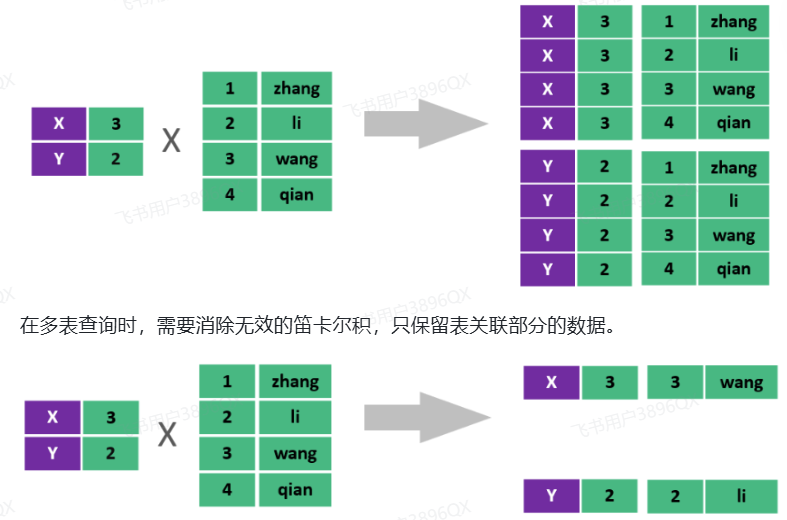
image.png

在多表查询时,需要消除无效的笛卡尔积,只保留表关联部分的数据。

image.png

在SQL语句中,如何去除无效的笛卡尔积呢?只需要给多表查询加上连接查询的条件即可。

1
select * from emp , dept where emp.dept_id = dept.id ;

这样,我们就查询出来了所有的员工,及其这个员工所属的部门信息。 而由于id为29、30的员工,没有dept_id字段值,所以在多表查询时,根据连接查询的条件并没有查询到。
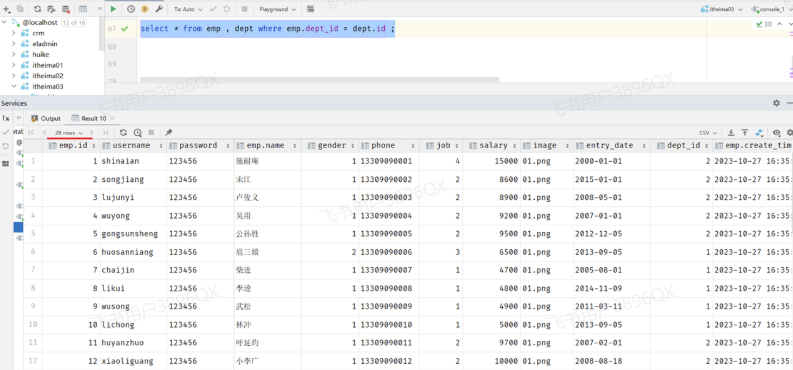
image.png

2.1.3 分类

多表查询可以分为:

image.png

  1. 连接查询

    • 内连接:相当于查询A、B交集部分数据
    • 外连接
      • 左外连接:查询左表所有数据(包括两张表交集部分数据)
      • 右外连接:查询右表所有数据(包括两张表交集部分数据)
  2. 子查询

2.2 内连接

内连接查询:查询两表或多表中交集部分数据。

内连接从语法上可以分为:

  • 隐式内连接
  • 显式内连接

隐式内连接语法:

1
select  字段列表   from1 , 表2   where  条件 ... ;

显式内连接语法:

1
select  字段列表   from1  [ inner ]  join2  on  连接条件 ... ;
  • 案例1:查询所有员工的ID,姓名,及所属的部门名称

    • 隐式内连接实现
1
select emp.id, emp.name, dept.name from emp , dept where emp.dept_id = dept.id;
  • 显式内连接实现
1
select emp.id, emp.name, dept.name from emp inner join dept on emp.dept_id = dept.id;
  • 案例2:查询 性别为男, 且工资 高于8000 的员工的ID, 姓名, 及所属的部门名称

    • 隐式内连接实现
1
select emp.id, emp.name, dept.name from emp , dept where emp.dept_id = dept.id and emp.gender = 1 and emp.salary > 8000;
  • 显式内连接实现
1
select emp.id, emp.name, dept.name from emp inner join dept on emp.dept_id = dept.id where emp.gender = 1 and emp.salary > 8000;

在多表联查时,我们指定字段时,需要在字段名前面加上表名,来指定具体是哪一张的字段。 如:emp.dept_id

给表起别名简化书写:

1
2
3
select  字段列表 from1 as 别名1 , 表2 as  别名2  where  条件 ... ;

select 字段列表 from1 别名1 , 表2 别名2 where 条件 ... ; -- as 可以省略

使用了别名的多表查询:

1
select e.id, e.name, d.name from emp as e , dept as d where e.dept_id = d.id and e.gender = 1 and e.salary > 8000;

注意事项: 一旦为表起了别名,就不能再使用表名来指定对应的字段了,此时只能够使用别名来指定字段。

2.3 外连接

外连接分为两种:左外连接 和 右外连接。

左外连接语法:

1
select  字段列表   from1  left  [ outer ]  join2  on  连接条件 ... ;

左外连接相当于查询表1(左表)的所有数据,当然也包含表1和表2交集部分的数据。

右外连接语法:

1
select  字段列表   from1  right  [ outer ]  join2  on  连接条件 ... ;

右外连接相当于查询表2(右表)的所有数据,当然也包含表1和表2交集部分的数据。

案例1:查询员工表 所有 员工的姓名, 和对应的部门名称 (左外连接)

1
2
-- 左外连接:以left join关键字左边的表为主表,查询主表中所有数据,以及和主表匹配的右边表中的数据
select e.name , d.name from emp as e left join dept as d on e.dept_id = d.id ;

案例2:查询部门表 所有 部门的名称, 和对应的员工名称 (右外连接)

1
2
-- 右外连接:以right join关键字右边的表为主表,查询主表中所有数据,以及和主表匹配的左边表中的数据
select e.name , d.name from emp as e right join dept as d on e.dept_id = d.id;

案例3:查询工资 高于8000 的 所有员工的姓名, 和对应的部门名称 (左外连接)

1
select e.name , d.name  from emp as e left join dept as d on e.dept_id = d.id where e.salary > 8000;

注意事项:

左外连接和右外连接是可以相互替换的,只需要调整连接查询时SQL语句中表的先后顺序就可以了。而我们在日常开发使用时,更偏向于左外连接。

2.4 子查询

2.4.1 介绍

SQL语句中嵌套select语句,称为嵌套查询,又称子查询。

1
SELECT  *  FROM   t1   WHERE  column1 =  ( SELECT  column1  FROM  t2 ... );

子查询外部的语句可以是insert / update / delete / select 的任何一个,最常见的是 select。

根据子查询结果的不同分为:

  1. 标量子查询(子查询结果为单个值 [一行一列])
  2. 列子查询(子查询结果为一列,但可以是多行)
  1. 行子查询(子查询结果为一行,但可以是多列)
  2. 表子查询(子查询结果为多行多列[相当于子查询结果是一张表])

子查询可以书写的位置:

  1. where之后
  2. from之后
  1. select之后

子查询的要点是,先对需求做拆分,明确具体的步骤,然后再逐条编写SQL语句。 最终将多条SQL语句合并为一条。

2.4.2 标量子查询

子查询返回的结果是单个值(数字、字符串、日期等),最简单的形式,这种子查询称为标量子查询

常用的操作符: = <> > >= < <=

  • 案例1:查询 最早入职 的员工信息
1
2
3
4
5
6
7
8
-- 1. 查询最早的入职时间
select min(entry_date) from emp; -- 结果: 2000-01-01

-- 2. 查询入职时间 = 最早入职时间的员工信息
select * from emp where entry_date = '2000-01-01';

-- 3. 合并为一条SQL
select * from emp where entry_date = (select min(entry_date) from emp);
  • 案例2:查询在 阮小五 入职之后入职的员工信息
1
2
3
4
5
6
7
8
-- 1. 查询 "阮小五" 的入职日期
select entry_date from emp where name = '阮小五'; -- 结果: 2015-01-01

-- 2. 根据上述查询到的这个入职日期, 查询在该日期之后入职的员工信息
select * from emp where entry_date > '2015-01-01';

-- 3. 合并SQL为一条SQL
select * from emp where entry_date > (select entry_date from emp where name = '阮小五');

2.4.3 列子查询

子查询返回的结果是一列(可以是多行),这种子查询称为列子查询。

常用的操作符:

image.png

  • 案例1:查询 “教研部” 和 “咨询部” 的所有员工信息
1
2
3
4
5
6
7
8
-- 1. 查询 "教研部" 和 "咨询部" 的部门ID
select id from dept where name = '教研部' or name = '咨询部'; -- 结果: 3,2

-- 2. 根据上面查询出来的部门ID, 查询员工信息
select * from emp where dept_id in(3,2);

-- 3. 合并SQL为一条SQL语句
select * from emp where dept_id in (select id from dept where name = '教研部' or name = '咨询部');

2.4.4 行子查询

子查询返回的结果是一行(可以是多列),这种子查询称为行子查询。

常用的操作符:= 、<> 、IN 、NOT IN

  • 案例1:查询与 “李忠” 的薪资 及 职位都相同的员工信息
1
2
3
4
5
6
7
8
-- 1. 查询 "李忠" 的薪资和职位
select salary , job from emp where name = '李忠'; -- 结果: 5000, 5

-- 2. 根据上述查询到的薪资和职位 , 查询对应员工的信息
select * from emp where (salary, job) = (5000,5);

-- 3. 将两条SQL合并为一条SQL
select * from emp where (salary, job) = (select salary , job from emp where name = '李忠');

2.4.5 表子查询

子查询返回的结果是多行多列,常作为临时表,这种子查询称为表子查询

  • 案例:获取每个部门中薪资最高的员工信息
1
2
3
4
5
6
-- a. 获取每个部门的最高薪资
select dept_id, max(salary) from emp group by dept_id;

-- b. 查询每个部门中薪资最高的员工信息
select * from emp e , (select dept_id, max(salary) max_sal from emp group by dept_id) a
where e.dept_id = a.dept_id and e.salary = a.max_sal;

2.4.6 案例

根据需求,完成多表查询的SQL语句的编写。

  • 1. 查询 “教研部” 性别为 男,且在 “2011-05-01” 之后入职的员工信息 。
1
select e.* from emp as e , dept as d where e.dept_id = d.id and d.name = '教研部' and e.gender = 1 and e.entry_date > '2011-05-01';
  • 2. 查询工资 低于公司平均工资的 且 性别为男 的员工信息 。
1
select e.* from emp as e , dept as d where e.dept_id = d.id and e.salary < (select avg(salary) from emp) and e.gender = 1;
  • 3. 查询部门人数超过 10 人的部门名称 。
1
select d.name , count(*) from emp as e , dept as d where e.dept_id = d.id group by d.name having count(*) > 10;
  • 4. 查询在 “2010-05-01” 后入职,且薪资高于 10000 的 “教研部” 员工信息,并根据薪资倒序排序。
1
select * from emp e , dept d where e.dept_id = d.id and e.entry_date > '2010-05-01' and e.salary > 10000 and d.name = '教研部' order by e.salary desc;
  • 5. 查询工资 低于本部门平均工资的员工信息 。【难】
1
2
3
4
5
6
-- 5.1 查询每个部门的平均工资
select dept_id, avg(salary) avg_sal from emp group by dept_id;

-- 5.2 查询工资 低于本部门平均工资 的员工信息 。
select e.* from emp e , (select dept_id, avg(salary) avg_sal from emp group by dept_id) as a
where e.dept_id = a.dept_id and e.salary < a.avg_sal;

3. 员工列表查询

那接下来,我们要来完成的是员工列表的查询功能实现。 具体的需求如下:
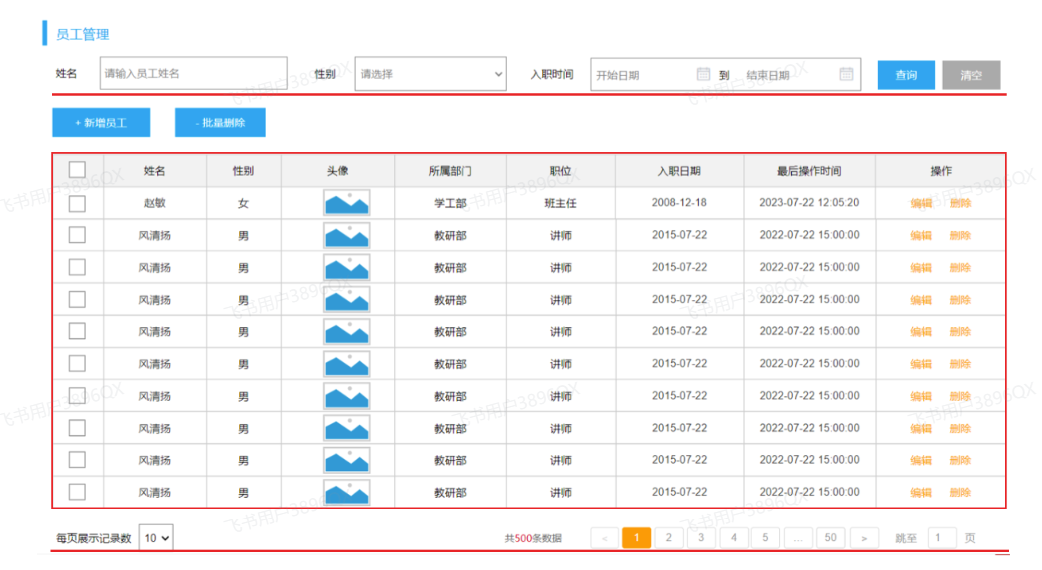
image.png

在查询员工列表数据时,既需要查询 员工的基本信息,还需要查询员工所属的部门名称,所以这里呢,会涉及到多表查询的操作。

而且,在查询员工列表数据时,既要考虑搜索栏中的查询条件,还要考虑对查询的结果进行分页处理。

那么接下来,我们在实现这个功能时,将会分为三个部分来逐一实现:

  • 准备工作
  • 分页查询
  • 条件分页查询

3.1 准备工作

需求:查询所有员工信息,并查询出部门名称。(涉及到的表:emp、dept)
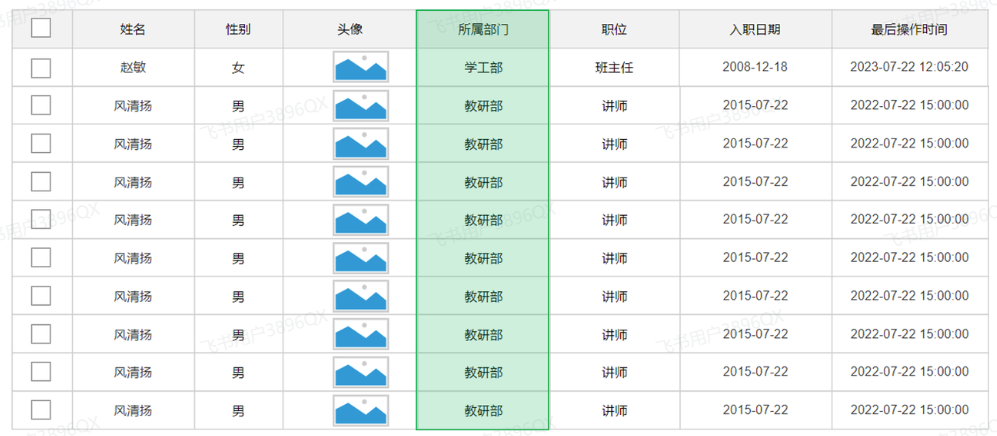
image.png

3.1.1 基础代码准备

1). 创建员工管理相关表结构

1
2
3
4
5
6
7
8
9
10
11
12
13
14
15
16
17
18
19
20
21
22
23
24
25
26
27
28
29
30
31
32
33
34
35
36
37
38
39
40
41
42
43
44
45
46
47
48
49
50
51
52
53
54
55
56
57
58
59
60
61
-- 员工表
create table emp(
id int unsigned primary key auto_increment comment 'ID,主键',
username varchar(20) not null unique comment '用户名',
password varchar(50) default '123456' comment '密码',
name varchar(10) not null comment '姓名',
gender tinyint unsigned not null comment '性别, 1:男, 2:女',
phone char(11) not null unique comment '手机号',
job tinyint unsigned comment '职位, 1 班主任, 2 讲师 , 3 学工主管, 4 教研主管, 5 咨询师',
salary int unsigned comment '薪资',
image varchar(300) comment '头像',
entry_date date comment '入职日期',
dept_id int unsigned comment '部门ID',
create_time datetime comment '创建时间',
update_time datetime comment '修改时间'
) comment '员工表';


INSERT INTO emp VALUES
(1,'shinaian','123456','施耐庵',1,'13309090001',4,15000,'https://web-framework.oss-cn-hangzhou.aliyuncs.com/2023/1.jpg','2000-01-01',2,'2023-10-20 16:35:33','2023-11-16 16:11:26'),
(2,'songjiang','123456','宋江',1,'13309090002',2,8600,'https://web-framework.oss-cn-hangzhou.aliyuncs.com/2023/1.jpg','2015-01-01',2,'2023-10-20 16:35:33','2023-10-20 16:35:37'),
(3,'lujunyi','123456','卢俊义',1,'13309090003',2,8900,'https://web-framework.oss-cn-hangzhou.aliyuncs.com/2023/1.jpg','2008-05-01',2,'2023-10-20 16:35:33','2023-10-20 16:35:39'),
(4,'wuyong','123456','吴用',1,'13309090004',2,9200,'https://web-framework.oss-cn-hangzhou.aliyuncs.com/2023/1.jpg','2007-01-01',2,'2023-10-20 16:35:33','2023-10-20 16:35:41'),
(5,'gongsunsheng','123456','公孙胜',1,'13309090005',2,9500,'https://web-framework.oss-cn-hangzhou.aliyuncs.com/2023/1.jpg','2012-12-05',2,'2023-10-20 16:35:33','2023-10-20 16:35:43'),
(6,'huosanniang','123456','扈三娘',2,'13309090006',3,6500,'https://web-framework.oss-cn-hangzhou.aliyuncs.com/2023/1.jpg','2013-09-05',1,'2023-10-20 16:35:33','2023-10-20 16:35:45'),
(7,'chaijin','123456','柴进',1,'13309090007',1,4700,'https://web-framework.oss-cn-hangzhou.aliyuncs.com/2023/1.jpg','2005-08-01',1,'2023-10-20 16:35:33','2023-10-20 16:35:47'),
(8,'likui','123456','李逵',1,'13309090008',1,4800,'https://web-framework.oss-cn-hangzhou.aliyuncs.com/2023/1.jpg','2014-11-09',1,'2023-10-20 16:35:33','2023-10-20 16:35:49'),
(9,'wusong','123456','武松',1,'13309090009',1,4900,'https://web-framework.oss-cn-hangzhou.aliyuncs.com/2023/1.jpg','2011-03-11',1,'2023-10-20 16:35:33','2023-10-20 16:35:51'),
(10,'linchong','123456','林冲',1,'13309090010',1,5000,'https://web-framework.oss-cn-hangzhou.aliyuncs.com/2023/1.jpg','2013-09-05',1,'2023-10-20 16:35:33','2023-10-20 16:35:53'),
(11,'huyanzhuo','123456','呼延灼',1,'13309090011',2,9700,'https://web-framework.oss-cn-hangzhou.aliyuncs.com/2023/1.jpg','2007-02-01',2,'2023-10-20 16:35:33','2023-10-20 16:35:55'),
(12,'xiaoliguang','123456','小李广',1,'13309090012',2,10000,'https://web-framework.oss-cn-hangzhou.aliyuncs.com/2023/1.jpg','2008-08-18',2,'2023-10-20 16:35:33','2023-10-20 16:35:57'),
(13,'yangzhi','123456','杨志',1,'13309090013',1,5300,'https://web-framework.oss-cn-hangzhou.aliyuncs.com/2023/1.jpg','2012-11-01',1,'2023-10-20 16:35:33','2023-10-20 16:35:59'),
(14,'shijin','123456','史进',1,'13309090014',2,10600,'https://web-framework.oss-cn-hangzhou.aliyuncs.com/2023/1.jpg','2002-08-01',2,'2023-10-20 16:35:33','2023-10-20 16:36:01'),
(15,'sunerniang','123456','孙二娘',2,'13309090015',2,10900,'https://web-framework.oss-cn-hangzhou.aliyuncs.com/2023/1.jpg','2011-05-01',2,'2023-10-20 16:35:33','2023-10-20 16:36:03'),
(16,'luzhishen','123456','鲁智深',1,'13309090016',2,9600,'https://web-framework.oss-cn-hangzhou.aliyuncs.com/2023/1.jpg','2010-01-01',2,'2023-10-20 16:35:33','2023-10-20 16:36:05'),
(17,'liying','12345678','李应',1,'13309090017',1,5800,'https://web-framework.oss-cn-hangzhou.aliyuncs.com/2023/1.jpg','2015-03-21',1,'2023-10-20 16:35:33','2023-10-20 16:36:07'),
(18,'shiqian','123456','时迁',1,'13309090018',2,10200,'https://web-framework.oss-cn-hangzhou.aliyuncs.com/2023/1.jpg','2015-01-01',2,'2023-10-20 16:35:33','2023-10-20 16:36:09'),
(19,'gudasao','123456','顾大嫂',2,'13309090019',2,10500,'https://web-framework.oss-cn-hangzhou.aliyuncs.com/2023/1.jpg','2008-01-01',2,'2023-10-20 16:35:33','2023-10-20 16:36:11'),
(20,'ruanxiaoer','123456','阮小二',1,'13309090020',2,10800,'https://web-framework.oss-cn-hangzhou.aliyuncs.com/2023/1.jpg','2018-01-01',2,'2023-10-20 16:35:33','2023-10-20 16:36:13'),
(21,'ruanxiaowu','123456','阮小五',1,'13309090021',5,5200,'https://web-framework.oss-cn-hangzhou.aliyuncs.com/2023/1.jpg','2015-01-01',3,'2023-10-20 16:35:33','2023-10-20 16:36:15'),
(22,'ruanxiaoqi','123456','阮小七',1,'13309090022',5,5500,'https://web-framework.oss-cn-hangzhou.aliyuncs.com/2023/1.jpg','2016-01-01',3,'2023-10-20 16:35:33','2023-10-20 16:36:17'),
(23,'ruanji','123456','阮籍',1,'13309090023',5,5800,'https://web-framework.oss-cn-hangzhou.aliyuncs.com/2023/1.jpg','2012-01-01',3,'2023-10-20 16:35:33','2023-10-20 16:36:19'),
(24,'tongwei','123456','童威',1,'13309090024',5,5000,'https://web-framework.oss-cn-hangzhou.aliyuncs.com/2023/1.jpg','2006-01-01',3,'2023-10-20 16:35:33','2023-10-20 16:36:21'),
(25,'tongmeng','123456','童猛',1,'13309090025',5,4800,'https://web-framework.oss-cn-hangzhou.aliyuncs.com/2023/1.jpg','2002-01-01',3,'2023-10-20 16:35:33','2023-10-20 16:36:23'),
(26,'yanshun','123456','燕顺',1,'13309090026',5,5400,'https://web-framework.oss-cn-hangzhou.aliyuncs.com/2023/1.jpg','2011-01-01',3,'2023-10-20 16:35:33','2023-11-08 22:12:46'),
(27,'lijun','123456','李俊',1,'13309090027',2,6600,'https://web-framework.oss-cn-hangzhou.aliyuncs.com/2023/1.jpg','2004-01-01',2,'2023-10-20 16:35:33','2023-11-16 17:56:59'),
(28,'lizhong','123456','李忠',1,'13309090028',5,5000,'https://web-framework.oss-cn-hangzhou.aliyuncs.com/2023/1.jpg','2007-01-01',3,'2023-10-20 16:35:33','2023-11-17 16:34:22'),
(30,'liyun','123456','李云',1,'13309090030',NULL,NULL,'https://web-framework.oss-cn-hangzhou.aliyuncs.com/2023/1.jpg','2020-03-01',NULL,'2023-10-20 16:35:33','2023-10-20 16:36:31'),
(36,'linghuchong','123456','令狐冲',1,'18809091212',2,6800,'https://web-framework.oss-cn-hangzhou.aliyuncs.com/2023/1.jpg','2023-10-19',2,'2023-10-20 20:44:54','2023-11-09 09:41:04');


-- 员工工作经历信息
create table emp_expr(
id int unsigned primary key auto_increment comment 'ID, 主键',
emp_id int unsigned comment '员工ID',
begin date comment '开始时间',
end date comment '结束时间',
company varchar(50) comment '公司名称',
job varchar(50) comment '职位'
)comment '工作经历';

2). 准备emp表对应的实体类Emp、EmpExpr

1
2
3
4
5
6
7
8
9
10
11
12
13
14
15
16
17
18
19
20
21
22
23
24
25
26
27
28
package com.itheima.pojo;

import lombok.Data;

import java.time.LocalDate;
import java.time.LocalDateTime;
import java.util.List;

@Data
public class Emp {
private Integer id; //ID,主键
private String username; //用户名
private String password; //密码
private String name; //姓名
private Integer gender; //性别, 1:男, 2:女
private String phone; //手机号
private Integer job; //职位, 1:班主任,2:讲师,3:学工主管,4:教研主管,5:咨询师
private Integer salary; //薪资
private String image; //头像
private LocalDate entryDate; //入职日期
private Integer deptId; //关联的部门ID
private LocalDateTime createTime; //创建时间
private LocalDateTime updateTime; //修改时间

//封装部门名称数
private String deptName; //部门名称
}

1
2
3
4
5
6
7
8
9
10
11
12
13
14
15
16
17
18
package com.itheima.pojo;

import lombok.Data;

import java.time.LocalDate;

/**
* 工作经历
*/
@Data
public class EmpExpr {
private Integer id; //ID
private Integer empId; //员工ID
private LocalDate begin; //开始时间
private LocalDate end; //结束时间
private String company; //公司名称
private String job; //职位
}

3). 准备Emp员工管理的基础结构,包括Controller、Service、Mapper

EmpMapper:

1
2
3
4
5
6
7
8
9
10
package com.itheima.mapper;

import com.itheima.pojo.Emp;
import org.apache.ibatis.annotations.Mapper;
import java.util.List;

@Mapper
public interface EmpMapper {

}

EmpService:

1
2
3
4
package com.itheima.service;

public interface EmpService {
}

EmpServiceImpl:

1
2
3
4
5
6
7
8
9
10
11
12
13
14
15
16
17
package com.itheima.service.impl;

import com.itheima.mapper.EmpMapper;
import com.itheima.service.EmpService;
import org.springframework.beans.factory.annotation.Autowired;
import org.springframework.stereotype.Service;

/**
* 员工管理
*/
@Service
public class EmpServiceImpl implements EmpService {

@Autowired
private EmpMapper empMapper;

}

EmpController:

1
2
3
4
5
6
7
8
9
10
11
12
13
14
15
16
17
18
package com.itheima.controller;

import com.itheima.service.EmpService;
import lombok.extern.slf4j.Slf4j;
import org.springframework.beans.factory.annotation.Autowired;
import org.springframework.web.bind.annotation.RestController;

/**
* 员工管理
*/
@Slf4j
@RestController
public class EmpController {

@Autowired
private EmpService empService;

}

3.1.2 SQL&Mapper接口

那接下来,我们就先考虑一下要查询所有的员工数据,及其关联的部门名称,这个SQL语句该如何实现 ? 这里,要查询所有的员工,也就意味着,即使员工没有部门,也需要将该员工查询出来 。

所以,这里需要用左外连接实现,具体SQL如下:

1). 基于AI生成对应的SQL语句

1
2
-- 查询所有的员工信息,如果员工关联了部门,也要查询出部门名称
select e.*, d.name as dept_name from emp e left join dept d on e.dept_id = d.id;

2). Mapper接口方法定义

那接下来,我们就定义一个员工管理的mapper接口 EmpMapper 并在其中完成员工信息的查询。 具体代码如下:

1
2
3
4
5
6
7
8
9
10
@Mapper
public interface EmpMapper {

/**
* 查询所有的员工及其对应的部门名称
*/
@Select("select e.*, d.name as deptName from emp e left join dept d on e.dept_id = d.id")
public List<Emp> list();

}

注意,上述SQL语句中,给 部门名称起了别名 deptName ,是因为在接口文档中,要求部门名称给前端返回的数据中,就必须叫 deptName。 而这里我们需要将查询返回的每一条记录都封装到Emp对象中,那么就必须保证查询返回的字段名与属性名是一一对应的。

此时,我们就需要在Emp中定义一个属性 deptName 用来封装部门名称。 具体如下:

1
2
3
4
5
6
7
8
9
10
11
12
13
14
15
16
17
18
19
@Data
public class Emp {
private Integer id; //ID,主键
private String username; //用户名
private String password; //密码
private String name; //姓名
private Integer gender; //性别, 1:男, 2:女
private String phone; //手机号
private Integer job; //职位, 1:班主任,2:讲师,3:学工主管,4:教研主管,5:咨询师
private Integer salary; //薪资
private String image; //头像
private LocalDate entryDate; //入职日期
private Integer deptId; //关联的部门ID
private LocalDateTime createTime; //创建时间
private LocalDateTime updateTime; //修改时间

//封装部门名称数
private String deptName; //部门名称
}

代码编写完毕后,我们可以编写一个单元测试,对上述的程序进行测试:

1
2
3
4
5
6
7
8
9
10
11
12
@SpringBootTest
class TliasWebManagementApplicationTests {

@Autowired
private EmpMapper empMapper;

@Test
public void testList(){
List<Emp> empList = empMapper.list();
empList.forEach(System.out::println);
}
}

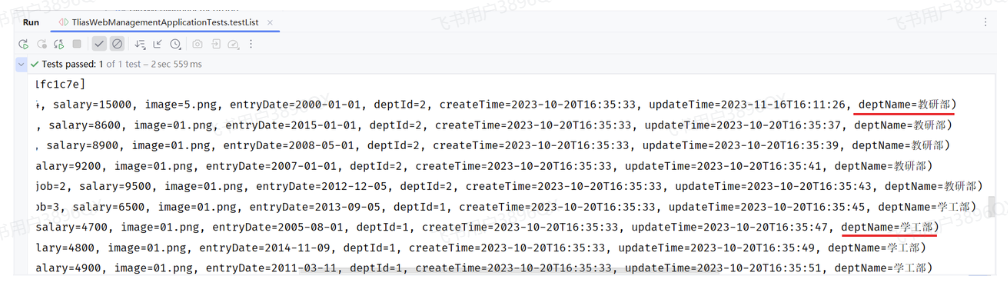
运行单元测试后,我们看到控制台输出的数据:

image.png

可以看到,员工的信息,员工关联的部门名称都查询出来了。

3.2 分页查询

3.2.1 分析

上述我们在Mapper接口中定义了接口方法,完成了查询所有员工及其部门名称的功能,是将数据库中所有的数据查询出来了。 试想如果数据库中的数据有很多(假设有几千几万条)的时候,将数据全部展示出来肯定不现实,那如何解决这个问题呢?

使用分页解决这个问题。每次只展示一页的数据,比如:一页展示10条数据,如果还想看其他的数据,可以通过点击页码进行查询。

而在员工管理的需求中,就要求我们进行分页查询,展示出对应的数据。 具体的页面原型如下:
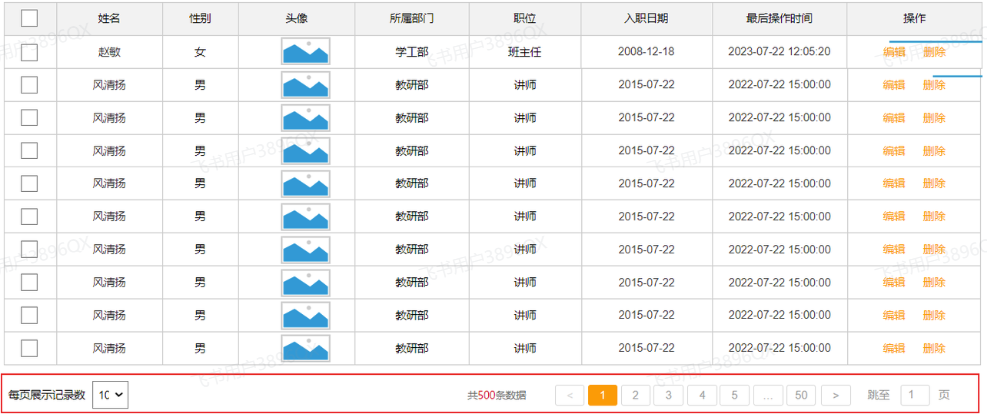
image.png

要想从数据库中进行分页查询,我们要使用LIMIT关键字,格式为:limit 开始索引 每页显示的条数。

1). 查询第1页数据的SQL语句是:

1
select * from emp  limit 0,10;

2). 查询第2页数据的SQL语句是:

1
select * from emp  limit 10,10;

3). 查询第3页的数据的SQL语句是:

1
select * from emp  limit 20,10;

观察以上SQL语句,发现: 开始索引一直在改变 , 每页显示条数是固定的

开始索引的计算公式: 开始索引 = (当前页码 - 1) * 每页显示条数

我们继续基于页面原型,继续分析,得出以下结论:

  1. 前端在请求服务端时,传递的参数

    • 当前页码 page
    • 每页显示条数 pageSize
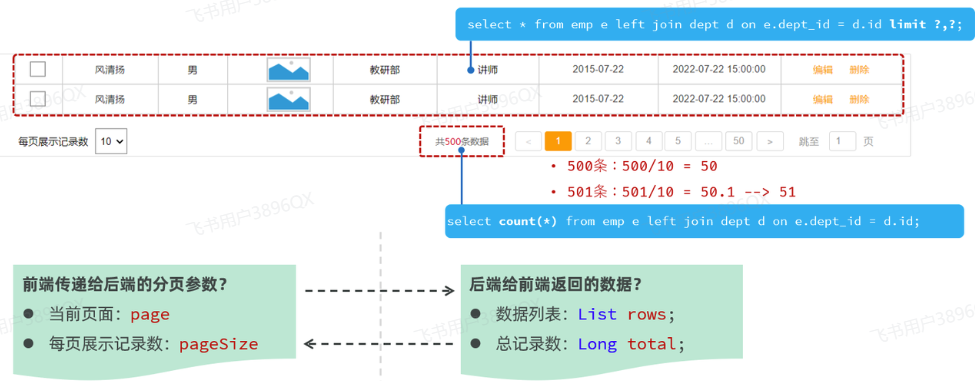
  2. 后端需要响应什么数据给前端

    • 所查询到的数据列表(存储到List 集合中)
    • 总记录数

image.png

后台给前端返回的数据包含:List集合(数据列表)、total(总记录数)

而这两部分我们通常封装到PageResult对象中,并将该对象转换为json格式的数据响应回给浏览器。

1
2
3
4
5
6
7
@Data
@NoArgsConstructor
@AllArgsConstructor
public class PageResult {
private Long total; //总记录数
private List rows; //当前页数据列表
}

3.2.2 接口描述

1). 基本信息

请求路径:/emps

请求方式:GET

接口描述:该接口用于员工列表数据的条件分页查询

2). 请求参数

参数名称 是否必须 示例 备注
name 姓名
gender 1 性别 , 1 男 , 2 女
begin 2010/1/1 范围匹配的开始时间(入职日期)
end 2020/1/1 范围匹配的结束时间(入职日期)
page 1 分页查询的页码,如果未指定,默认为1
pageSize 10 分页查询的每页记录数,如果未指定,默认为10
请求数据样例:
1
/emps?name=张&gender=1&begin=2007-09-01&end=2022-09-01&page=1&pageSize=10

3). 响应数据

参数格式:application/json

参数说明:

名称 类型 是否必须 备注
code number 必须 响应码, 1 成功 , 0 失败
msg string 非必须 提示信息
data object 必须 返回的数据
|- total number 必须 总记录数
|- rows object [] 必须 数据列表
|- id number 非必须 id
|- username string 非必须 用户名
|- name string 非必须 姓名
|- password string 非必须 密码
|- gender number 非必须 性别 , 1 男 ; 2 女
|- image string 非必须 图像
|- job number 非必须 职位, 说明: 1 班主任,2 讲师, 3 学工主管, 4 教研主管, 5 咨询师
|- salary number 非必须 薪资
|- entryDate string 非必须 入职日期
|- deptId number 非必须 部门id
|- deptName string 非必须 部门名称
|- createTime string 非必须 创建时间
|- updateTime string 非必须 更新时间
响应数据样例:
1
2
3
4
5
6
7
8
9
10
11
12
13
14
15
16
17
18
19
20
21
22
23
24
25
26
27
28
29
30
31
32
33
34
35
36
37
38
39
{
"code": 1,
"msg": "success",
"data": {
"total": 2,
"rows": [
{
"id": 1,
"username": "jinyong",
"password": "123456",
"name": "金庸",
"gender": 1,
"image": "https://web-framework.oss-cn-hangzhou.aliyuncs.com/2022-09-02-00-27-53B.jpg",
"job": 2,
"salary": 8000,
"entryDate": "2015-01-01",
"deptId": 2,
"deptName": "教研部",
"createTime": "2022-09-01T23:06:30",
"updateTime": "2022-09-02T00:29:04"
},
{
"id": 2,
"username": "zhangwuji",
"password": "123456",
"name": "张无忌",
"gender": 1,
"image": "https://web-framework.oss-cn-hangzhou.aliyuncs.com/2022-09-02-00-27-53B.jpg",
"job": 2,
"salary": 6000,
"entryDate": "2015-01-01",
"deptId": 2,
"deptName": "教研部",
"createTime": "2022-09-01T23:06:30",
"updateTime": "2022-09-02T00:29:04"
}
]
}
}

目前我们只考虑分页查询,先不考虑查询条件,而上述的接口文档中,与分页查询相关的参数就两个,一个是page,一个是pageSize。

3.2.3 原始方式

3.2.3.1 代码实现

通过查看接口文档:员工列表查询

请求路径:/emps

请求方式:GET

请求参数:跟随在请求路径后的参数字符串。 例:/emps?page=1&pageSize=10

响应数据:json格式
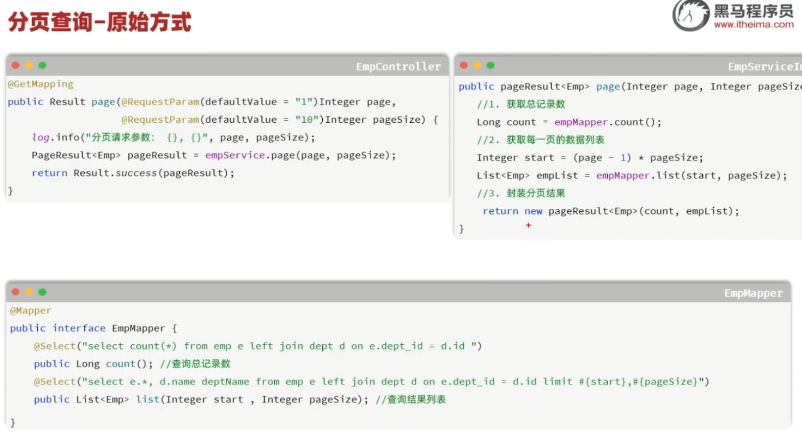
image.png

1). EmpController

1
2
3
4
5
6
7
8
9
10
11
12
13
14
15
16
17
@Slf4j
@RequestMapping("/emps")
@RestController
public class EmpController {

@Autowired
private EmpService empService;

@GetMapping
public Result page(@RequestParam(defaultValue = "1") Integer page ,
@RequestParam(defaultValue = "10") Integer pageSize){
log.info("查询员工信息, page={}, pageSize={}", page, pageSize);
PageResult pageResult = empService.page(page, pageSize);
return Result.success(pageResult);
}

}

@RequestParam(defaultValue=”默认值”) //设置请求参数默认值

2). EmpService

1
2
3
4
5
6
7
8
public interface EmpService {
/**
* 分页查询
* @param page 页码
* @param pageSize 每页记录数
*/
PageResult page(Integer page, Integer pageSize);
}

3). EmpServiceImpl

1
2
3
4
5
6
7
8
9
10
11
12
13
14
15
16
17
18
19
@Service
public class EmpServiceImpl implements EmpService {

@Autowired
private EmpMapper empMapper;

@Override
public PageResult page(Integer page, Integer pageSize) {
//1. 获取总记录数
Long total = empMapper.count();

//2. 获取结果列表
Integer start = (page - 1) * pageSize;
List<Emp> rows = empMapper.list(start, pageSize);

//3. 封装结果
return new PageResult(total, rows);
}
}

4). EmpMapper

1
2
3
4
5
6
7
8
9
10
11
12
13
14
15
16
@Mapper
public interface EmpMapper {

/**
* 查询总记录数
*/
@Select("select count(*) from emp e left join dept d on e.dept_id = d.id ")
public Long count();

/**
* 查询所有的员工及其对应的部门名称
*/
@Select("select e.*, d.name deptName from emp as e left join dept as d on e.dept_id = d.id limit #{start}, #{pageSize}")
public List<Emp> list(Integer start , Integer pageSize);

}
3.2.3.2 功能测试

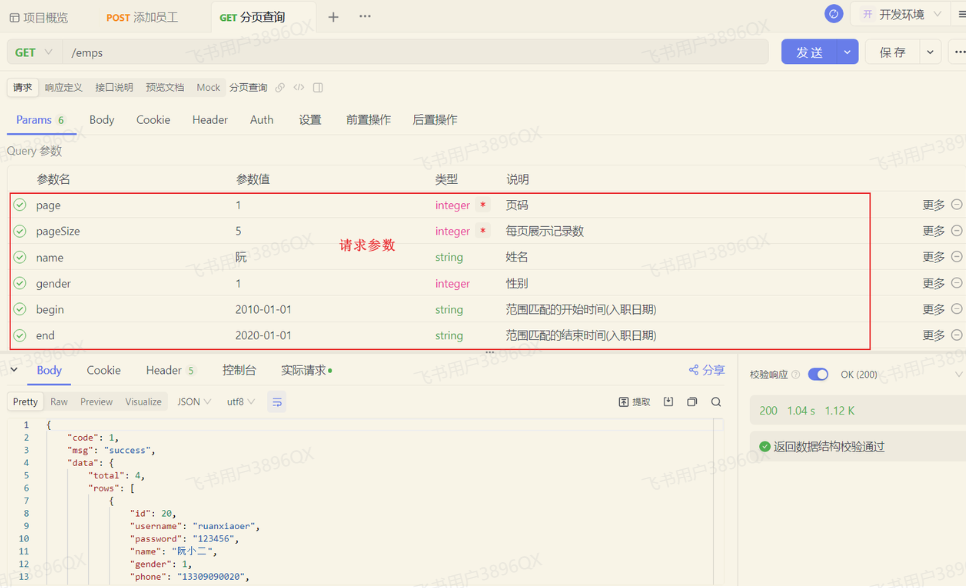
功能开发完成后,重新启动项目,使用Apifox,发起GET请求:
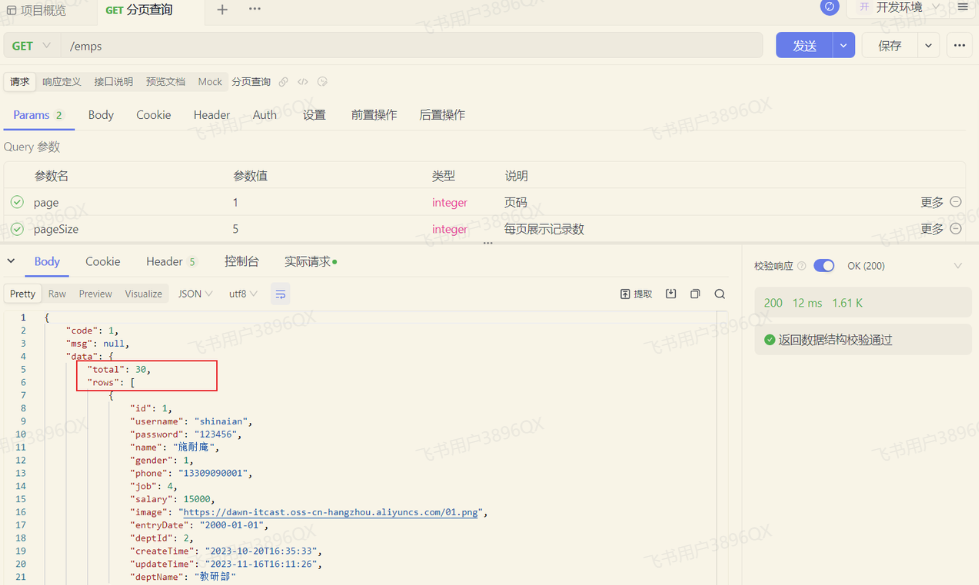
image.png

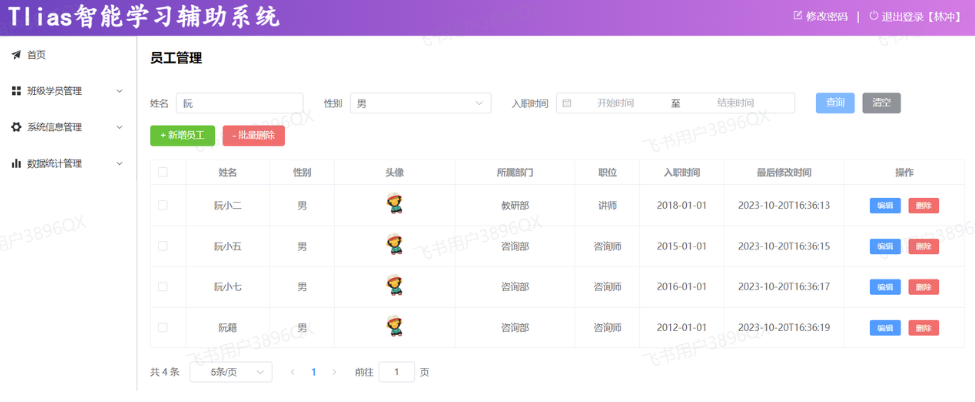
3.2.3.3 前后端联调

打开浏览器,测试后端功能接口:

image.png

点击下面的页码,可以正常的查询出对应的数据 。

3.2.4 PageHelper分页插件

3.2.4.1 介绍

前面我们已经完了基础的分页查询,大家会发现:分页查询功能编写起来比较繁琐。 而分页查询的功能是非常常见的,我们查询员工信息需要分页查询,将来在做其他项目时,查询用户信息、订单信息、商品信息等等都是需要进行分页查询的。

而分页查询的思路、步骤是比较固定的。 在Mapper接口中定义两个方法执行两条不同的SQL语句:

  1. 查询总记录数
  2. 指定页码的数据列表

在Service当中,调用Mapper接口的两个方法,分别获取:总记录数、查询结果列表,然后在将获取的数据结果封装到PageBean对象中。

大家思考下:在未来开发其他项目,只要涉及到分页查询功能(例:订单、用户、支付、商品),都必须按照以上操作完成功能开发

结论:原始方式的分页查询,存在着”步骤固定”、”代码频繁”的问题
解决方案:可以使用一些现成的分页插件完成。对于Mybatis来讲现在最主流的就是PageHelper。

PageHelper是第三方提供的Mybatis框架中的一款功能强大、方便易用的分页插件,支持任何形式的单标、多表的分页查询。

官网: https://pagehelper.github.io/

那接下来,我们可以对比一下,使用PageHelper分页插件进行分页 与 原始方式进行分页代码实现的上的差别。
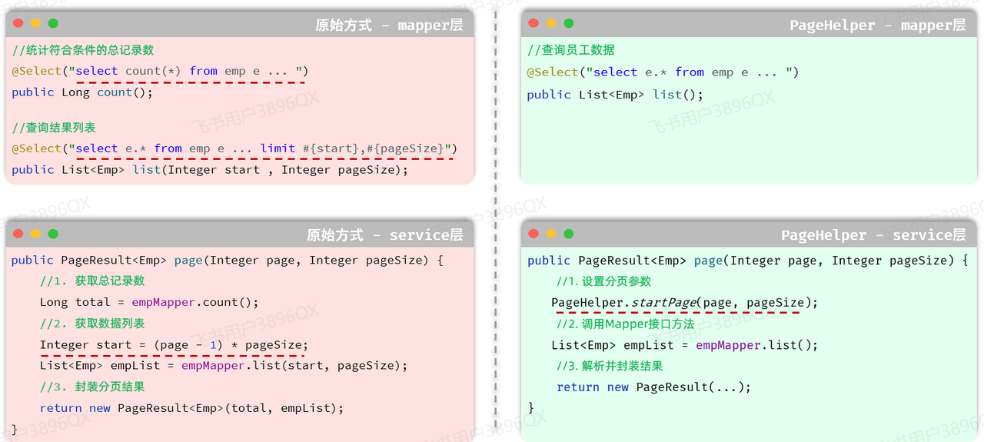
image.png

  • Mapper接口层:

    • 原始的分页查询功能中,我们需要在Mapper接口中定义两条SQL语句。
    • PageHelper实现分页查询之后,只需要编写一条SQL语句,而且不需要考虑分页操作,就是一条正常的查询语句。
  • Service层:

    • 需要根据页码、每页展示记录数,手动的计算起始索引。
    • 无需手动计算起始索引,直接告诉PageHelper需要查询那一页的数据,每页展示多少条记录即可。
3.2.4.2 代码实现

当使用了PageHelper分页插件进行分页,就无需再Mapper中进行手动分页了。 在Mapper中我们只需要进行正常的列表查询即可。在Service层中,调用Mapper的方法之前设置分页参数,在调用Mapper方法执行查询之后,解析分页结果,并将结果封装到PageResult对象中返回。

1). 在pom.xml引入依赖

1
2
3
4
5
6
<!--分页插件PageHelper-->
<dependency>
<groupId>com.github.pagehelper</groupId>
<artifactId>pagehelper-spring-boot-starter</artifactId>
<version>1.4.7</version>
</dependency>

2). EmpMapper

1
2
3
4
5
/**
* 查询所有的员工及其对应的部门名称
*/
@Select("select e.*, d.name deptName from emp as e left join dept as d on e.dept_id = d.id")
public List<Emp> list();

3). EmpServiceImpl

1
2
3
4
5
6
7
8
9
10
11
12
@Override
public PageResult page(Integer page, Integer pageSize) {
//1. 设置分页参数
PageHelper.startPage(page,pageSize);

//2. 执行查询
List<Emp> empList = empMapper.list();
Page<Emp> p = (Page<Emp>) empList;

//3. 封装结果
return new PageResult(p.getTotal(), p.getResult());
}
3.2.4.3 功能测试

功能开发完成后,我们重启项目工程,打开Apifox,发起GET请求,访问 :http://localhost:8080/emps?page=1\&pageSize=5
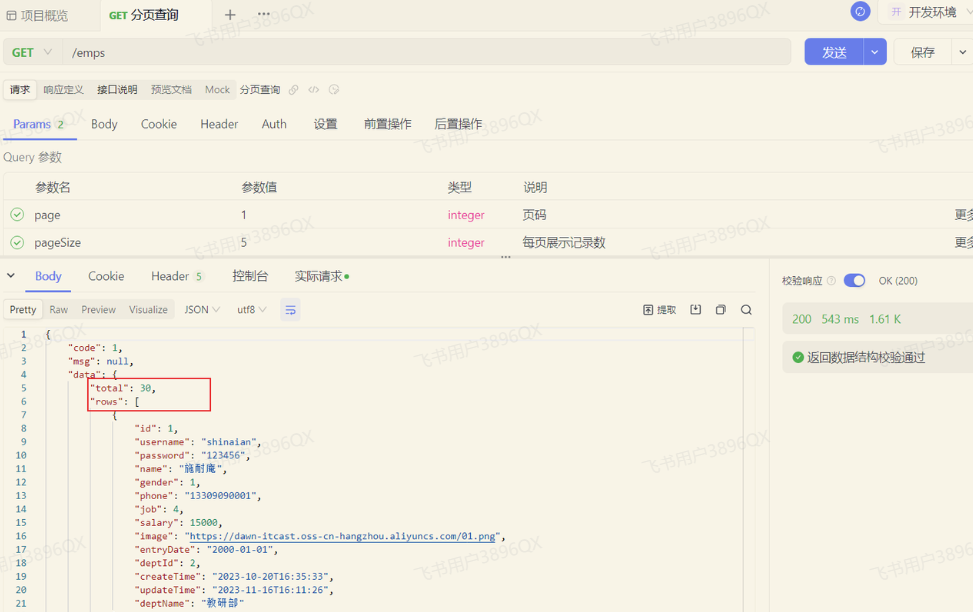
image.png

我们可以看到数据可以正常查询返回,是可以正常实现分页查询的。

3.2.4.4 实现机制

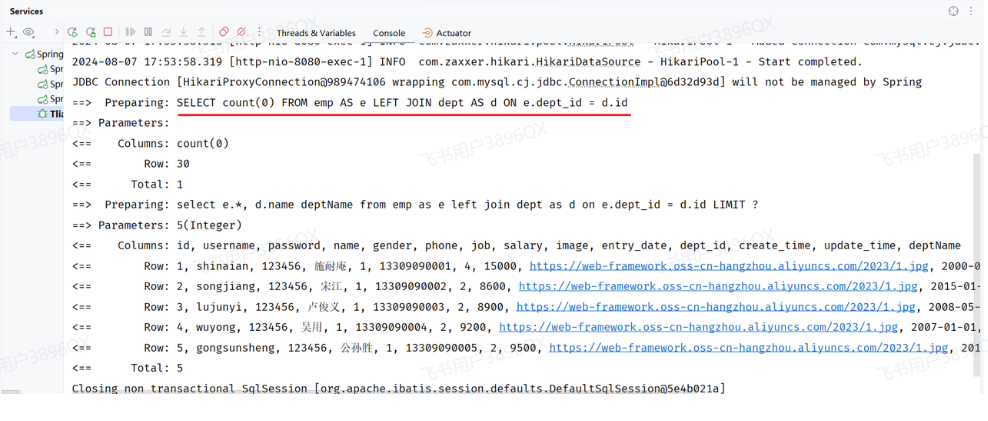
我们打开Idea的控制台,可以看到在进行分页查询时,输出的SQL语句。
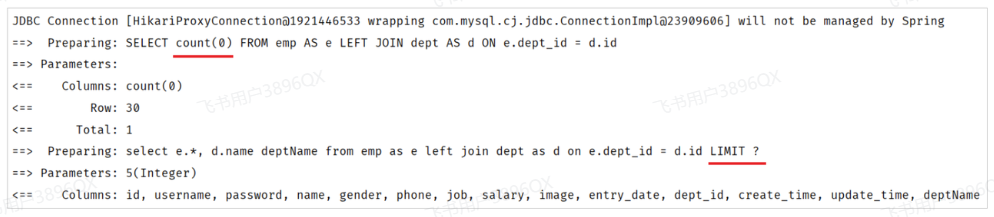
image.png

我们看到执行了两条SQL语句,而这两条SQL语句,其实是从我们在Mapper接口中定义的SQL演变而来的。

  • 第一条SQL语句,用来查询总记录数。

image.png

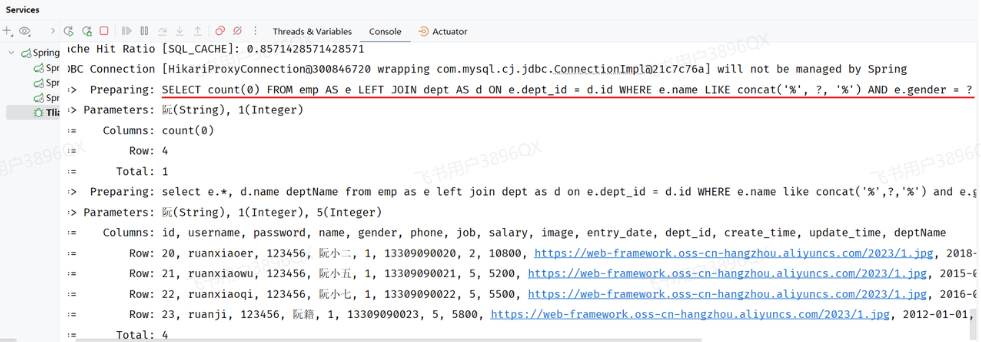
其实就是将我们编写的SQL语句进行的改造增强,将查询返回的字段列表替换成了 count(0) 来统计总记录数。

  • 第二条SQL语句,用来进行分页查询,查询指定页码对应 的数据列表。

image.png

其实就是将我们编写的SQL语句进行的改造增强,在SQL语句之后拼接上了limit进行分页查询,而由于测试时查询的是第一页,起始索引是0,所以简写为limit ?。

而PageHelper在进行分页查询时,会执行上述两条SQL语句,并将查询到的总记录数,与数据列表封装到了 Page<Emp> 对象中,我们再获取查询结果时,只需要调用Page对象的方法就可以获取。

注意:

  • PageHelper实现分页查询时,SQL语句的结尾一定一定一定不要加分号(;).。

  • PageHelper只会对紧跟在其后的第一条SQL语句进行分页处理。

3.3 条件分页查询

完了分页查询后,下面我们需要在分页查询的基础上,添加条件。

3.3.1 需求
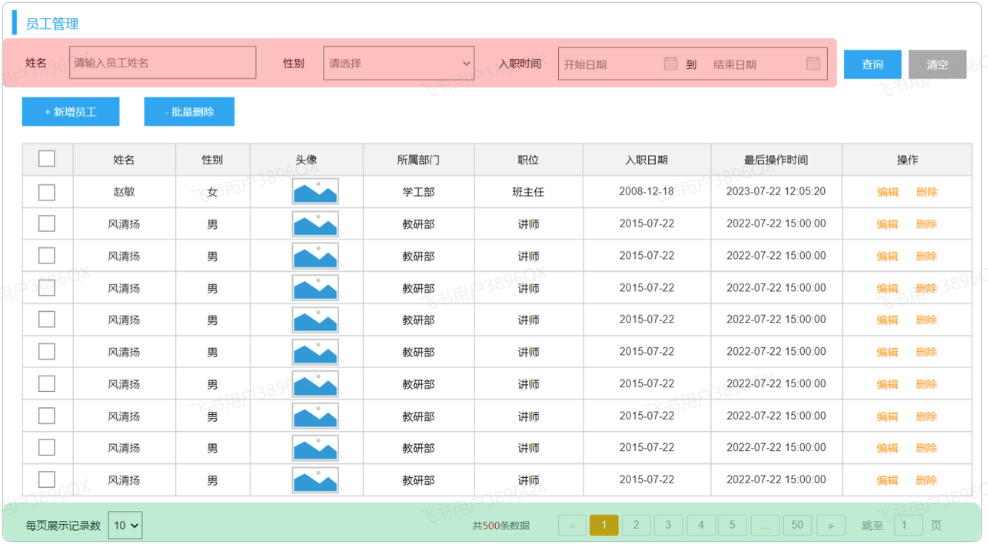
image.png

通过员工管理的页面原型我们可以看到,员工列表页面的查询,不仅仅需要考虑分页,还需要考虑查询条件。 分页查询我们已经实现了,接下来,我们需要考虑在分页查询的基础上,再加上查询条件。

我们看到页面原型及需求中描述,搜索栏的搜索条件有三个,分别是:

  • 姓名:模糊匹配
  • 性别:精确匹配
  • 入职日期:范围匹配

3.3.2 接口描述

参照接口文档中的 员工管理 -> 员工列表查询

3.3.3 思路分析
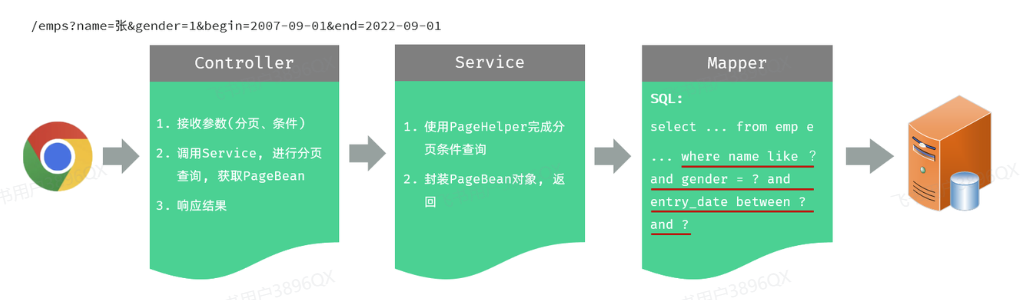
image.png

3.3.4 功能开发

通过查看接口文档:员工列表查询

请求路径:/emps
请求方式:GET

请求参数:

参数名称 是否必须 示例 备注
name 姓名
gender 1 性别 , 1 男 , 2 女
begin 2010/1/1 范围匹配的开始时间(入职日期)
end 2020/1/1 范围匹配的结束时间(入职日期)
page 1 分页查询的页码,如果未指定,默认为1
pageSize 10 分页查询的每页记录数,如果未指定,默认为10

在原有分页查询的代码基础上进行改造。

1). 在EmpController方法中通过多个方法形参,依次接收这几个参数

1
2
3
4
5
6
7
8
9
10
11
12
13
14
15
16
17
18
19
@Slf4j
@RestController
@RequestMapping("/emps")
public class EmpController {

@Autowired
private EmpService empService;

@GetMapping
public Result page(@RequestParam(defaultValue = "1") Integer page,
@RequestParam(defaultValue = "10") Integer pageSize,
String name, Integer gender,
@DateTimeFormat(pattern = "yyyy-MM-dd") LocalDate begin,
@DateTimeFormat(pattern = "yyyy-MM-dd") LocalDate end) {
log.info("查询请求参数: {}, {}, {}, {}, {}, {}", page, pageSize, name, gender, begin, end);
PageResult pageResult = empService.page(page, pageSize, name, gender, begin, end);
return Result.success(pageResult);
}
}

2). 修改EmpService及EmpServiceImpl中的代码逻辑

EmpService:

1
2
3
4
5
6
public interface EmpService {
/**
* 分页查询
*/
PageResult page(Integer page, Integer pageSize, String name, Integer gender, LocalDate begin, LocalDate end);
}

EmpServiceImpl:

1
2
3
4
5
6
7
8
9
10
11
12
13
14
15
16
17
18
19
20
/**
* 员工管理
*/
@Service
public class EmpServiceImpl implements EmpService {

@Autowired
private EmpMapper empMapper;

@Override
public PageResult page(Integer page, Integer pageSize, String name, Integer gender, LocalDate begin, LocalDate end) {
//1. 设置PageHelper分页参数
PageHelper.startPage(page, pageSize);
//2. 执行查询
List<Emp> empList = empMapper.list(name, gender, begin, end);
//3. 封装分页结果
Page<Emp> p = (Page<Emp>) empList;
return new PageResult(p.getTotal(), p.getResult());
}
}

3). 调整EmpMapper接口方法

1
2
3
4
5
6
7
8
9
@Mapper
public interface EmpMapper {

/**
* 查询所有的员工及其对应的部门名称
*/
public List<Emp> list(String name, Integer gender, LocalDate begin, LocalDate end);

}

由于SQL语句比较复杂,建议将SQL语句配置在XML映射文件中。

4). 新增Mapper映射文件EmpMapper.xml

1
2
3
4
5
6
7
8
9
10
11
12
<!--定义Mapper映射文件的约束和基本结构-->
<!DOCTYPE mapper
PUBLIC "-//mybatis.org//DTD Mapper 3.0//EN"
"http://mybatis.org/dtd/mybatis-3-mapper.dtd">
<mapper namespace="com.itheima.mapper.EmpMapper">
<select id="list" resultType="com.itheima.pojo.Emp">
select e.*, d.name deptName from emp as e left join dept as d on e.dept_id = d.id
where e.name like concat('%',#{name},'%')
and e.gender = #{gender}
and e.entry_date between #{begin} and #{end}
</select>
</mapper>

功能测试:

image.png

测试时,需要注意传递的查询条件,有些查询条件查不到数据的,因为数据库没有符合条件的记录。

3.3.5 程序优化1

在上述分页条件查询中,请求参数比较多,有6个,如下所示:

  • 请求参数:/emps?name=张&gender=1&begin=2007-09-01&end=2022-09-01&page=1&pageSize=10

那我们在controller层方法中,接收请求参数的时候,直接在controller方法中声明这样6个参数即可,这样做,功能可以实现,但是不方便维护和管理。
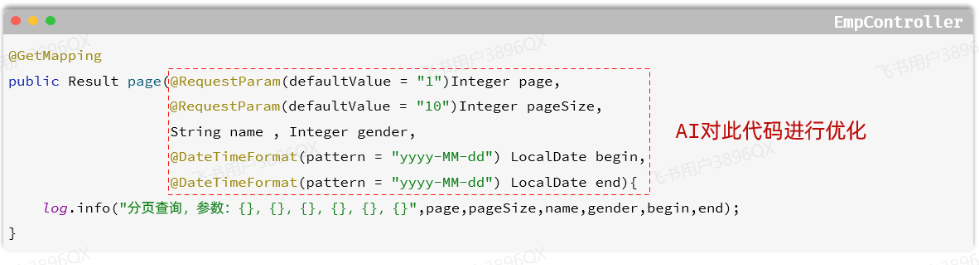
image.png

那接下来呢,我们就可以通过 通义零码 AI辅助工具,对这一块儿的代码进行优化。 具体操作如下:
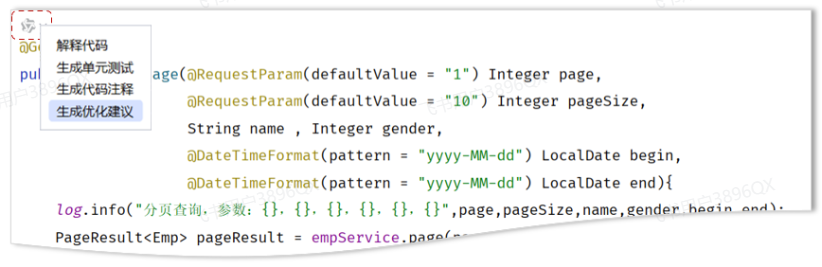
image.png

优化思路:定义一个实体类,来封装这几个请求参数。 【需要保证,前端传递的请求参数和实体类的属性名是一样的】

1). 定义实体类:EmpQueryParam

1
2
3
4
5
6
7
8
9
10
11
12
13
14
15
16
17
18
19
package com.itheima.pojo;

import lombok.Data;
import org.springframework.format.annotation.DateTimeFormat;
import java.time.LocalDate;

@Data
public class EmpQueryParam {

private Integer page = 1; //页码
private Integer pageSize = 10; //每页展示记录数
private String name; //姓名
private Integer gender; //性别
@DateTimeFormat(pattern = "yyyy-MM-dd")
private LocalDate begin; //入职开始时间
@DateTimeFormat(pattern = "yyyy-MM-dd")
private LocalDate end; //入职结束时间

}

2). EmpController接收请求参数

1
2
3
4
5
6
@GetMapping
public Result page(EmpQueryParam empQueryParam) {
log.info("查询请求参数: {}", empQueryParam);
PageResult pageResult = empService.page(empQueryParam);
return Result.success(pageResult);
}

3). 修改EmpService接口方法

1
2
3
4
5
6
7
public interface EmpService {
/**
* 分页查询
*/
//PageResult page(Integer page, Integer pageSize, String name, Integer gender, LocalDate begin, LocalDate end);
PageResult page(EmpQueryParam empQueryParam);
}

4). 修改EmpServiceImpl中的page方法

1
2
3
4
5
6
7
8
9
10
11
12
13
14
15
16
17
18
19
20
21
22
23
24
25
26
27
@Service
public class EmpServiceImpl implements EmpService {

@Autowired
private EmpMapper empMapper;

/*@Override
public PageResult page(Integer page, Integer pageSize, String name, Integer gender, LocalDate begin, LocalDate end) {
//1. 设置PageHelper分页参数
PageHelper.startPage(page, pageSize);
//2. 执行查询
List<Emp> empList = empMapper.list(name, gender, begin, end);
//3. 封装分页结果
Page<Emp> p = (Page<Emp>) empList;
return new PageResult(p.getTotal(), p.getResult());
}*/

public PageResult page(EmpQueryParam empQueryParam) {
//1. 设置PageHelper分页参数
PageHelper.startPage(empQueryParam.getPage(), empQueryParam.getPageSize());
//2. 执行查询
List<Emp> empList = empMapper.list(empQueryParam);
//3. 封装分页结果
Page<Emp> p = (Page<Emp>)empList;
return new PageResult(p.getTotal(), p.getResult());
}
}

5). 修改EmpMapper接口方法

1
2
3
4
5
6
7
8
9
10
11
12
13
14
@Mapper
public interface EmpMapper {

/**
* 查询所有的员工及其对应的部门名称
*/
// @Select("select e.*, d.name as deptName from emp e left join dept d on e.dept_id = d.id")
// public List<Emp> list(String name, Integer gender, LocalDate begin, LocalDate end);

/**
* 根据查询条件查询员工
*/
List<Emp> list(EmpQueryParam empQueryParam);
}

EmpMapper.xml 中的配置无需修改。

代码优化完毕之后,重新启动运行测试,依然正常运行:
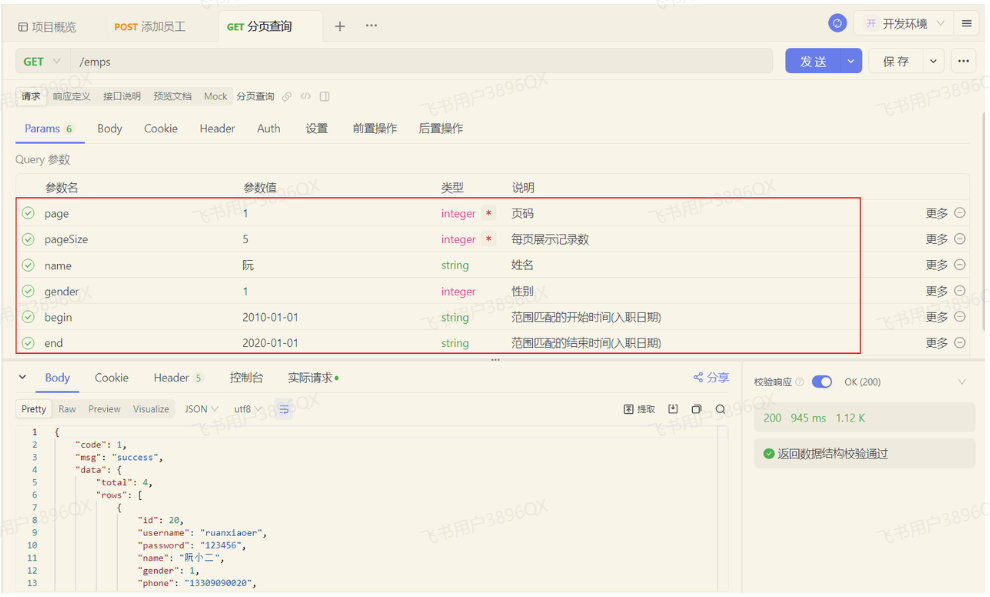
image.png

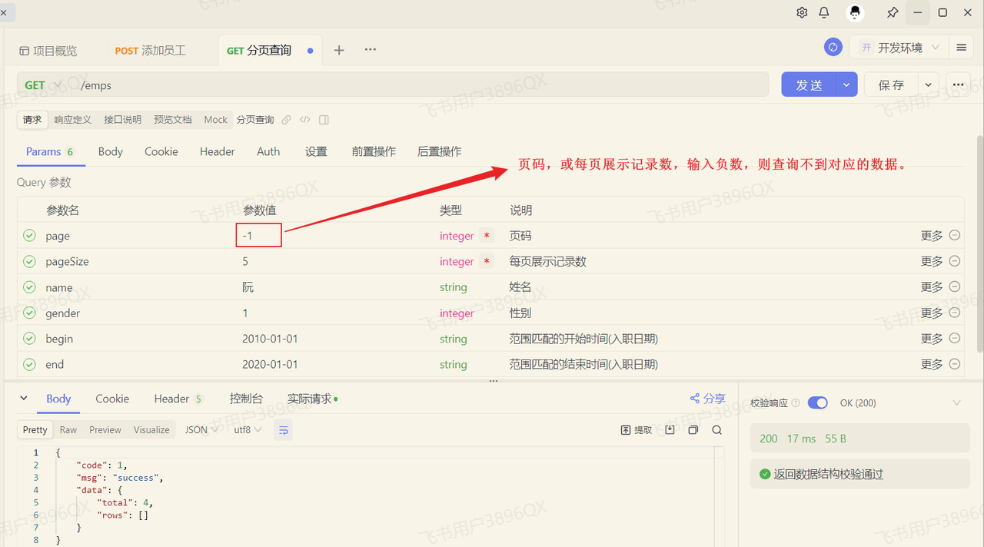
当我们在测试的时候,页码输入负数,查询是有问题的,查不到对应的数据了。

image.png

那其实在PageHelper中,我们可以通过合理化参数配置,来解决这个问题。直接在application.yml中,引入如下配置即可:

1
2
3
pagehelper:
reasonable: true
helper-dialect: mysql

reasonable:分页合理化参数,默认值为false。当该参数设置为true时,pageNum<=0时会查询第一页,pageNum>pages(超过总数时),会查询最后一页。默认false 时,直接根据参数进行查询。

测试如下:
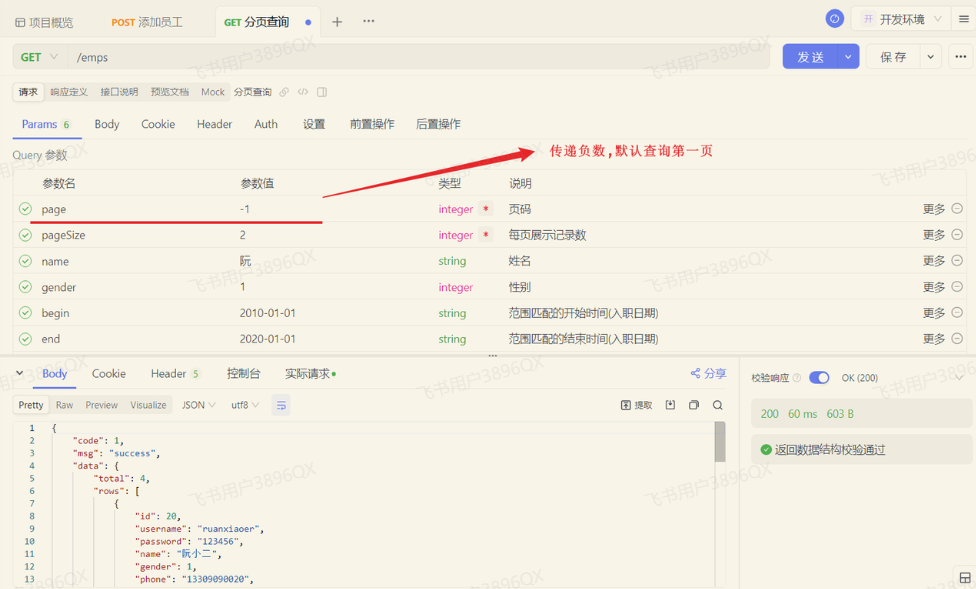
image.png

3.3.6 程序优化2

当前,我们在查询的时候,Mapper映射配置文件中的SQL语句中,查询条件是写死的。 而我们在员工管理中,根据条件查询员工信息时,查询条件是可选的,可以输入也可以不输入。

image.png

  • 如果只输入 姓名 这个查询条件,则SQL语句中只根据name字段查询,SQL如下:
1
select e.*, d.name deptName from emp as e left join dept as d on e.dept_id = d.id where e.name like concat('%',#{name},'%');
  • 如果只输入 性别 这个查询条件,则SQL语句中只根据gender字段查询,SQL如下:
1
select e.*, d.name deptName from emp as e left join dept as d on e.dept_id = d.id where e.gender = #{gender};
  • 如果输入 姓名性别这两个查询条件,则SQL语句中要根据name、gender两个字段查询,SQL如下:
1
2
select e.*, d.name deptName from emp as e left join dept as d on e.dept_id = d.id
where e.name like concat('%',#{name},'%') and e.gender = #{gender};

我们看到,这个SQL语句不应该是写死的,而应该根据用户输入的条件的变化而变化。 那这里呢,就要通过Mybatis中的动态SQL来实现。

所谓动态SQL,指的就是随着用户的输入或外部的条件的变化而变化的SQL语句。

具体的代码实现如下:

1
2
3
4
5
6
7
8
9
10
11
12
13
14
15
16
17
18
19
20
<!--定义Mapper映射文件的约束和基本结构-->
<!DOCTYPE mapper
PUBLIC "-//mybatis.org//DTD Mapper 3.0//EN"
"http://mybatis.org/dtd/mybatis-3-mapper.dtd">
<mapper namespace="com.itheima.mapper.EmpMapper">
<select id="list" resultType="com.itheima.pojo.Emp">
select e.*, d.name deptName from emp as e left join dept as d on e.dept_id = d.id
<where>
<if test="name != null and name != ''">
e.name like concat('%',#{name},'%')
</if>
<if test="gender != null">
and e.gender = #{gender}
</if>
<if test="begin != null and end != null">
and e.entry_date between #{begin} and #{end}
</if>
</where>
</select>
</mapper>

在这里呢,我们用到了两个动态SQL的标签:<if> <where>。 这两个标签的具体作用如下:

<if>:判断条件是否成立,如果条件为true,则拼接SQL。

<where>:根据查询条件,来生成where关键字,并会自动去除条件前面多余的and或or。

代码优化完毕后,重新启动服务,测试如下:
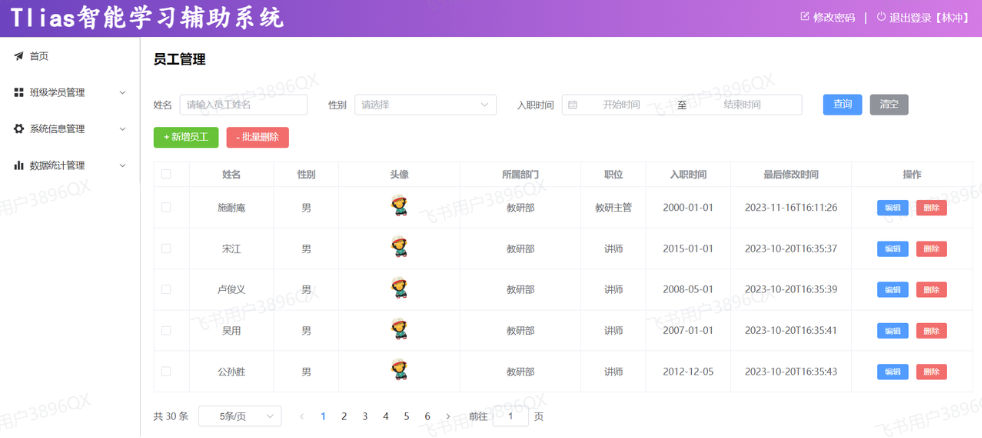
image.png

没有输入任何查询条件时,运行日志如下:

image.png

当我们输入姓名和性别时

image.png

运行日志如下:

image.png

我们可以看到,当我们输入不同的搜索条件时,会动态的根据查询条件,动态拼接SQL语句。