运算符&选择语句
1:选择语句
1.1 顺序结构
**顺序结构:**是程序中最简单最基本的流程控制,没有特定的语法结构,按照代码的先后顺序,依次执行
1.2 Debug的基本使用
**Debug:**是供程序员使用的程序调试工具,它可以用于查看程序的执行流程,也可以用于追踪程序执行过程来调试程序

1.3 选择语句之if
选择语句有两种结构:
- if语句
- switch语句
1
2
3
4
5
| if(条件){
当条件为true会执行到这里
}else{
当条件为false会执行到这里
}
|
if只有一行且不是定义变量,可以省略{}
1.4 选择语句之switch
格式说明:
1
2
3
4
5
6
7
8
9
10
11
12
13
14
15
16
17
18
19
20
|
int light = 1;
switch (light) {
case 1:
System.out.println("红灯停");
break;
case 2:
System.out.println("绿灯行");
break;
case 3:
System.out.println("黄灯亮了等一等");
break;
default:
System.out.println("交通信号灯故障,请在保证安全的情况下通行");
break;
}
|
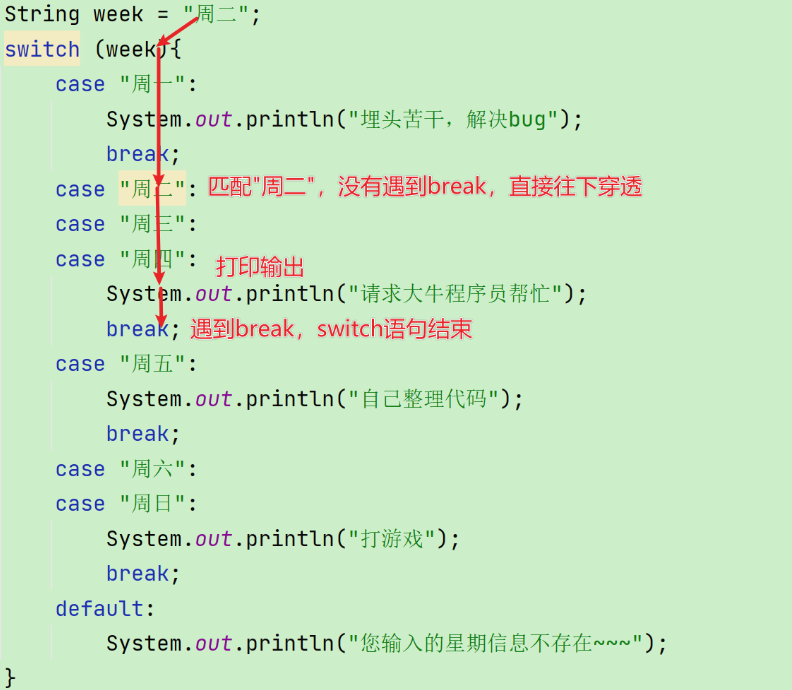
case的穿透性
case穿透: 在switch语句中,如果case的后面不写break,将出现穿透现象,也就是不会在判断下一个case的值,直接向后运行,直到遇到break,或者整体switch结束。
在JDK14开始switch语句可以使用箭头语法,从而避免穿透的问题,语法格式如下:
2:for循环结构
循环结构有三种语句,分别是:
- for循环
- while循环
- do…while循环
2.1 for循环结构
还提到了这里的几个部分,分别是定义变量,条件判断,控制变量的变化,展示手机信息(可能被多次执行)
格式:
1
2
3
4
5
6
7
| public class ForDemo {
public static void main(String[] args) {
for(int i=1; i<=5; i+=1) {
System.out.println("HelloWorld");
}
}
}
|
2.2 案例1(输出数据)
1
2
3
4
5
6
7
8
9
10
11
12
13
14
15
16
17
18
19
20
21
22
23
24
25
26
27
28
29
30
31
32
33
34
35
36
37
38
39
40
41
42
43
44
45
46
47
48
49
50
51
| public class Demo04Break {
public static void main(String[] args) {
for (int i = 1; i <= 10; i++) {
if (i % 5 == 0) {
break;
}
System.out.println("HelloWorld....." + i);
}
System.out.println("main....end....");
}
}
public class Demo05Continue {
public static void main(String[] args) {
for (int i = 1; i <= 10; i++) {
if (i % 5 == 0) {
continue;
}
System.out.println("HelloWorld....." + i);
}
System.out.println("main....end....");
}
}
public class Test06ContinueFQG {
public static void main(String[] args) {
for (int num = 0; num < 100; num++) {
int ge = num%10;
int shi = num/10%10;
if ((ge == 7 || shi == 7) || (num % 7 == 0)) {
continue;
}
System.out.println(num);
}
}
}
|
1
2
3
4
5
6
7
8
9
10
| break的作用:
1.可以使用在循环和switch语句中,其它位置不可用
2.break是用来结束所在的循环的
(1)一旦执行break,本次循环的循环体的后续代码不再执行
(2)一旦执行break,剩余次数的循环也不再执行
(3)相当于从执行break的位置,直接跳转到break所在的循环的后面执行
continue的作用:
1.提前结束本次循环,继续进行下一次循环
2.continue只影响本次循环,break影响所有循环
3.continue只能使用在循环语句中
|
2.3 案例2(水仙花数)
3:while循环结构
3.1 while循环结构
3.2 案例
1
2
3
4
5
6
7
8
9
10
11
12
13
14
15
16
17
18
19
20
21
22
23
24
25
26
27
28
29
30
31
32
33
34
35
36
37
38
39
|
public class WhileDemo {
public static void main(String[] args) {
int i = 1;
while (i<=5) {
System.out.println("HelloWorld");
i++;
}
}
}
public class WhileTest02 {
public static void main(String[] args) {
int count = 0;
double paper = 0.001;
double zf = 8848.86;
while (paper < zf) {
paper *= 2;
count++;
}
System.out.println("要折叠" + count + "次");
}
}
|
4:do-while循环结构
4.1 do-while循环结构
1
2
3
4
5
6
7
8
9
10
11
12
|
public class DoWhileDemo {
public static void main(String[] args) {
int i = 1;
do {
System.out.println("HelloWorld");
i++;
} while (i<=5);
}
}
|
4.2 三种循环的区别
1
2
3
4
5
6
7
8
9
10
11
12
|
for ( ; ; ){
System.out.println("Hello World1");
}
while (true) {
System.out.println("Hello World2");
}
do {
System.out.println("Hello World3");
}while (true);
|
三种循环的区别总结
1.建议使用顺序: for,while,do-while
2.循环次数确定的话,建议使用for,循环次数不确定建议使用while
循环次数不确定需要先写成死循环的格式
3.do-while循环来讲的话,至少执行一次
4.while和do-while循环而言,循环结束后,初始化条件中定义的变量可以继续使用, 但是for循环的不能使用
三种循环语句的区别:
for循环和while循环先判断条件是否成立,然后决定是否执行循环体(先判断后执行)
do…while循环先执行一次循环体,然后判断条件是否成立,是否继续执行循环体(先执行后判断)
5:continue和break
5.1 break语句
- 使用场景:终止switch或者循环
- 在选择结构switch语句中
- 在循环语句中
- 离开使用场景的存在是没有意义的
5.2 continue语句
5.3 continue练习
1
2
3
4
5
6
7
8
9
10
11
12
13
14
15
16
17
18
19
20
21
22
23
24
25
26
27
|
public class Test06ContinueFQG {
public static void main(String[] args) {
for (int num = 0; num < 100; num++) {
int ge = num%10;
int shi = num/10%10;
if ((ge == 7 || shi == 7) || (num % 7 == 0)) {
continue;
}
System.out.println(num);
}
}
}
|
6 Scanner
Scanner是Java.util包中的类,用于解析基本类型和字符串的简单文本扫描器。
- 简化控制台输入处理
- 自动解析不同类型的数据(整数、浮点数、字符串等)
1
2
3
4
5
6
7
8
9
10
11
12
13
14
15
16
17
18
19
20
21
22
| import java.util.Scanner;
public class ScannerDemo {
public static void main(String[] args) {
Scanner scanner = new Scanner(System.in);
System.out.print("请输入整数:");
int num = scanner.nextInt();
System.out.print("请输入浮点数:");
double decimal = scanner.nextDouble();
System.out.print("请输入字符串:");
String text = scanner.next();
scanner.close();
}
}
|
7 Random
Random类用于生成伪随机数序列,提供多种数据类型的随机值生成。
1
2
3
4
5
6
7
8
9
10
11
12
13
14
15
16
17
18
19
20
21
22
23
24
25
26
27
28
29
30
31
32
33
34
35
36
37
38
39
40
41
42
43
44
45
46
47
48
49
50
51
52
53
54
55
| 1.导包:
import 包名.类名;
Random类导包: import java.util.Random;
2.创建对象:
类名 对象名 = new 类名(参数...);
键盘录入对象: Scanner sc = new Scanner(System.in);
注意: System.in目前是固定写法
随机数Random类的对象: Random r = new Random();
注意:右侧()中什么都不用写,目前是固定写法
3.使用:
r.nextInt(): 产生一个int范围(正负21亿)内的随机数字
r.nextInt(整数常量或者int类型变量 n): 产生一个0(包含)到n(不包含n)之间的随机数字
举例:
r.nextInt(10): 产生一个0(包含0)到10(不包含10)之间的随机数字 [0,10) 等价于 [0,9]
r.nextInt(100): 产生一个0(包含0)到100(不包含10)之间的随机数字 [0,100) 等价于 [0,99]
4.练习:
(1)产生10个int范围内的随机数字
(2)产生10个1(包含1)到100(包含100)之间的随机数字
r.nextInt(100): 0,1,2,3......99
r.nextInt(100) + 1:
0,1,2,3......99
+ 1
--------------------
1,2,3......99,100
public class Demo05Random {
public static void main(String[] args) {
Random r = new Random();
for (int i = 0; i < 10; i++) {
int num = r.nextInt();
System.out.println(num);
}
for (int i = 0; i < 10; i++) {
int num = r.nextInt(100) + 1;
System.out.println(num);
}
while(true) {
int num = r.nextInt(100) + 1;
System.out.println(num);
if (num == 0 || num == 101) {
break;
}
}
}
}
|
8 猜数字游戏
1
| 程序启动的时候生成一个1--100之间的随机数,让用户循环猜5次,猜错了就提示"大了"或"小了",直到猜对或次数用尽为止
|
1
2
3
4
5
6
7
8
9
10
11
12
13
14
15
16
17
18
19
20
21
22
23
24
25
26
27
28
29
30
31
32
33
34
35
36
37
38
39
40
41
42
43
44
45
46
|
public class Test09 {
public static void main(String[] args) {
Random random = new Random();
int randomCode = random.nextInt(1, 101);
System.out.println("游戏已经准备就绪了.........."+randomCode);
Scanner sc = new Scanner(System.in);
boolean res = false;
for (int i = 1; i <= 5; i++) {
System.out.println("请输入您第" + i + "次要猜的数字:");
int a = sc.nextInt();
if(a > randomCode){
System.out.println(a+"太大了,请往小了猜...");
}else if(a < randomCode){
System.out.println(a+"太小了,请往大了猜...");
}else {
res = true;
System.out.println("真棒,用"+i+"次机会,就猜对了!");
break;
}
}
if(!res){
System.out.println("很遗憾,您没有猜对,正确答案是:"+randomCode);
}
}
}
|