day10【File&IO】
第一章 File类
1.1 File类的概述
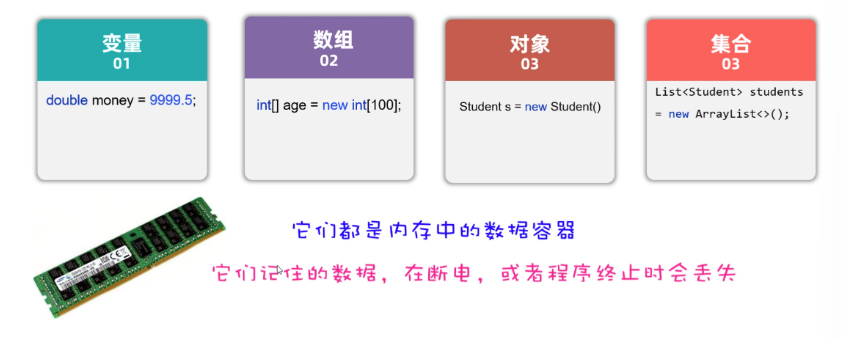
- 先问大家一个问题,目前你写代码时存储数据,可以用哪些方案?
可以是变量、可以是数组、可以是对象、可以是集合,但是这些数据都是存储在内存中的,只要程序执行结束,或者断点了,数据就消失了。
不能永久存储。

- 有些数据要长久保存,该怎么办呢?
- 可以将数据以文件的形式存在硬盘里,即使程序结束了,断点了只要硬盘没坏,数据就永久存在。
而现在要学习的File类,它的就用来表示当前系统下的文件(也可以是文件夹),通过File类提供的方法可以获取文件大小、判断文件是否存在、创建文件、创建文件夹等。
但是需要我们注意:File对象只能对文件进行操作,不能操作文件中的内容。
1
2
3
4
5
6
| java.io.File类: 用来描述计算机中文件/文件夹/路径的
文件和目录路径名的抽象表示形式。
文件: 用file表示,用来存储数据的
文件夹/目录: 用directory表示,用来存储文件的,管理文件的
路径/地址: 用path表示,用来唯一确定文件/文件夹的具体存储位置
windows系统中,文件/文件夹的路径中有\,但是在java中要表示\需要写\\
|
1.2 File类的静态成员
1
2
3
4
5
6
7
8
9
10
11
12
13
14
15
16
17
18
19
20
21
| File类中的静态成员:
public static String pathSeparator: 多个路径之间的分隔符号
与系统有关的路径分隔符,为了方便,它被表示为一个字符串。
public static String separator: 一个路径中多个名称之间的分隔符号
与系统有关的默认名称分隔符,为了方便,它被表示为一个字符串。
public class Demo01File {
public static void main(String[] args) {
String path = "E:\\io\\a\\b\\c\\abc.txt";
System.out.println(path);
String pathSeparator = File.pathSeparator;
System.out.println(pathSeparator);
String separator = File.separator;
System.out.println(separator);
String path2 = "E:"+separator+"io"+separator+"a"+separator+"b"+separator+"c"+separator+"abc.txt";
System.out.println(path2);
}
}
|
1.3 File类的构造方法
1
2
3
4
5
6
7
8
9
10
11
12
13
14
15
16
| File类的构造方法
File(String pathname)
参数:String类型的路径
可以表示文件或者文件夹
所表示的文件或文件夹可以存在,也可以不存在
File(String parent, String child)
参数:
parent:String类型的父路径
child:String类型的子路径
可以表示文件或者文件夹,子路径可以是文件或者文件夹
所表示的文件或文件夹可以存在也可以不存在
File(File parent, String child)
参数:
parent:File类型的父路径
child:String类型的子路径
|
1
2
3
4
5
6
7
8
9
10
11
12
13
14
15
16
17
18
19
20
21
| public class Demo02FileConstructor {
public static void main(String[] args) {
File f1 = new File("D:\\workspace\\视频录制2");
File f2 = new File("D:\\workspace\\视频录制\\03.补充-join方法介绍.mp4");
System.out.println(f1.exists());
System.out.println(f2.exists());
File f3 = new File("D:\\workspace","视频录制");
System.out.println(f3.exists());
File f4 = new File(f3,"03.补充-join方法介绍.mp4");
System.out.println(f4.exists());
File f5 = new File("1.txt");
System.out.println(f5.exists());
}
}
|
1.4 File类的获取方法
1
2
3
4
5
6
7
8
9
| File类的获取方法
public String getAbsolutePath() :返回此File的绝对路径名字符串。
public String getPath() :将此File转换为路径名字符串(构造方法路径)。
public String getName() :返回由此File表示的文件或目录的名称。
路径名中最后一个分隔符后面的内容
public long length() :返回由此File表示的文件的长度。
文件中的字节数
public File getParentFile():
返回由此File表示的文件或目录的父目录,如果没有父目录
|
1
2
3
4
5
6
7
8
9
10
11
12
13
14
15
16
17
18
19
| public class Demo03FileGet {
public static void main(String[] args) {
File f1 = new File("D:\\projects\\javaee\\day10\\io\\ab\\a.txt");
System.out.println("绝对路径: "+f1.getAbsolutePath());
System.out.println("构造方法路径: "+f1.getPath());
System.out.println("文件名: "+f1.getName());
System.out.println("文件长度: "+f1.length());
System.out.println("父路径: "+f1.getParentFile());
File dir1 = new File("D:\\projects\\javaee\\day10\\io\\ab");
System.out.println("绝对路径: "+dir1.getAbsolutePath());
System.out.println("构造方法路径: "+dir1.getPath());
System.out.println("文件名: "+dir1.getName());
System.out.println("文件长度: "+dir1.length());
System.out.println("父路径: "+dir1.getParentFile());
}
}
|
1.5 绝对路径和相对路径
1
2
3
4
5
6
7
8
9
10
11
| 绝对路径和相对路径
绝对路径: 从盘符开始写的路径
相对路径: 都有一个参照物,相对于谁,就以谁为参照物
IDEA中文件路径都是以项目根路径作为参数物(省略不写)
IDEA中相对路径写法: 从模块名称开始向后写
练习1:
a.txt
绝对路径: D:\projects\javaee\day10\io\ab\a.txt
项目根路径: D:\projects\javaee
相对路径: day10\io\ab\a.txt
|
1.6 File类的判断方法
1
2
3
4
| File类的判断方法
public boolean exists() :
public boolean isDirectory() :此File表示的是否为目录。
public boolean isFile() :此File表示的是否为文件。
|
1
2
3
4
5
6
7
8
9
10
11
12
13
14
15
16
17
18
|
public class MyFile_3 {
public static void main(String[] args) {
File f1 = new File("D:\\workspace\\视频录制2");
File f2 = new File("1.txt");
System.out.println(f1.exists());
System.out.println(f1.isFile());
System.out.println(f1.isDirectory());
System.out.println(f2.exists());
System.out.println(f2.isFile());
System.out.println(f2.isDirectory());
}
}
|
1.7 File类的创建和删除方法
1
2
3
4
5
6
7
8
9
| 创建删除功能的方法
public boolean createNewFile() :当且仅当具有该名称的文件尚不存在时,创建一个新的空文件。
public boolean mkdir() :创建由此File表示的目录。make
只能创建一级文件夹
public boolean mkdirs() :创建由此File表示的目录,包括任何必需但不存在的父目录。
可以创建多级文件夹(包含一级)
public boolean delete() :删除由此File表示的文件或目录,java中删除动作不走回收站。
可以删除文件:
可以删除文件夹:
|
1
2
3
4
5
6
7
8
9
10
11
12
13
14
15
16
17
18
19
20
21
22
23
24
|
public class MyFile_4 {
public static void main(String[] args) throws IOException {
File f1 = new File("2.txt");
File f2 = new File("3/4/5");
System.out.println(f1.createNewFile());
System.out.println(f2.mkdirs());
File f3 = new File("4/3.txt");
System.out.println(f3.createNewFile());
File f4 = new File("4");
System.out.println(f1.delete());
System.out.println(f2.delete());
System.out.println(f4.delete());
}
}
|
1.8 File类的遍历方法
1
2
3
| 目录的遍历
public String[] list() :获取当前目录下的所有的目录和文件的字符串的名字
public File[] listFiles() :获取当前目录下的所有的目录和文件的File对象
|
1
2
3
4
5
6
7
8
9
10
11
12
13
14
15
16
17
18
19
20
21
22
23
24
25
26
27
28
29
30
31
32
33
34
35
|
public class MyFile_5 {
public static void main(String[] args) throws IOException {
File dir = new File("D:\\上课专用\\K哥线下0基础杭州11期班\\02-Java进阶");
myListFile(dir);
}
public static void myListFile(File dir){
if(dir == null || !dir.exists()){
System.out.println(dir+"无效....");
return;
}
if(dir.isFile()){
System.out.println(dir.getAbsolutePath());
return;
}
File[] arr = dir.listFiles();
for (File file : arr) {
myListFile(file);
}
}
}
|
1
2
3
4
5
6
7
8
9
10
11
12
13
14
15
16
17
18
19
20
21
22
23
24
25
26
27
28
29
30
31
32
33
34
35
36
37
38
39
|
public class MyFile_6 {
public static void main(String[] args) throws IOException {
File f1= new File("1.txt");
System.out.println(f1.length());
File f2= new File("D:\\上课专用\\K哥线下0基础杭州11期班\\02-Java进阶");
System.out.println(f2.length());
System.out.println(getLenth(f2));
}
public static long getLenth(File dir){
if(dir == null || !dir.exists()){
System.out.println(dir+"无效....");
return 0;
}
if(dir.isFile()){
System.out.println(dir.getAbsolutePath());
return dir.length();
}
File[] arr = dir.listFiles();
long len = 0;
for (File file : arr) {
len+=getLenth(file);
}
return len;
}
}
|
第二章 字节流
File只能操作文件,但是不能操作文件中的内容。
IO流的作用:就是可以对文件或者网络中的数据进行读、写的操作。
- 把数据从磁盘、网络中读取到程序中来,用到的是 输入流。
- 把程序中的数据写入磁盘、网络中,用到的是 输出流。
- 简单记:输入流(读数据)、输出流(写数据)
1
2
3
| IO流分为两大派系:
1.字节流:字节流又分为字节输入流、字节输出流
2.字符流:字符流由分为字符输入流、字符输出流
|
2.1 OutputStream介绍
1
2
3
4
5
6
7
8
9
10
11
12
| java.io.OutputStream类: 字节输出流顶层抽象父类,写出字节的 写出去
常用方法:
public void close(): 关闭流,释放资源
public void write(int b): 写出一个字节
public void write(byte[] bs): 写出一个字节数组
public void write(byte[] bs,int startIndex,int len): 写出一个字节数组的一部分
参数:
byte[] bs: 字节数组
int startIndex: 起始索引
int len: 写出字节的个数
java.io.OutputStream类: 抽象父类,不能直接new对象
|
2.2 字节输出流写数据的方法
1
2
3
4
5
6
7
8
9
10
11
12
13
14
15
16
| java.io.OutputStream类: 抽象父类,不能直接new对象
常用子类:
java.io.FileOutputStream类:
文件字节输出流,以字节的方式,写出内容到文件中,----写出去 目标文件
构造方法:
public FileOutputStream(File path):
public FileOutputStream(String path):
参数:
File/String类型的文件路径
使用步骤:
第一步:创建FileOutputStream文件字节输出流管道,与目标文件接通。
第二步:调用wirte()方法往文件中写数据
第三步:调用close()方法释放资源
String变成字节数组?
public byte[] getBytes(): 获取调用方法字符串对应的字节数组
|
1
2
3
4
5
6
7
8
9
10
11
12
13
14
15
16
17
18
19
20
21
22
23
24
25
26
27
28
29
30
31
32
33
34
35
36
37
38
39
40
41
42
|
public class MyFOS_2 {
public static void main(String[] args) throws IOException {
FileOutputStream f1 = new FileOutputStream("3/4/1.txt",true);
f1.write("\r\n".getBytes());
f1.write(97);
byte[] arr = {'h','e','l','l','o'};
f1.write(arr);
String s= "ni hao a";
f1.write(s.getBytes());
f1.close();
}
}
|
1
2
3
4
5
6
7
8
9
10
11
12
13
14
| java.io.InputStream类: 字节输入流顶层抽象父类,以字节的方式读取内容 读进来
常用方法:
public void close(): 关闭流,释放资源
public int read(): 读取一个字节,返回int数据
public int read(byte[] bs): 读取一个字节数组,返回int数据(表示读取到的字节的数量)
参数:
byte[] bs: 字节数组,作用是存储读取到的多个字节的内容
返回值:
int: 表示读取到的字节的数量
文件都有结束标志,read方法遇到结束标志,返回-1
如果read方法返回-1,说明文件读取结束了
java.io.InputStream类:抽象类,不能直接new对象
|
1
2
3
4
5
6
7
8
9
10
11
12
13
| java.io.InputStream类:抽象类,不能直接new对象
常用子类:
java.io.FileInputStream类: 文件字节输入流,以字节的方式读取文件内容,读进来,源文件
构造方法:
public FileInputStream(File path):
public FileInputStream(String path):
参数:
File/String类型的文件路径
第一步:创建FileInputStream文件字节输入流管道,与源文件接通。
第二步:调用read()方法开始读取文件的字节数据。
第三步:调用close()方法释放资源
|
1
2
3
4
5
6
7
8
9
10
11
12
13
14
15
16
17
18
19
20
21
22
23
24
25
|
public class MyFIS {
public static void main(String[] args) throws IOException {
FileInputStream fis = new FileInputStream("3/4/1.txt");
int zj;
while ((zj=fis.read()) != -1){
System.out.print((char) zj);
}
fis.close();
}
}
|
由于一个中文在UTF-8编码方案中是占3个字节,采用一次读取一个字节的方式,读一个字节就相当于读了1/3个汉字,此时将这个字节转换为字符,是会有乱码的。
2.6 一次读取一个字节数组
1
2
3
4
5
6
7
8
9
10
11
12
13
14
15
16
17
18
19
20
21
22
23
24
25
26
27
28
29
30
31
|
public class MyFIS_2 {
public static void main(String[] args) throws IOException {
FileInputStream fis = new FileInputStream("3/4/1.txt");
byte[] arr = new byte[4];
int count;
while ((count = fis.read(arr)) != -1){
String s = new String(arr, 0, count);
System.out.print(s);
}
fis.close();
}
}
|
2.7 文件复制(重要)
1
| 使用字节流可以进行任何文件的复制,因为字节流操作的是组成文件的最小单元-字节。
|
1
2
3
4
5
6
7
8
9
10
11
12
13
14
15
16
17
18
19
20
21
22
23
24
25
26
27
28
29
30
31
32
33
34
35
36
37
38
39
40
41
42
43
44
|
public class MyFileCopy {
public static void main(String[] args) throws IOException {
File file = new File("D:\\上课专用\\K哥线下0基础杭州11期班\\02-Java进阶\\day11 - File类-字节流-编码表-字符流-try-with-resources-Hutool工具\\05-视频\\08.File类判断相关的方法.mp4");
File file2 = new File("D:\\abcd_1.mp4");
File file3 = new File("D:\\abcd_2.mp4");
mycopy1(file,file2);
mycopy2(file,file3);
}
private static void mycopy2(File file, File file3) throws IOException {
int count;
byte[] arr = new byte[8192];
FileInputStream fin = new FileInputStream(file);
FileOutputStream fout = new FileOutputStream(file3);
long t1 = System.currentTimeMillis();
while ((count = fin.read(arr))!= -1){
fout.write(arr,0,count);
}
long t2 = System.currentTimeMillis();
fin.close();
fout.close();
System.out.println("按字节数组复制完成,共耗时:"+(t2-t1)+"毫秒!");
}
}
}
|
第三章 编码表
3.1 什么是字符集(编码表)
是一个系统支持的所有字符的集合,包括各国家文字、标点符号、图形符号、数字等
由于计算机能够处理的数据只能是0和1组成的二进制数据,为了让计算机能够处理字符,(所谓编码,就是为一个字符编一个二进制数据),如下图所示:
中国人用的字符集叫做GBK字符集,这里面包含2万多个汉字字符,GBK中一个汉字采用两个字节来存储,为了能够显示英文字母,GBK字符集也兼容了ASCII字符集,在GBK字符集中一个字母还是采用一个字节来存储。
汉字和字母的编码特点
在文件中存储一个我a你,底层其实存储的是这样的二进制数据。
需要我们注意汉字和字母的编码特点:GBK
- 如果是存储字母,采用1个字节来存储,一共8位,其中第1位是0
- 如果是存储汉字,采用2个字节来存储,一共16位,其中第1位是1
当读取文件中的字符时,通过识别读取到的第1位是0还是1来判断是字母还是汉字
- 如果读取到第1位是0,就认为是一个字母,此时往后读1个字节。
- 如果读取到第1位是1,就认为是一个汉字,此时往后读2个字节。
Unicode字符集
由国际化标准组织牵头,设计了一套全世界通用的字符集,叫做Unicode字符集。在Unicode字符集中包含了世界上所有国家的文字,一个字符采用4个自己才存储。
在Unicode字符集中,采用一个字符4个字节的编码方案,又造成另一个问题:用4个字节就有点浪费。
于是又对Unicode字符集中的字符进行了重新编码。
分别是UTF-32、UTF-16、UTF-8; 其中比较常用的编码方案是UTF-8
1
2
3
4
| 1. UTF-8是一种可变长的编码方案,工分为4个长度区
2. 英文字母、数字占1个字节兼容(ASCII编码)
3. 汉字字符占3个字节
4. 极少数字符占4个字节
|
1
2
3
4
5
6
7
8
| ASCII字符集:《美国信息交换标准代码》,包含英文字母、数字、标点符号、控制字符
特点:1个字符占1个字节
GBK字符集:中国人自己的字符集,兼容ASCII字符集,还包含2万多个汉字
特点:1个字母占用1个字节;1个汉字占用2个字节
Unicode字符集:包含世界上所有国家的文字,有三种编码方案,最常用的是UTF-8
UTF-8编码方案:英文字母、数字占1个字节兼容(ASCII编码)、汉字字符占3个字节
|
编码和解码
1
2
3
4
5
6
7
8
9
10
11
12
13
14
15
16
17
| String的编码和解码?
问题1: 编码
如何获取字符串(String)指定编码表对应的字节数组(byte[])呢?
public byte[] getBytes():
按照默认编码表(IDEA默认编码表: UTF-8),获取调用方法的字符串对应的字节数组
public byte[] getBytes(String charsetName):
按照方法参数指定编码表,获取调用方法的字符串对应的字节数组
问题2: 解码
如何把字节数组(byte[])按照指定编码表,转换成对应的字符串(String)呢?
public String(byte[] bs):
按照默认编码表(IDEA默认编码表: UTF-8),把构造方法参数指定的字节数组转换成字符串
public String(byte[] bs,String charsetName):
按照构造方法参数指定的编码表,把构造方法参数指定的字节数组转换成字符串
你好 UTF-8编码: [-28, -67, -96, -27, -91, -67]
你好 GBK编码: [-60, -29, -70, -61]
|
其实String类类中就提供了相应的方法,可以完成编码和解码的操作。
- 编码:把字符串按照指定的字符集转换为字节数组
- 解码:把字节数组按照指定的字符集转换为字符串
1
2
3
4
5
6
7
8
9
10
11
12
13
14
15
16
17
18
19
20
21
22
23
24
25
26
27
28
29
30
31
32
33
34
35
|
public class Test06 {
public static void main(String[] args) throws Exception {
String s = "我爱Java";
byte[] arr1 = s.getBytes();
byte[] arr2 = s.getBytes("gbk");
byte[] arr3 = s.getBytes("utf-8");
System.out.println(Arrays.toString(arr1));
System.out.println(Arrays.toString(arr2));
System.out.println(Arrays.toString(arr3));
byte[] arr4 = {-26, -120, -111, -25, -120, -79, 74, 97, 118, 97};
String s1 = new String(arr4);
byte[] arr5 = {-50, -46, -80, -82, 74, 97, 118, 97};
String s2 = new String(arr5,"utf-8");
byte[] arr6 = {-26, -120, -111, -25, -120, -79, 74, 97, 118, 97};
String s3 = new String(arr6,"gbk");
System.out.println(s1);
System.out.println(s2);
System.out.println(s3);
}
}
|
第四章 字符流
4.1为什么会出现字符流
字符流的介绍
由于字节流操作中文不是特别的方便,字符流是专门为读取文本数据而生的
字符流 = 字节流 + 编码表
中文的字节存储方式
用字节流复制文本文件时,文本文件也会有中文,但是没有问题,原因是最终底层操作会自动进行字节拼接成中文,如何识别是中文的呢?
汉字在存储的时候,无论选择哪种编码存储,第一个字节都是负数
4.2 Reader类
Reader 是Java中所有字符输入流的抽象基类,用于从各种来源读取字符数据(16位Unicode字符)。
- 提供统一的字符读取接口
- 支持国际化文本处理(区别于字节流)
- 实现装饰器模式,便于功能扩展
1
2
3
4
5
| int read() // 读取单个字符
int read(char[] cbuf) // 读取字符到数组
int read(char[] cbuf, int off, int len) // 读取指定长度的字符
void close() // 关闭流
boolean ready() // 检查是否准备好读取
|
- 必须显式关闭流,避免资源泄漏
- 读取中文等双字节字符时,字符流比字节流更方便
4.3、FileReader类
FileReader是Reader的具体实现类,专门用于从文件中读取字符数据。
- 简化文件字符读取操作
- 自动处理字符编码(使用平台默认编码)
- 继承自InputStreamReader,将字节流转换为字符流
1
2
3
4
5
6
7
8
9
10
11
12
13
14
15
16
17
18
19
20
21
22
23
|
public class MyReader {
public static void main(String[] args) throws IOException {
FileReader fr = new FileReader("3/4/1.txt");
int count;
char[] arr = new char[4];
while ((count = fr.read(arr))!= -1){
String s = new String(arr, 0, count);
System.out.print(s);
}
fr.close();
}
}
|
- 编码问题:使用平台默认编码,中文环境下可能是GBK
- 文件存在性:读取前需确保文件存在,否则抛出FileNotFoundException
4.4、Writer抽象类
Writer是所有字符输出流的抽象基类,用于向各种目标写入字符数据。
- 提供统一的字符写入接口
- 支持字符编码转换
- 便于实现各种输出目标(文件、网络、内存等)
1
2
3
4
5
6
7
| void write(int c) // 写入单个字符
void write(char[] cbuf) // 写入字符数组
void write(char[] cbuf, int off, int len) // 写入部分字符数组
void write(String str) // 写入字符串
void write(String str, int off, int len) // 写入部分字符串
void flush() // 刷新缓冲区
void close() // 关闭流
|
- 写入操作可能被缓冲,需要时调用flush()
- 字符串写入时自动处理字符编码
- 继承类需要实现抽象方法
4.5、FileWriter类
FileWriter是Writer的具体实现类,专门用于向文件写入字符数据。
- 简化文件字符写入操作
- 支持追加模式(append mode)
- 自动处理文件创建和编码转换
- FileWriter写完数据之后,必须刷新或者关闭,写出去的数据才能生效。
1
2
3
4
5
6
7
8
9
10
11
12
13
14
15
16
17
18
19
20
21
22
23
24
25
26
27
28
29
30
|
public class MyWriter {
public static void main(String[] args) throws IOException {
FileWriter fw = new FileWriter("3/4/1.txt",true);
fw.write("\r\n");
fw.write("嘿嘿黑3a号");
fw.flush();
fw.close();
}
}
public class Test09 {
public static void main(String[] args) throws IOException {
System.out.println("请输入用户名:");
String name = MyScannerUtils_v2.getString();
System.out.println("请输入密码:");
String password = MyScannerUtils_v2.getString();
FileWriter fw = new FileWriter("3/4/user.txt",true);
fw.write(name+","+password+"\r\n");
fw.close();
}
}
|
- 覆盖与追加:第二个构造参数控制是否追加(默认false=覆盖)
- 自动创建:如果文件不存在会自动创建,但目录必须存在
- 编码问题:使用平台默认编码,可能引起跨平台问题
第五章 异常处理
1
2
3
4
5
6
7
8
9
10
11
12
13
14
15
16
17
18
|
|
1
2
3
4
5
6
7
8
9
10
11
12
13
14
15
16
17
18
19
20
21
22
23
24
25
26
27
28
29
30
31
32
33
34
35
36
37
38
39
| public class Test10 {
public static void main(String[] args) {
m1();
}
private static void m2() {
System.out.println("请输入用户名:");
String name = MyScannerUtils_v2.getString();
System.out.println("请输入密码:");
String password = MyScannerUtils_v2.getString();
try (FileWriter fw = new FileWriter("3/4/user.txt",true);){
fw.write(name+","+password+"\r\n");
} catch (IOException e) {
throw new RuntimeException(e);
}
}
private static void m1() {
System.out.println("请输入用户名:");
String name = MyScannerUtils_v2.getString();
System.out.println("请输入密码:");
String password = MyScannerUtils_v2.getString();
FileWriter fw = null;
try {
fw= new FileWriter("3/4/user.txt",true);
fw.write(name+","+password+"\r\n");
} catch (IOException e) {
throw new RuntimeException(e);
} finally {
try {
fw.close();
} catch (IOException e) {
throw new RuntimeException(e);
}
}
}
}
|
6.1 概述
Hutool是一个小而全的Java工具类库,通过静态方法封装,降低相关API的学习成本,提高工作效率,使Java拥有函数式语言般的优雅,让Java语言也可以“甜甜的”。
Hutool中的工具方法来自每个用户的精雕细琢,它涵盖了Java开发底层代码中的方方面面,它既是大型项目开发中解决小问题的利器,也是小型项目中的效率担当;
6.2 使用步骤
6.3 常用API
1
2
3
4
5
6
7
8
9
10
11
12
13
14
15
16
17
18
19
|
public class MyHT {
public static void main(String[] args) {
List<String> strings = FileUtil.readUtf8Lines("D:\\workspace\\IdeaWorkSpace\\shi_yi_javase_pro\\3\\4\\1.txt");
System.out.println(strings);
FileUtil.writeUtf8String("嘿嘿哈哈吼吼",new File("3/4/2.txt"));
File f1 = new File("D:\\上课专用\\K哥线下0基础杭州11期班\\02-Java进阶\\day11 - File类-字节流-编码表-字符流-try-with-resources-Hutool工具\\03-代码\\day11_IO\\src");
File f2 = new File("D:\\src222");
FileUtil.copy(f1,f2,true);
}
}
|
1
2
3
4
5
6
7
8
9
10
11
12
13
14
15
16
17
18
19
20
21
22
23
24
25
26
|
public class MyTest {
public static void main(String[] args) throws IOException {
read();
}
private static void read() throws IOException {
FileReader reader = new FileReader("1\\1.txt",Charset.forName("GBK"));
char[] arr = new char[4];
int count;
while ((count = reader.read(arr))!=-1){
System.out.print(new String(arr,0,count));
}
reader.close();
}
private static void writeString() throws IOException {
FileWriter fw = new FileWriter("1\\1.txt", Charset.forName("gbk"));
fw.write("这是瞎写的aa222");
fw.close();
}
}
|
扩展_Properties
1
2
3
4
5
6
7
8
9
10
11
12
13
14
15
16
17
18
19
20
21
22
23
24
25
26
27
28
29
30
31
32
33
34
35
36
37
38
39
40
41
42
43
44
|
public class MyPro {
public static void main(String[] args) throws Exception {
m2();
}
private static void m2() throws Exception {
Properties p = new Properties();
FileReader fr = new FileReader("1\\2.txt");
p.load(fr);
fr.close();
Set<String> keys = p.stringPropertyNames();
for (String key : keys) {
String v = p.getProperty(key);
System.out.println(key+"=======>"+v);
}
}
private static void m1() throws IOException {
Properties p = new Properties();
p.setProperty("张三","李四");
p.setProperty("王五","赵六");
p.setProperty("柳岩","杨幂");
FileWriter fw = new FileWriter("1\\2.properties");
p.store(fw,"这是注释的内容");
fw.close();
System.out.println("完事....");
}
}
|
作业
1
2
3
4
5
6
7
8
9
10
11
12
13
14
15
16
17
18
19
20
21
22
23
24
25
26
27
28
29
30
31
32
33
34
35
36
37
38
39
40
41
42
43
44
45
46
47
|
public class BackupUtil {
private BackupUtil(){
}
public static void fileCopy(File src) throws Exception {
String name = src.getName();
File dest = new File("backup",name);
FileInputStream fin = new FileInputStream(src);
FileOutputStream fout = new FileOutputStream(dest);
int count;
byte[] arr = new byte[8192];
long total = src.length();
long yj = 0;
while ((count=fin.read(arr))!=-1){
fout.write(arr,0,count);
yj+= count;
String result = String.format("%.2f", 1.0*yj/total*100);
System.out.print("\r 已复制:"+result+"%");
Thread.sleep(10);
}
fin.close();
fout.close();
System.out.println();
System.out.println("复制完成...");
FileWriter fw = new FileWriter("backup.log",true);
fw.write(LocalDateTime.now() +"|"+src.getAbsolutePath()+"|"+dest.getAbsolutePath()+"|"+total+"\r\n");
fw.close();
}
}
|
1
2
3
4
5
6
7
8
9
10
| public class Test {
public static void main(String[] args) throws Exception {
File f1 = new File("source\\Snipaste_2026-04-07_10-17-28.jpg");
File f2 = new File("source\\02.昨日作业讲解-1.mp4");
BackupUtil.fileCopy(f1);
BackupUtil.fileCopy(f2);
System.out.println("main....");
}
}
|