day08 【Map集合】 第一章 xml 1.1 xml概述 1 2 3 4 什么是XML? 1. XML:可扩展标记语言(EXtensible Markup Language) 2. XML 它是一种标记语言,很类似 HTML,HTML文件也是XML文档,标签都是自定义的。 如:<user> 所以1.1 没有人用。同时,在2004 年2 月W3C又发布了1.0 版本的第三版。我们要学习的还是1.0 版本。
1 2 3 4 XML与HTML的主要差异? 1. xml标签都是自定义的,html标签是预定义。 2. xml的语法严格,html语法松散。 3. xml是存储数据的,html是展示数据。
1 2 3 4 5 6 7 8 XML是可扩展的标记语言,意思是它是由一些标签组成的,而这些标签是自己定义的。本质上一种数据格式,可以用来表示复杂的数据关系。 XML文件有如下的特点: ● XML中的<标签名 > 称为一个标签或者一个元素,一般是成对出现的。 ● XML中的标签名可以自己定义(可扩展),但是必须要正确的嵌套 ● XML中只能有一个根标签。 ● XML标准中可以有属性 ● XML必须第一行有一个文档声明,格式是固定的<?xml version="1.0" encoding="UTF-8" ?> ● XML文件必须是以.xml为后缀结尾
1.2 xml的作用
1 2 3 4 5 6 7 8 9 <?xml version="1.0" encoding="UTF-8" ?> <persons > <person id ="p001" > <name > 张三</name > </person > <person id ="p002" > <name > 李四</name > </person > </persons >
类似于Java代码:
1 2 3 4 5 6 7 8 9 10 class Person { String id; String name; } public void test () { HashSet<Person> persons = new HashSet <Person>(); persons.add( new Person ("p001" ,"张三" ) ); persons.add( new Person ("p002" ,"李四" ) ); }
1 2 3 4 5 6 <?xml version="1.0" encoding="UTF-8" ?> <beans > <bean className ="com.zhisheng.bean.User" > <property name ="username" value ="jack" > </property > </bean > </beans >
类似于java代码:
1 2 3 4 class Bean { private String username; }
1 2 3 4 5 6 public static void main (String[] args) { Class clzzz = Class.forName("com.zhisheng.bean.User" ); Object obj = clazz.newInstance(); Method method = clazz.getMethod("setUsername" ,String.class); method.invoke(obj,"jack" ); }
————以上代码不用写———–
1.3 xml的组成 文档声明
1 2 3 4 5 6 7 8 文档声明 1. XML文档声明格式:<?xml version="1.0" encoding="UTF-8" ?> 2. 格式说明: (1 )文档声明必须为<?xml开头,以?>结束; (2 )文档声明必须从文档的0 行0 列位置开始; 3. 文档声明只有2 个属性: (1 )versioin:指定XML文档版本。必须属性,因为我们不会选择1.1 ,只会选择1.0 ; (2 )encoding:指定当前文档的编码。可选属性,默认值是utf-8 ;
标签
1 2 3 4 5 6 7 8 9 10 元素(标签) element 1. 举例: <bean></bean> 2. 普通元素的结构开始标签、元素体、结束标签组成。例如:<hello>大家好</hello> 2. 元素体:元素体可以是元素,也可以是文本,例如:<b><a>你好</a></b> 3. 空元素:空元素只有开始标签,而没有结束标签,但元素必须自己闭合,例如:<c/> 4. 元素命名: (1 )区分大小写 (2 )不能使用空格,不能使用冒号: (3 )不建议以XML、xml、Xml开头 5. 格式化良好的XML文档,必须只有一个根元素
xml文件标签元素练习(文件名: zhisheng01xml/Demo01Element.xml):
1 2 3 4 5 6 7 8 9 10 11 12 13 14 15 16 17 18 19 20 21 22 23 24 25 26 27 28 29 30 31 32 <?xml version="1.0" encoding="UTF-8" ?> <!-- xml的注释 xml文档声明: <?xml version="1.0" encoding="UTF-8" ?>: 必须写在第一行第一列 version="1.0" : 版本号 encoding="UTF-8" : 编码表 --> <!-- xml的组成: 标签 标签: 元素 Element 语法: <标签名> </标签名> 开始结束标签 语法: <标签名/> 自闭和标签 注意: 1. 标签名: 符合命名规范 尽量不要写 xml,Xml,xmL 2. xml文件中: 必须写一个根标签,其它标签都写在根标签内部 3. 标签内部: (1 )子标签 (2 )文本 4. 标签命名: (1 ) 区分大小写 (2 ) 不能使用空格,不能使用冒号: (3 ) 不建议以XML、xml、Xml开头 --> <a> 文本 <b>子标签文本</b> <c/> <d></d> <name></name> </a>
属性
1 2 3 4 5 6 属性 attribute 1. 举例: <bean id="" className="" > 2. 属性是元素的一部分,它必须出现在元素的开始标签中 3. 属性的定义格式:属性名=属性值,其中属性值必须使用单引或双引 4. 一个元素可以有0 ~N个属性,但一个元素中不能出现同名属性 5. 属性名不能使用空格、冒号等特殊字符,且必须以字母开头
xml文件标签属性练习(文件名: zhisheng01xml/Demo01Attribute.xml):
1 2 3 4 5 6 7 8 9 10 11 12 13 14 15 <?xml version="1.0" encoding="UTF-8" ?> <!-- xml的组成: 属性 Attribute 1.属性属于标签的一部分 2.属性只能写在开始标签中 3.格式: 属性名="属性值" 属性值,可以使用""或者'' 建议使用"" 4.属性可以写多个,之间用空格隔开,没有顺序上的要求 5.同一个标签中,属性名不能重复 6.属性名不能使用空格、冒号等特殊字符,且必须以字母开头 --> <person name="张三" id="p001" age="18"> </person >
注释
1 XML的注释,以“<!--”开始,以“-->”结束。注释内容会被XML解析器忽略!
转义字符
1 2 因为很多符号已经被XML文档结构所使用,所以在元素体或属性值中想使用这些符号就必须使用转义字符。 例如:“<”、“>”、“’”、“””、“&”。
1.4 xml解析概述 1 当将数据存储在XML后,我们就希望通过程序获得XML的内容。人们为不同问题提供不同的解析方式,并提交对应的解析器,方便开发人员操作XML。
1.5 常见的解析方式和解析器 开发中比较常见的解析方式有三种,如下:
1 2 3 4 5 6 7 8 9 1. DOM:要求解析器把整个XML文档装载到内存,并解析成一个Document对象。 (1 )优点:元素与元素之间保留结构关系,故可以进行增删改查操作。 (2 )缺点:XML文档过大,可能出现内存溢出显现。 2. SAX: 是一种速度更快,更有效的方法。它逐行扫描文档,一边扫描一边解析。 并以事件驱动的方式进行具体解析,每执行一行,都将触发对应的事件。(了解) (1 )优点:处理速度快,可以处理大文件 (2 )缺点:只能读,逐行后将释放资源。 3. PULL:Android内置的XML解析方式,类似SAX。(了解)
解析器
1 就是根据不同的解析方式提供的具体实现。有的解析器操作过于繁琐,为了方便开发人员,有提供易于操作的解析开发包。
1.6 dom解析原理和结构模型
XML DOM 将整个XML文档加载到内存,生成一个DOM树 ,并获得一个Document对象,通过Document对象就可以对DOM进行操作。
DOM中的核心概念就是节点,在XML文档中的元素、属性、文本等,在DOM中都是节点
1.7 API使用 DOM4J介绍
1 2 3 DOM4J是一个Java的XML API,具有性能优异、功能强大和极其易使用的特点,它的性能超过sun公司官方的dom技术,如今可以看到越来越多的Java软件都在使用DOM4J来读写XML。 如果想要使用DOM4J,需要引入支持xpath的jar包dom4j-1.6 .1 .jar DOM4J必须使用核心类SaxReader加载xml文档获得Document,通过Document对象获得文档的根元素,然后就可以操作了。
常用API如下:
1 2 3 4 5 6 7 8 9 10 11 1. SaxReader对象 read(…) 加载执行xml文档 2. Document对象 getRootElement() 获得根元素 3. Element对象 elements(…) 获得指定名称的所有子元素。可以不指定名称 element(…) 获得指定名称第一个子元素。可以不指定名称 getName() 获得当前元素的元素名 attributeValue(…) 获得指定属性名的属性值 elementText(…) 获得指定名称子元素的文本值 getText() 获得当前元素的文本内容
API案例实现
编写xml文件:
1 2 3 4 5 6 7 8 9 10 11 12 <?xml version="1.0" encoding="UTF-8" ?> <beans > <bean id ="001" className ="cn.zhisheng.demo.User" > <property name ="user" value ="jack" > 杰克</property > <property name ="user" value ="rose" > 露丝</property > </bean > <bean id ="002" className ="cn.zhisheng.demo.Admin" > <property name ="user" value ="admin" > 管理员</property > <property name ="user" value ="write" > 普通用户</property > </bean > </beans >
编写解析xml代码:
1 2 3 4 5 6 7 8 9 10 11 12 13 14 15 16 17 18 19 20 21 22 23 24 25 26 27 28 29 30 31 32 33 34 35 36 37 38 39 40 41 42 43 public class MyTest07 { public static void main (String[] args) throws Exception { SAXReader reader = new SAXReader (); Document document = reader.read("xml/a.xml" ); Element root = document.getRootElement(); List<Element> elements = root.elements(); for (Element book : elements) { String name = book.getName(); Attribute id = book.attribute("id" ); String value = id.getValue(); List<Element> list = book.elements(); System.out.println(name + "标签的属性id的值是:" + value + ",包含的子标签有:" ); System.out.print("\t" ); for (Element nOrp : list) { String name1 = nOrp.getName(); String text = nOrp.getText(); System.out.print(name1+"标签的元素体是:" +text+"\t" ); } System.out.println(); } } }
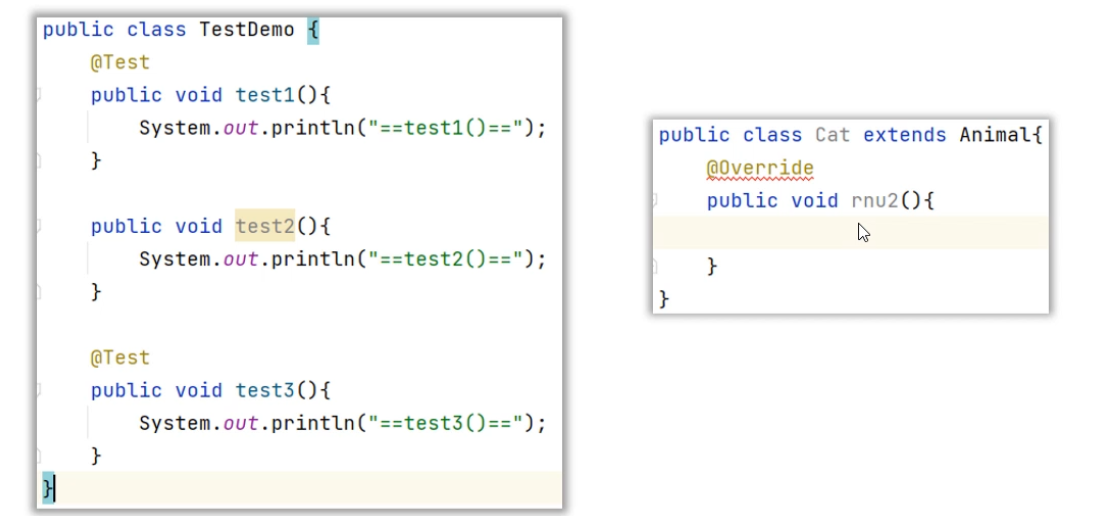
第二章 注解 2.1 介绍 1 2 3 4 5 6 7 8 9 10 11 12 13 14 15 1. 概念: 注解(Annotation): 也叫元数据。一种代码级别的说明。 它是JDK1.5 及以后版本引入的一个特性,与类、接口、枚举是在同一个层次。 它可以声明在包、类、字段、方法、局部变量、方法参数等的前面,用来对这些元素进行说明,注释。 2. 作用分类: (1 )编写文档:通过代码里标识的注解生成文档【例如,生成文档doc文档】 (2 )代码分析:通过代码里标识的注解对代码进行分析【例如,注解的反射】 (3 )编译检查:通过代码里标识的注解让编译器能够实现基本的编译检查【例如,Override】 3. 常见注解 (1 )@Override : 用来修饰方法声明,告诉编译器该方法是重写父类中的方法,如果父类不存在该方法,则编译失败。 (2 )@FunctionalInterface : 检测是否是函数式接口的 (3 )@SuppressWarnings : 抑制IDEA中的警告信息
先来认识一下什么是注解?
Java注解是代码中的特殊标记,比如@Override、@Test等,作用是:让其他程序根据注解信息决定怎么执行该程序。
注解不光可以用在方法上,还可以用在类上、变量上、构造器上等位置。
2.2 自定义注解 1 2 3 4 5 6 7 8 9 10 11 12 13 14 15 16 17 18 19 20 public class Demo03Annotation {}
1 2 3 4 5 6 7 8 9 10 public @interface MyAnno01 {} public @interface MyAnno02 { String name () ; int age () default 18 ; String[] hobbies(); MyAnno01 myAnno01 () ; }
2.3 自定义注解基本使用 1 2 3 4 5 6 7 8 9 10 11 12 13 14 15 16 17 18 19 20 21 22 23 24 25 26 27 28 29 30 31 32 33 34 35 36 37 38 39 40 41 42 43 44 45 46 47 48 49 50 51 52 53 54 55 56 57 58 59 60 61 62 63 @Retention(RetentionPolicy.RUNTIME) @Target({ElementType.METHOD,ElementType.TYPE}) public @interface A { public String[] hobby(); public Class cz () ; public Sex sex () ; public B b () ; } @Retention(RetentionPolicy.RUNTIME) @Target({ElementType.METHOD,ElementType.TYPE}) public @interface B { public int value () default 100 ; } public enum Sex { MAN,WOMEN } import java.lang.annotation.Annotation;import java.util.Arrays;@A(hobby={"唱","太哦"},cz= Object.class,sex = Sex.MAN,b=@B(200)) public class MyTest12_01 { public static void main (String[] args) { Class aClass = MyTest12_01.class; A a = (A) aClass.getDeclaredAnnotation(A.class); String[] hobby = a.hobby(); Class cz = a.cz(); Sex sex = a.sex(); B b = a.b(); int value = b.value(); System.out.println(Arrays.toString(hobby)); System.out.println(cz); System.out.println(sex); System.out.println(b); System.out.println(value); } }
2.5 元注解@Target介绍 什么是元注解?
元注解是修饰注解的注解。
1 2 @Target 是用来声明注解只能用在那些位置,比如:类上、方法上、成员变量上等@Retetion 是用来声明注解保留周期,比如:源代码时期、字节码时期、运行时期
1 2 3 4 5 6 7 8 9 10 11 12 13 14 15 16 17 18 19 20 21 22 23 24 25 26 27 28 29 30 31 32 33 34 35 36 37 38 @MyAnno06 public class Demo05YuanAnnotation { private String name; @MyAnno06 public static void main (String[] args) { } } @Target({ElementType.TYPE,ElementType.METHOD}) public @interface MyAnno06 {}
2.6 元注解@Retention介绍 1 2 3 4 5 6 7 8 9 10 11 12 13 14 15 16 17 18 19 20 21 22 23 24 25 26 27 28 29 30 31 32 33 34 35 36 37 38 39 40 41 42 43 44 45 46 47 48 49 50 51 52 53 54 55 56 57 @MyAnno07 public class Demo06YuanAnnotation { @MyAnno08 private String name; @MyAnno07 @MyAnno08 public static void main (String[] args) { } } @Target({ElementType.TYPE,ElementType.METHOD}) @Retention(RetentionPolicy.CLASS) public @interface MyAnno07 {} @Target({ElementType.METHOD,ElementType.FIELD}) @Retention(RetentionPolicy.SOURCE) public @interface MyAnno08 {}
2.7 注解解析获取到类上的注解 1 2 3 4 5 6 7 8 9 10 11 12 13 14 15 16 17 18 19 20 21 22 23 24 25 26 27 28 29 30 31 32 33 34 35 36 37 38
1 2 3 4 5 6 7 8 9 10 11 12 13 14 15 16 17 @Target({ElementType.TYPE,ElementType.METHOD}) @Retention(RetentionPolicy.RUNTIME) public @interface Books { String value () ; double price () default 100 ; String[] authors(); }
1 2 3 4 5 6 7 8 @Books(value = "面向对象",price = 180,authors = {"响哥","刚哥"}) public class BookStore { @Books(value = "jdk8新特性",authors = "响哥") public void show () { } }
1 2 3 4 5 6 7 8 9 10 11 12 13 14 15 16 17 18 19 20 21 public class Demo06AnnotationTest { @Test public void getParseClassAnnotation () throws Exception { Class<?> clazz = Class.forName("itheima06.BookStore" ); if (clazz.isAnnotationPresent(Books.class)) { Books booksAnno = clazz.getAnnotation(Books.class); String bookName = booksAnno.value(); double price = booksAnno.price(); String[] authors = booksAnno.authors(); System.out.println(bookName+"::" +price+"::" + Arrays.toString(authors)); } } }
2.8 模拟junit框架的注解 1 2 3 4 5 6 7 8 9 10 11 12 13 14 15 16 17 18 19 20 21 22 23 24 25 26 27 28 29 30 31 32 33 34 35 36 37 38 39 40 41 42 43 44 45 46 47 48 49 50 51 52 53 54 55 56 57 58 59 60 @Retention(RetentionPolicy.RUNTIME) @Target(ElementType.METHOD) public @interface MyAnnoTest { public boolean value () default true ; } public class Test13 { @MyAnnoTest public void a1 () { System.out.println("a1..." ); } @MyAnnoTest(true) public void a2 () { System.out.println("a2..." ); } @MyAnnoTest(false) public void a3 () { System.out.println("a3..." ); } @MyAnnoTest public void a4 () { System.out.println("a4..." ); } public void a5 () { System.out.println("a5..." ); } } public class MyAPP { public static void main (String[] args) throws InstantiationException, IllegalAccessException, InvocationTargetException { Class<Test13> aClass = Test13.class; Test13 test13 = aClass.newInstance(); Method[] arr = aClass.getMethods(); for (Method method : arr) { if (method.isAnnotationPresent(MyAnnoTest.class)) { MyAnnoTest test = method.getAnnotation(MyAnnoTest.class); if (test.value()) { method.invoke(test13); } else { System.out.println(method.getName() + "方法头上有注解,但是值是false,所以不执行!" ); } } else { System.out.println(method.getName() + "方法头上没注解,所以不执行!" ); } } } }
第三章 Map集合【重点】 3.1 Map集合的特点 1 2 3 4 5 6 7 8 java.util.Map<K,V>接口: 双列集合根接口,内部定义的方法,子接口/实现类都有 和java.util.Collection<T>接口: 单列集合的根接口,无关的 Map<K,V>接口的特点: 1. 键唯一,值可以重复 2. 一个键对应一个值,叫一一对应关系(映射关系/键值对关系) 3. 依靠键维护映射关系(可以通过键获取到值,但是不能通过值获取键)
所谓双列集合,就是说集合中的元素是一对一对的。Map集合中的每一个元素是以key=value的形式存在的,一个key=value就称之为一个键值对,而且在Java中有一个类叫Entry类,Entry的对象用来表示键值对对象 。
所有的Map集合有如下的特点:键不能重复,值可以重复,每一个键只能找到自己对应的值。
下面我们先写一个Map集合,保存几个键值对
1 2 3 4 5 6 7 8 9 10 11 12 13 14 15 16 17 18 19 public class MapTest1 { public static void main (String[] args) { Map<String, Integer> map = new LinkedHashMap <>(); map.put("手表" , 100 ); map.put("手表" , 220 ); map.put("手机" , 2 ); map.put("Java" , 2 ); map.put(null , null ); System.out.println(map); Map<Integer, String> map1 = new TreeMap <>(); map1.put(23 , "Java" ); map1.put(23 , "MySQL" ); map1.put(19 , "李四" ); map1.put(20 , "王五" ); System.out.println(map1); } }
Map集合也有很多种,每一种Map集合其键的特点是有些差异的,值是键的一个附属值,所以我们只关注键的特点 就可以了。
3.2 Map集合实现类的特点 1 2 3 4 5 6 7 8 9 10 11 12 13 14 15 16 17 18 19 20 21 22 23 24 25 26 27 28 29 Map接口常用实现类: java.util.HashMap<K,V>集合特点 ----使用 1. 键具备哈希特性: 哈希表 数组 + 单向链表/红黑树(链表数量>8 同时 数组元素>=64 ,链表变成红黑树) 2. 查询速度非常快,增删速度也不慢 3. 键要唯一: 键所属的类覆盖重写hashCode和equals方法 4. 键无序: 不保证存入和取出的顺序是一致的 5. 键无索引: 不能通过索引的方式获取键 6. 允许存储null 键和null 值 7. 线程不同步,不安全,但是效率高 java.util.Hashtable<K,V>集合特点 ----不使用 1. 键具备哈希特性: 哈希表 数组 + 单向链表 2. 查询速度非常快,增删速度也不慢 3. 键要唯一: 键所属的类覆盖重写hashCode和equals方法 4. 键无序: 不保证存入和取出的顺序是一致的 5. 键无索引: 不能通过索引的方式获取键 6. 不允许存储null 键和null 值 7. 线程同步,安全,但是效率低 java.util.LinkedHashMap<K,V>集合特点 ----使用 3. 键具备哈希特性和链表特性: 哈希表 数组 + 双向链表/红黑树(链表数量>8 同时 数组元素>=64 ,链表变成红黑树) 2. 查询速度非常快,增删速度也不慢 3. 哈希特性保证键要唯一: 键所属的类覆盖重写hashCode和equals方法 4. 链表特性保证键有序: 保证存入和取出的顺序是一致的 5. 键无索引: 不能通过索引的方式获取键 6. 允许存储null 键和null 值 7. 线程不同步,不安全,但是效率高
3.3 Map集合的常用方法 1 2 3 4 5 6 7 8 9 10 11 12 13 14 15 16 17 18 19 20 21 22 23 24 25 26 27 28 29 30 31 32 33 34 35 36 37 38 39 40 41 42 43 44 45 46 47 48 49 50 51 52 53 54 55 56 57 58 59 60 61 Map接口中的常用方法 public V put (K key, V value) : 把指定的键与指定的值添加到Map集合中。 如果键key,是第一次存储,返回null 如果键key已经存在,返回是被替换掉的值 键相同,值被替换 public V get (Object key) 根据指定的键,在Map集合中获取对应的值。 键不存在: 返回null public V remove (Object key) : 把指定的键 所对应的键值对元素 在Map集合中删除,返回被删除元素的值。 public boolean containsKey (Object key) :判断该集合中是否有此键。 public boolean containsValue (Object value) :判断该集合中是否有此值。 HashMap<Integer,String> map = new HashMap <>(); String v = map.put(207 ,"11期" ); map.put(206 ,"12期" ); map.put(205 ,"办公室" ); map.put(413 ,"9期" ); String v2 = map.put(413 ,"10期" ); System.out.println(map); System.out.println(v); System.out.println(v2); System.out.println(map.get(206 )); System.out.println(map.get(413 )); System.out.println(map.get(416 )); System.out.println(map.getOrDefault(207 , "嘿嘿嘿" )); System.out.println(map.getOrDefault(208 , "嘿嘿嘿" )); Integer key1 = 413 ; Integer key2 = 413 ; Integer key3 = 127 ; Integer key4 = 127 ; System.out.println(key1 == key2); System.out.println(key3 == key4); String remove = map.remove(413 ); System.out.println("被删除掉的是:" +remove); System.out.println("删除后集合剩余:" +map); Collection<String> values = map.values(); System.out.println(values); System.out.println(map.containsKey(206 )); System.out.println(map.containsValue("办公室" )); System.out.println(map.size()); map.clear(); System.out.println(map.isEmpty());
3.5 Map集合的遍历_键找值 1 2 3 4 5 6 7 8 9 10 11 12 13 14 15 16 17 18 19 20 21 22 23 24 25 26 Map接口中的常用方法 public Set<K> keySet () : 获取Map集合中所有的键,存储到Set集合中。 public Collection<V> values () :返回Map集合中的所有值到Collection集合。 public class MyHashMap_2 { public static void main (String[] args) { HashMap<Integer, String> map = new HashMap <>(); map.put(207 , "11期" ); map.put(206 , "12期" ); map.put(205 , "办公室" ); map.put(413 , "9期" ); map.put(413 , "10期" ); Set<Integer> keys = map.keySet(); for (Integer key : keys) { String v = map.get(key); System.out.println(key+"====>" +v); } } }
3.6 Map集合的遍历_键值对 1 2 3 4 5 6 7 8 9 10 11 12 13 Map集合遍历方式二: 键值对方式 原理分析: Map<K,V>接口内部定义静态的内部接口Entry<K,V>,用来描述结婚(键值对/映射关系)的 Map接口的所有实现类内部,必然定义类实现Entry接口,覆盖重写抽象方法, 描述自己的结婚证(键值对/映射关系) Map接口内部静态接口Entry<K,V>抽象方法: public abstract K getKey () : 获取键 public abstract V getValue () : 获取值 public abstract V setValue (V newValue) : 修改值,返回的被修改的值 Map<K,V>接口内部,定义抽象方法,用来获取所有的结婚证(键值对/映射关系) public abstract Set<Entry> entrySet () : 用来获取所有的结婚证(键值对/映射关系) Map接口的所有实现类,必然覆盖重写entrySet方法,获取键值对对象组成的Set集合
1 2 3 4 5 6 7 8 9 10 11 12 13 14 15 16 17 18 19 20 21 22 23 24 25 public class MyHashMap_3 { public static void main (String[] args) { HashMap<Integer, String> map = new HashMap <>(); map.put(207 , "11期" ); map.put(206 , "12期" ); map.put(205 , "办公室" ); map.put(413 , "9期" ); map.put(413 , "10期" ); Set<Map.Entry<Integer, String>> entries = map.entrySet(); for (Map.Entry<Integer, String> entry : entries) { Integer key = entry.getKey(); String value = entry.getValue(); System.out.println(key+"---->" +value); } } }
3.7 Map集合的遍历_foreach 1 2 3 4 5 6 7 8 9 10 11 12 13 14 15 16 17 18 19 20 21 22 23 24 25 26 27 public class MyHashMap_4 { public static void main (String[] args) { HashMap<Integer, String> map = new HashMap <>(); map.put(207 , "11期" ); map.put(206 , "12期" ); map.put(205 , "办公室" ); map.put(413 , "9期" ); map.put(413 , "10期" ); map.forEach(new BiConsumer <Integer, String>() { public void accept (Integer k, String v) { System.out.println(k+"====>" +v); } }); map.forEach(( k, v) -> { System.out.println(k + "---->" + v); }); } }
3.8 HashMap存储自定义对象并遍历 1 2 3 4 5 6 7 8 9 10 11 12 13 14 15 16 17 18 19 20 21 22 23 24 25 26 27 28 29 30 31 32 33 34 35 36 37 38 39 40 41 42 43 44 45 46 47 48 49 50 51 public class Student { private String name; private int age; ... @Override public boolean equals (Object o) { if (this == o) return true ; if (o == null || getClass() != o.getClass()) return false ; Student student = (Student) o; if (age != student.age) return false ; return Objects.equals(name, student.name); } @Override public int hashCode () { int result = name != null ? name.hashCode() : 0 ; result = 31 * result + age; return result; } } public class Test03 { public static void main (String[] args) { HashMap<Student,String> map = new HashMap <>(); map.put(new Student ("张三" ,18 ),"北京" ); map.put(new Student ("张三" ,18 ),"杭州" ); map.put(new Student ("李四" ,18 ),"上海" ); map.put(new Student ("王五" ,18 ),"杭州" ); map.forEach((student, city) -> System.out.println(student + " lives in " + city)); } }
3.9 LinkedHashMap集合的使用 1 2 3 4 5 6 7 8 9 10 11 12 13 14 15 16 17 18 19 20 21 22 23 24 25 26 27 28 29 30 31 32 33 34 35 36 37 38 39 40 41 42 43 public class Demo04LinkedHashMapTest { public static void main (String[] args) { LinkedHashMap<Student,String> hm = new LinkedHashMap <>(); hm.put(new Student ("张三" ,38 ),"北京" ); hm.put(new Student ("张三" ,38 ),"南京" ); hm.put(new Student ("李四" ,18 ),"上海" ); hm.put(new Student ("李四" ,18 ),"武汉" ); hm.put(new Student ("王五" ,28 ),"广州" ); hm.put(new Student ("王五" ,28 ),"深圳" ); Set<Map.Entry<Student, String>> set = hm.entrySet(); for (Map.Entry<Student, String> entry : set) { System.out.println(entry.getKey()+"::::" +entry.getValue()); } } }
LinkedHashMap的底层原理,和LinkedHashSet底层原理是一样的。底层多个一个双向链表来维护键的存储顺序。
取元素时,先取头节点元素,然后再依次取下一个几点,一直到尾结点。所以是有序的。
3.10 TreeMap
TreeMap集合的特点也是由键决定的,默认按照键的升序排列,键不重复,也是无索引的。
TreeMap集合的底层原理和TreeSet也是一样的,底层都是红黑树实现的。
所以可以对键进行排序。比如往TreeMap集合中存储Student对象作为键,排序方法有两种。
排序方式1: 写一个Student类,让Student类实现Comparable接口
1 2 3 4 5 6 7 8 9 10 11 12 13 14 15 16 17 18 19 20 21 22 23 24 25 26 27 28 public class Student implements Comparable <Student>{ private String name; private int age; private double height; public Student () {} public Student (String name, int age, double height) { this .name=name; this .age=age; this .height=height; } @Override public int compareTo (Student o) { return this .age-o.age; } }
排序方式2: 在创建TreeMap集合时,直接传递Comparator比较器对象。
1 2 3 4 5 6 7 8 9 10 11 12 13 14 15 16 public class Test3TreeMap { public static void main (String[] args) { Map<Student, String> map = new TreeMap <>(new Comparator <Student>() { @Override public int compare (Student o1, Student o2) { return Double.compare(o1.getHeight(), o2.getHeight()); } }); map.put(new Student ("蜘蛛精" , 25 , 168.5 ), "盘丝洞" ); map.put(new Student ("蜘蛛精" , 25 , 168.5 ), "水帘洞" ); map.put(new Student ("至尊宝" , 23 , 163.5 ), "水帘洞" ); map.put(new Student ("牛魔王" , 28 , 183.5 ), "牛头山" ); System.out.println(map); } }
这种方式都可以对TreeMap集合中的键排序。
注意:只有TreeMap的键才能排序,HashMap键不能排序 。
3.10 Properties集合介绍 1 2 3 4 5 6 7 8 9 10 11 12 13 14 15 16 17 18 19 20 21 22 23 java.util.Properties集合: 代表属性集 数据存储格式: 属性名=属性值 name=zhangsan age=18 可以存储文件中 Properties是Hashtable的子类 Hashtable是Map集合的实现类 所以: Properties也是Map集合的实现类,Map集合中定义的方法,它都有 面试题: Hashtable和HashMap的区别? 1. HashMap可以存储null 键和null 值 2. Hashtable不能存储null 键和null 值 3. HashMap线程不同步,不安全,但是效率高 4. Hashtable线程同步,安全,但是效率低 Properties的特点: 3. Properties也是Map集合的实现类,Map集合中定义的方法,它都有 2. Hashtable是Map接口的实现类,具有泛型K代表键的类型,V代表值的类型 但是Properties继承Hashtable时,确定键的类型Object以及值的类型Object 所以创建Properties集合对象时,不能再指定泛型 3. Properties集合提供了参数和返回值都是String的方法,而String后期可以写在文件中 4. Properties集合是唯一一个和IO流配合使用的双列集合 Properties集合的使用 空参构造 public Properties () : 可以直接创建对象
3.11 Properties集合的基本使用 1 2 3 4 5 6 7 8 Properties集合常用方法: public Object setProperty (String key,String value) : 向集合中存储键值对。 等价于Map集合 public V put (K k,V v) : 向集合中存储键值对。 public String getProperty (String key) : 获取集合中键对应的值,无此键返回null 。等价于Map集合 public V get (K k) : 根据键获取值 public Set<String> stringPropertyNames () : 集合中的所有键存储到Set集合。等价于Map集合 public Set<K> keySet () : 集合中的所有键存储到Set集合。
1 2 3 4 5 6 7 8 9 10 11 12 13 14 15 16 17 18 19 20 21 22 23 24 25 26 27 28 29 30 31 32 33 34 35 36 37 38 39 40 41 42 43 44 45 public class MyProperties { public static void main (String[] args) { Properties p = new Properties (); p.setProperty("张三" ,"李四" ); p.put(123 ,456 ); System.out.println(p); String v1 = p.getProperty("张三" ); String v2 = p.getProperty("李四" ,"嘿嘿嘿" ); System.out.println(v1); System.out.println(v2); String property = p.getProperty("123" ); Object o = p.get(123 ); System.out.println(property); System.out.println(o); Set<String> set = p.stringPropertyNames(); for (String s : set) { String property1 = p.getProperty(s); System.out.println(property1); } Set<Object> set1 = p.keySet(); for (Object object : set1) { Object o1 = p.get(object); System.out.println(object+"=====>" +o1); } } } {张三=李四, 123 =456 } 李四 嘿嘿嘿 null 456 李四 张三=====>李四 123 =====>456
3.12 Map练习统计字符个数的案例
1 2 3 4 5 6 7 8 9 10 11 12 13 14 15 16 17 18 19 20 21 22 23 24 25 26 27 28 public class Test03_2 { public static void main (String[] args) { String s = "abacaDad123745%$^$%^$23hsd" ; HashMap<Character,Integer> map = new HashMap <>(); for (int i = 0 ; i < s.length(); i++) { Character c = s.charAt(i); Integer v = map.getOrDefault(c, 0 ); map.put(c,++v); } System.out.println(map); } }
第四章 集合嵌套(重要) list.of 不支持增删改 但支持查询
就是把一个集合当做元素,存储到另一个集合中去,我们把这种用法称之为集合嵌套。
1 2 3 4 5 1. 从需求中我们可以看到,有三个省份,每一个省份有多个城市 我们可以用一个Map集合的键表示省份名称,而值表示省份有哪些城市 2. 而又因为一个身份有多个城市,同一个省份的多个城市可以再用一个List集合来存储。 所以Map集合的键是String类型,而指是List集合类型 HashMap<String, List<String>> map = new HashMap <>();
1 2 3 4 5 6 7 8 9 10 11 12 13 14 15 16 17 18 19 20 21 22 23 24 25 26 27 28 29 30 31 32 33 34 public class Test { public static void main (String[] args) { Map<String, List<String>> map = new HashMap <>(); List<String> cities1 = new ArrayList <>(); Collections.addAll(cities1, "南京市" ,"扬州市" ,"苏州市" ,"无锡市" ,"常州市" ); map.put("江苏省" , cities1); List<String> cities2 = new ArrayList <>(); Collections.addAll(cities2, "武汉市" ,"孝感市" ,"十堰市" ,"宜昌市" ,"鄂州市" ); map.put("湖北省" , cities2); List<String> cities3 = new ArrayList <>(); Collections.addAll(cities3, "石家庄市" ,"唐山市" , "邢台市" , "保定市" , "张家口市" ); map.put("河北省" , cities3); System.out.println(map); List<String> cities = map.get("湖北省" ); for (String city : cities) { System.out.println(city); } map.forEach((p, c) -> { System.out.println(p + "----->" + c); }); } }
4.1 集合嵌套List嵌套List
1 2 3 4 5 6 7 8 9 10 11 12 13 14 15 16 17 18 19 20 21 22 23 24 25 26 public class Test05 { public static void main (String[] args) { List<List<Integer>> list = new ArrayList <>(); List<Integer> list1 = new ArrayList <>(); Collections.addAll(list1,1 ,3 ,5 ); List<Integer> list2 = new ArrayList <>(); Collections.addAll(list2,2 ,4 ,6 ); List<Integer> list3 = new ArrayList <>(); Collections.addAll(list3,7 ,8 ,9 ); Collections.addAll(list,list1,list2,list3); for (List<Integer> xl : list) { for (Integer i : xl) { System.out.println(i); } } } }
4.2 集合嵌套List嵌套Map
1 2 3 4 5 6 7 8 9 10 11 12 13 14 15 16 17 18 19 20 21 22 23 24 25 26 27 28 29 30 31 public class Test05_2 { public static void main (String[] args) { List<Map<Integer,String>> list = new ArrayList <>(); Map<Integer,String> map1 = new HashMap <>(); Map<Integer,String> map2 = new HashMap <>(); Map<Integer,String> map3 = new HashMap <>(); map1.put(207 ,"11期" ); map1.put(206 ,"12期" ); map2.put(413 ,"9期" ); map3.put(205 ,"办公室" ); Collections.addAll(list,map1,map2,map3); for (Map<Integer, String> map : list) { Set<Integer> set = map.keySet(); for (Integer key : set) { String v = map.get(key); System.out.print(key+"===>" +v+"\t" ); } System.out.println(); } } }
4.3 集合嵌套Map嵌套Map
1 2 3 4 5 6 7 8 9 10 11 12 13 14 15 16 17 18 19 20 21 22 23 24 25 26 27 28 29 30 31 32 33 34 35 36 public class Test05_3 { public static void main (String[] args) { Map<String,Map<Integer,String>> map = new HashMap <>(); Map<Integer, String> map1 = Map.of(207 , "11期" , 206 , "12期" ); Map<Integer, String> map2 = Map.of(413 , "9期" , 415 , "10期" ); Map<Integer, String> map3 = Map.of(205 , "办公室" ); map.put("3号楼" ,map1); map.put("4号楼" ,map2); map.put("2号楼" ,map3); Set<Map.Entry<String,Map<Integer,String>>> set=map.entrySet(); for (Map.Entry<String, Map<Integer, String>> entry : set) { String key = entry.getKey(); Map<Integer, String> value = entry.getValue(); System.out.println(key+"有以下教室:" ); System.out.print("\t" ); value.forEach(new BiConsumer <Integer, String>() { @Override public void accept (Integer k, String v) { System.out.print(k+"--->" +v+"\t" ); } }); System.out.println(); } } }
4.4 创建不可变的集合 1 2 3 4 5 6 7 8 9 10 11 12 13 14 15 16 17 18 19 20 21 22 23 24 25 26 27 28 29 30 31 public class Test06 { public static void main (String[] args) { List<Integer> list = List.of(1 , 3 , 5 , 5 , 2 , 4 , 6 ); System.out.println(list); System.out.println(list.get(0 )); List<Integer> list2 = new ArrayList <>(list); System.out.println(list2); list2.add(88 ); list2.set(0 , 666 ); list2.remove(1 ); System.out.println(list2); Map<Integer, Integer> map = Map.of(2 , 22 , 3 , 33 , 4 , 22 ); System.out.println(map); } }
作业 1 2 3 4 5 6 7 8 9 10 11 12 13 14 15 16 17 18 19 20 21 22 23 24 25 26 27 28 29 30 31 32 33 34 35 36 37 38 39 40 41 42 43 44 45 46 47 48 49 50 51 52 53 54 55 56 57 58 59 60 61 62 63 64 65 66 67 68 69 70 71 72 73 74 75 package com.zxq._01_昨日作业;import java.util.Objects;public class Course { private String id; private String name; private double score; @Override public String toString () { return "Course{" + "id='" + id + '\'' + ", name='" + name + '\'' + ", score=" + score + '}' ; } @Override public boolean equals (Object o) { if (this == o) return true ; if (o == null || getClass() != o.getClass()) return false ; Course course = (Course) o; if (Double.compare(score, course.score) != 0 ) return false ; if (!Objects.equals(id, course.id)) return false ; return Objects.equals(name, course.name); } @Override public int hashCode () { int result; long temp; result = id != null ? id.hashCode() : 0 ; result = 31 * result + (name != null ? name.hashCode() : 0 ); temp = Double.doubleToLongBits(score); result = 31 * result + (int ) (temp ^ (temp >>> 32 )); return result; } public String getId () { return id; } public void setId (String id) { this .id = id; } public String getName () { return name; } public void setName (String name) { this .name = name; } public double getScore () { return score; } public void setScore (double score) { this .score = score; } public Course (String id, String name, double score) { this .id = id; this .name = name; this .score = score; } }
1 2 3 4 5 6 7 8 9 10 11 12 13 14 15 16 17 18 19 20 21 22 23 24 25 26 27 28 29 30 31 32 33 34 35 36 37 38 39 40 41 42 43 44 45 46 47 48 49 50 51 52 53 54 55 56 57 58 59 60 61 62 63 64 65 66 67 68 69 70 71 72 package com.zxq._01_昨日作业;import java.util.Objects;public class Student { private String id; private String name; private int age; @Override public String toString () { return "Student{" + "id='" + id + '\'' + ", name='" + name + '\'' + ", age=" + age + '}' ; } @Override public boolean equals (Object o) { if (this == o) return true ; if (o == null || getClass() != o.getClass()) return false ; Student student = (Student) o; if (age != student.age) return false ; if (!Objects.equals(id, student.id)) return false ; return Objects.equals(name, student.name); } @Override public int hashCode () { int result = id != null ? id.hashCode() : 0 ; result = 31 * result + (name != null ? name.hashCode() : 0 ); result = 31 * result + age; return result; } public String getId () { return id; } public void setId (String id) { this .id = id; } public String getName () { return name; } public void setName (String name) { this .name = name; } public int getAge () { return age; } public void setAge (int age) { this .age = age; } public Student (String id, String name, int age) { this .id = id; this .name = name; this .age = age; } }
1 2 3 4 5 6 7 8 9 10 11 12 13 14 15 16 17 18 19 20 21 22 23 24 25 26 27 28 29 30 31 32 33 34 35 36 37 38 39 40 41 42 43 44 45 46 47 48 49 50 51 52 53 54 55 56 57 58 59 60 61 62 63 64 65 66 67 68 69 70 71 72 73 74 75 76 77 78 79 80 81 82 83 84 85 86 87 88 89 90 91 92 93 94 95 96 97 98 99 100 101 102 103 104 105 106 107 108 109 110 111 112 113 114 115 116 117 118 119 120 121 122 123 124 125 126 127 128 129 130 131 package com.zxq._01_昨日作业;import java.util.HashMap;import java.util.HashSet;import java.util.Set;public class SystemManager { private HashMap<String,Student> students = new HashMap <>(); private HashMap<String,Course> courses = new HashMap <>(); private HashMap<Student, Set<Course>> stuChCourse = new HashMap <>(); private HashMap<Course, Set<Student>> courseForStudent = new HashMap <>(); public void addStudent (Student student) { if (students.containsKey(student.getId())){ System.out.println("该id的学生信息,已经存在了,需要更换一个id" ); }else { students.put(student.getId(), student); System.out.println("添加学生:" +student+"成功了" ); } } public void addCourse (Course course) { if (courses.containsKey(course.getId())){ System.out.println("该id的课程信息,已经存在了,需要更换一个id" ); }else { courses.put(course.getId(), course); System.out.println("添加课程:" +course+"成功了" ); } } public void studentChooseCourse (String sid,String cid) { Student student = students.get(sid); if (student == null ){ System.out.println("学号不存在!" ); return ; } Course course = courses.get(cid); if (course == null ){ System.out.println("课程不存在!" ); return ; } Set<Course> set = stuChCourse.getOrDefault(student, new HashSet <Course>()); set.add(course); stuChCourse.put(student,set); Set<Student> set1 = courseForStudent.getOrDefault(course, new HashSet <Student>()); set1.add(student); courseForStudent.put(course,set1); } public void showByStudent (String id) { Student student = students.get(id); Set<Course> set = stuChCourse.get(student); System.out.println(student+"选择的课程信息是:" +set); } public void showByCourse (String cid) { Course course = courses.get(cid); Set<Student> set = courseForStudent.get(course); System.out.println(course+"被以下学生选择了:" +set); } public void showScoreByStudent (String sid) { Student student = students.get(sid); Set<Course> set = stuChCourse.get(student); double sum = 0 ; for (Course course : set) { sum+=course.getScore(); } System.out.println(student+"对应的学分是:" +sum); } public void show () { System.out.println(stuChCourse); } }
1 2 3 4 5 6 7 8 9 10 11 12 13 14 15 16 17 18 19 20 21 22 23 24 25 26 27 28 29 30 31 32 33 34 package com.zxq._01_昨日作业;public class Test { public static void main (String[] args) { SystemManager sm = new SystemManager (); sm.addStudent(new Student ("001" ,"张三" ,23 )); sm.addStudent(new Student ("002" ,"李四" ,23 )); sm.addStudent(new Student ("003" ,"王璐" ,23 )); sm.addCourse(new Course ("c001" ,"语文" ,5.0 )); sm.addCourse(new Course ("c002" ,"数学" ,4.0 )); sm.addCourse(new Course ("c003" ,"英语" ,6.0 )); sm.studentChooseCourse("001" ,"c001" ); sm.studentChooseCourse("001" ,"c002" ); sm.studentChooseCourse("002" ,"c001" ); sm.studentChooseCourse("002" ,"c003" ); sm.studentChooseCourse("003" ,"c001" ); sm.showByStudent("001" ); sm.showByStudent("002" ); sm.showByStudent("003" ); sm.showByCourse("c001" ); sm.showByCourse("c002" ); sm.showByCourse("c003" ); sm.showScoreByStudent("001" ); sm.showScoreByStudent("002" ); sm.showScoreByStudent("003" ); } }